Notion vs ClickUp vs Monday vs Asana: we only recommend two of the four to most SMB teams
Our 2026 verdict: it comes down to Notion or ClickUp for almost every team under 50 people. Monday and Asana are good products that most SMBs end up paying more for and using less of. Here is the reasoning, pair by pair.
 By Ishan Vats · Founder, IV Consulting · 150+ ops transformations over 10+ years
Some links below are affiliate links. If you buy through them we may earn a commission, at no extra cost to you.
 Best for docs + flexibilityNotion
 Best for power + featuresClickUp
 Best for visual trackingMonday
 Best for simple structureAsana
For most SMBs the real choice is Notion vs ClickUp, not a four-way race. That holds even when the move is forced rather than chosen, which is the position teams land in after Microsoft Project Online retires on 30 September 2026, or when a vendor changes hands, as Coda teams found when Coda became Superhuman Docs. Pick Notion if your work is documentation-heavy and you want one flexible system of record. Pick ClickUp if your work is execution-heavy and you need tasks, docs, dashboards, and native automation in one place. Monday is worth its premium only if client-facing visual reporting is the point of the tool, and Asana only if you want strict task accountability and nothing else. Whichever you pick, the tool is 20 percent of the result and the setup is the other 80 percent.
The verdict
Our 2026 pick: which of the four should you actually buy?
Most comparisons end with "it depends" and leave you exactly where you started. Here is the call we actually make when a client asks.
Buy Notion if your bottleneck is knowledge. Scattered SOPs, tribal knowledge in people's heads, three versions of the same process doc, a client list living in a spreadsheet. Notion is the only one of the four that is genuinely excellent at being your system of record, and its databases are strong enough to run projects on top of that record. This is the pick for agencies, consultancies, content teams, and any ops-heavy business where writing things down is the job.
Buy ClickUp if your bottleneck is execution. Work is getting dropped, nobody knows what is blocked, and you need reporting your ops lead trusts. ClickUp gives you tasks, docs, dashboards, and native automation without bolting on a second product. It asks for more setup time than the others and it punishes teams who skip that step, but the ceiling is the highest of the four.
We do not usually recommend Monday or Asana to SMBs, and the reason is not quality. Both are well-built. The problem is that both are narrow: Monday is a visual tracker with a premium price and weaker automation depth, and Asana is a task manager that will not hold your documentation. Most SMBs that buy either one end up buying a second tool within a year to cover the gap, and then they are paying for two systems and syncing between them. Notion and ClickUp both cover that ground in one product.
There are two situations where that call flips. If your dashboards are shown to clients every week and the way they look is part of the deliverable, Monday is genuinely the best of the four at that job and worth the premium. If your team has already failed at one flexible tool and what you actually need is fewer options rather than more, Asana's rigidity is a feature, not a limitation.
The trap
Why most teams pick the wrong tool
You have been sold on four different tools by four different people. Notion, ClickUp, Monday, Asana. Each one promises to fix your workflows, eliminate chaos, and give your team clarity. But picking the wrong one costs you months of wasted setup, frustrated employees, and a stack of features you never touch.
There is a pattern. A founder sees a video about ClickUp and signs the whole team up. Three months later, half the workspace is empty and everyone is still assigning tasks over WhatsApp. The problem is not the tool. The problem is picking a tool before understanding the problem.
Most owners choose a platform based on what a friend recommended, what went viral on LinkedIn, or what had the best free trial. Then they spend weeks forcing their existing chaos into a system that was never designed for them.
Before you pick anything, answer this: what is actually breaking in your business right now? Is it unclear task ownership? Scattered documentation? No visibility into project progress? Your answer should drive the decision, not the hype.
The shortlist
What each tool does best
Each platform has a sweet spot. Match it to the way your team actually works and the decision gets much easier.
Notion: best for knowledge-heavy teams
Notion is a workspace and documentation tool first, project manager second. It is exceptional at internal wikis, SOPs, lightweight CRMs, and connected databases. If your team constantly creates, updates, and references documents, Notion will feel like a second brain. The lightweight CRM case is the one people underestimate: four linked databases and a weekly review handle a 2 to 8 person sales motion perfectly well, and we have written up the exact field spec we ship for a Notion CRM if that is the job you are actually hiring a tool for.
It is not the strongest out-of-the-box task manager. You build your workflows from scratch or start from proven Notion AI templates. Pair it with an automation layer and you have a serious operations hub.
Best for: agencies, content teams, consultancies, and ops-heavy businesses that live and breathe documentation.
ClickUp: best for power users who want everything in one place
ClickUp is the Swiss Army knife of project management. It packs more features than any competitor: tasks, docs, goals, sprints, time tracking, dashboards, and native automations. If your team needs everything in one platform and your ops lead will invest time in setup, ClickUp is a strong pick.
The downside is that feature depth can overwhelm new users fast. Without proper workspace architecture, ClickUp becomes a graveyard of half-used features and confused team members. Done right, it can cut admin time significantly with ClickUp AI. ClickUp's AI has since moved past writing help: its Autopilot Agents now answer questions and take actions inside Chat, and we cover what they can safely handle and where to keep a human in the loop.
Best for: fast-growing startups, dev teams, and operations-led businesses that need deep customisation and reporting.
Monday: best for visual teams and external stakeholders
Monday excels at visual project tracking. Its clean boards, colour-coded timelines, and polished dashboards make it easy to onboard non-technical stakeholders. If you run client-facing projects and need to share progress externally, Monday is hard to beat on first impressions.
It is pricier than the alternatives, and its automation is more limited than ClickUp. Price the AI layer separately from the platform, because the meters differ far more than the seats do: see Rovo vs Notion AI vs ClickUp Brain. But if ease of use and client-facing visibility are your top priorities, Monday earns its price tag.
Best for: project-based businesses, creative agencies, and teams that regularly share progress with clients.
Asana: best for structured task accountability
Asana is the original structured project manager. Clean, intuitive, and built for team accountability. Every task has an owner, every project has a timeline, and the interface respects those rules.
Asana's weakness is flexibility. It does not handle documents well and it is not a CRM or a knowledge base. It is a task and project manager, and it is exceptional at exactly that job.
Best for: structured teams, HR ops, marketing teams, and businesses that want strong accountability without setup complexity.
Head to head
Notion vs ClickUp: which one should you actually pick?
This is the pairing most teams are really deciding between, so it deserves more than a row in a table.
The short version: Notion wins if the thing you keep losing is information. ClickUp wins if the thing you keep losing is work.
Notion starts from the document. Everything is a page, pages live in databases, and databases relate to each other. That model is superb for wikis, SOPs, client records, and content pipelines, and it means your process documentation sits next to the work instead of in a separate tool nobody opens. The cost of that flexibility is that Notion hands you a blank canvas. There is no opinionated task model waiting for you, so two teams can build wildly different systems in it, and an unstructured Notion workspace degrades into a documentation graveyard faster than any other tool here.
ClickUp starts from the task. Statuses, assignees, dependencies, sprints, time tracking, and dashboards are all native, and its automation builder is the strongest of the four without reaching for a third-party tool. The cost is density. ClickUp shows you more surface area than a new user can absorb, and teams that roll it out without deciding their hierarchy and naming first end up with a workspace full of half-configured features.
Where people go wrong is assuming they can have both by picking the one that also does the other job. Notion Docs are better than ClickUp Docs, and ClickUp task management is better than Notion task management. Neither gap closes by trying harder. Decide which of the two problems is actually costing you money this quarter and buy for that one.
If you land on Notion, the running cost people underestimate is AI credits rather than seats, so it helps to know how Notion AI credits and limits actually work, and it is worth testing Notion AI against a real workflow before you commit. If you land on ClickUp, budget setup time rather than licence spend: a structured rollout is what separates the teams that get hours back from ClickUp from the ones that abandon it.
Head to head
Monday vs Asana: is Monday better than Asana?
The second-most common pairing, and the one where the answer is most dependent on who sees the screen.
Monday is better if people outside your team look at the board. Asana is better if they do not. That is close to the whole answer.
Monday's advantage is presentation. Colour-coded boards, timeline views, and dashboards that a non-technical stakeholder can read without a walkthrough. If you run client projects and progress visibility is part of what you are selling, that polish does real commercial work and justifies a higher per-seat cost. Its weaknesses are automation depth and documentation, and its pricing model is the least forgiving of the four as headcount grows.
Asana's advantage is discipline. It has the clearest task model of any tool here: every task has one owner, projects have real structure, and the interface does not let you drift. Teams that have already failed at a flexible tool often succeed on Asana precisely because it offers fewer ways to go wrong. Its weakness is scope. Asana will not hold your documents, will not be your CRM, and gets awkward as soon as your process needs branching logic.
Our honest position on this pair: both are fine products, and most SMBs asking this question would be better served by Notion or ClickUp, because the money spent on Monday or Asana usually gets spent again within a year on whichever tool covers the half they do not. The exception is the client-facing dashboard case, where Monday earns its place outright.
The filter
The 5 questions to ask before you choose
Answer these five honestly and they will point you straight to the right tool.
- Do you need deep documentation? If yes, Notion or ClickUp with Docs belong on your shortlist.
- How technical is your team? Less technical teams will struggle with ClickUp and Notion without structured setup. Monday and Asana have gentler learning curves.
- Do you share project updates with clients? Monday wins for external-facing dashboards and guest access.
- How much do you care about automation? ClickUp and Notion, connected to an automation platform, offer the deepest automation potential.
- What is your budget? ClickUp and Notion offer strong free and affordable paid tiers. Monday and Asana get expensive at scale.
One question sits outside this list because it is answered by a different tool entirely. If what you are really trying to fix is a sales pipeline rather than project delivery, none of these four is the answer for long: see Notion CRM vs HubSpot vs Pipedrive for where the pipeline should live and when to move it out.
The comparison
Notion vs ClickUp vs Monday vs Asana, side by side
The fast read across the five factors that decide most SMB tool choices.
| Factor | Notion | ClickUp | Monday | Asana |
|---|---|---|---|---|
| Tasks | Good | Excellent | Excellent | Excellent |
| Docs | Excellent | Good | Limited | Limited |
| Automation | High via integrations | High native | Medium | Medium |
| Learning curve | Medium | High | Low | Low |
| Price | Affordable | Affordable | Expensive at scale | Moderate |
| Doubles as your wiki | Yes | Partly | No | No |
| Built-in AI | Notion AI, usage metered | ClickUp Brain | monday AI | Asana AI |
| Client and guest views | Shared pages | Guest seats with permissions | Strongest client-facing views | Guest access at task level |
| Best for | Knowledge-heavy ops teams | Power users, all in one | Visual, client-facing work | Structured task accountability |
| Our call | Recommend | Recommend | Only for client dashboards | Only if you need rigidity |
All four vendors repackage their AI and their tiers regularly, so treat the AI row as a capability check, not a pricing one, and confirm current tiers before you buy.
Every other pairing, settled
If you are deciding between a specific two rather than all four, here is the call for each pair.
| The pairing | Our pick | Why |
|---|---|---|
| Notion vs ClickUp | Depends on the bottleneck | Notion for knowledge, ClickUp for execution. The one genuinely close call of the six. |
| Monday vs Asana | Monday, narrowly | Only because of client-facing views. Asana wins if the board stays internal. |
| ClickUp vs Monday | ClickUp | More depth, stronger native automation, and it does not get punishing as you add seats. |
| ClickUp vs Asana | ClickUp | Asana is cleaner on day one, but you outgrow its ceiling and then you are migrating. |
| Notion vs Asana | Notion | Asana cannot hold your documentation. Notion can do both jobs adequately. |
| Notion vs Monday | Notion | Unless the dashboards are client-facing, in which case Monday, clearly. |
The bill
What actually drives the cost of each tool?
Sticker price per seat is the number everyone compares and the one that predicts your bill least well. These are the four things that actually move it.
1. Seat count, and who counts as a seat. All four bill per user, but they differ on who has to be one. If a lot of people need to view work without doing it, the tool's guest and viewer policy matters more than its headline rate. This is where Monday tends to get expensive on real teams: the price per seat is only part of it, the other part is that seats are sold in blocks, so growing by one person can mean paying for several.
2. Which tier gates the feature you actually came for. Automations, dashboards, timeline and Gantt views, guest permissions, and admin controls all sit behind different tiers on different products. Teams routinely compare entry tiers, buy, then discover the one capability that justified the purchase sits two tiers up. Before you compare prices, list the three features you are actually buying and find the tier each one lives on. That is the real price.
3. AI usage, which is metered separately. AI on these platforms is not a flat feature, it is consumption. Notion in particular meters AI usage, which is why the bill can move month to month even when your headcount does not. Model that before you commit rather than after your first surprise invoice. The two leaders here meter on opposite axes, ClickUp by headcount and Notion by autonomous run volume, and we priced both per seat against the vendor pages in ClickUp Brain vs Notion AI.
4. Setup and migration, which is the largest line item and never appears on the pricing page. Whether you do it internally or hire it out, the hours spent designing hierarchy, naming, permissions, and automations dwarf the first year of licence cost on a small team. A tool that is 20 percent cheaper per seat and takes twice as long to make usable is not the cheaper tool.
The real lever
The setup is 80% of the equation
Here is what most comparison articles skip: the tool is only 20 percent of the result. The other 80 percent is how you set it up.
We have seen businesses move to ClickUp and fail because they replicated their old spreadsheet in a new interface. We have seen Notion deployments turn into documentation graveyards because no one defined the structure. We have seen Monday become a vanity dashboard that nobody uses to make real decisions.
The right tool with the wrong setup will always underperform. When we work with SMBs at IV Consulting, we do not just recommend a tool. We design the full system: task hierarchy, naming conventions, automation flows, team dashboards, and governance rules. Your team actually uses it because it makes their job easier, not harder.
That setup is also what decides whether the next layer works. AI and automation for project teams only produce reliable status rollups, risk flags, and forecasting when the task data underneath them is consistent, which is a setup problem before it is a tool problem.
FAQ
Questions people ask before they commit
Can I switch tools later if I pick the wrong one?
Which tool is best for a 5-person team?
Do I need a consultant to set up these tools?
Is Notion better than ClickUp?
Why do you not recommend Monday or Asana to most SMBs?
What about Microsoft Teams or Slack?
Is ClickUp or Notion better for documentation?
Ishan Vats
Founder, IV Consulting · operations & systems consultant
I design and build the workspace layer for teams from startup to enterprise, on whichever of these tools actually fits. 150+ ops transformations over 10+ years, including ClickUp and Notion builds you can read about on this site.
Model my Notion AI cost →Keep reading
Related guides and work
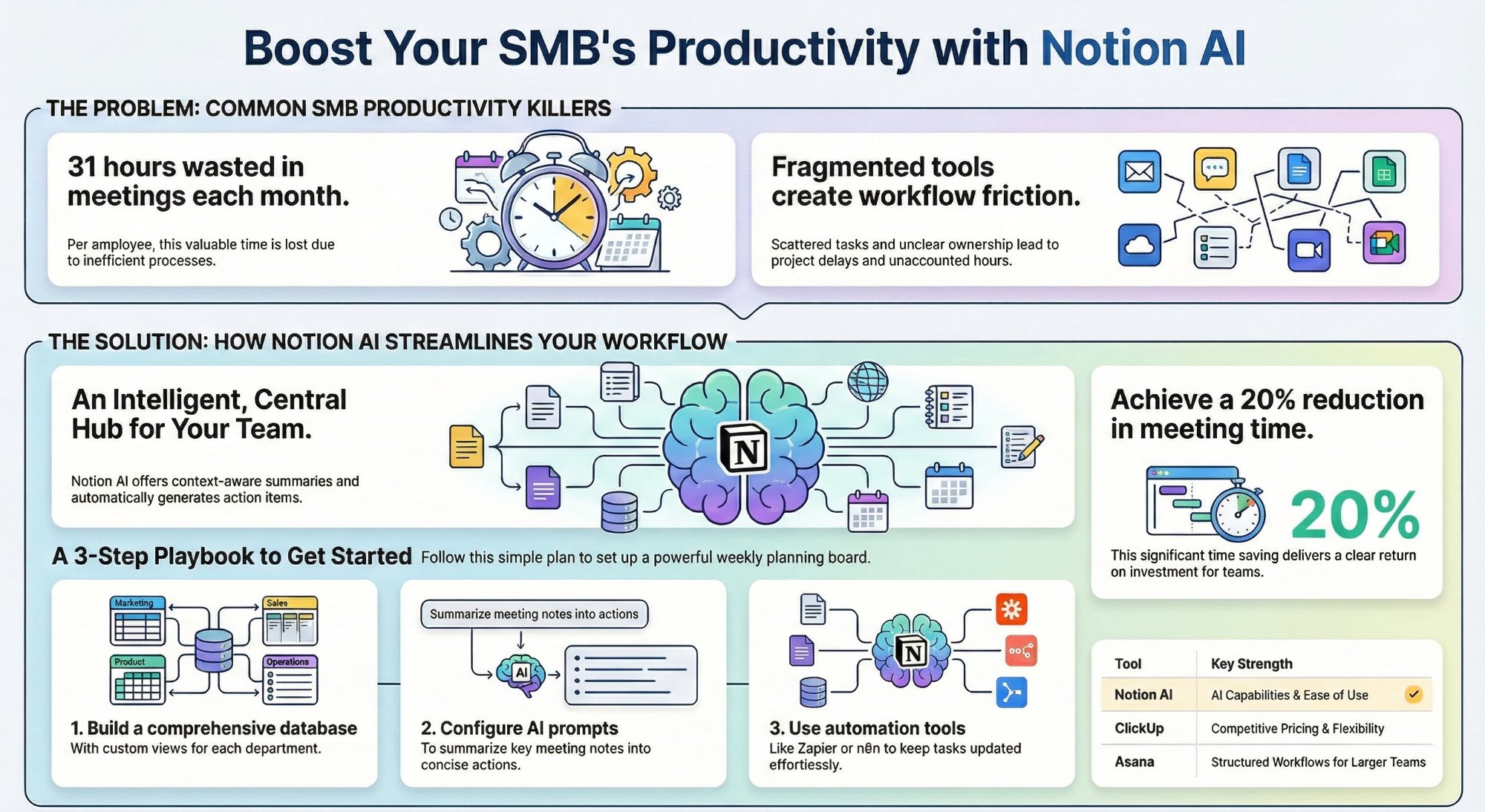
Can Notion AI workspace views replace your PM tool?
A practical SMB playbook for turning Notion into a real project hub.
Read the playbook →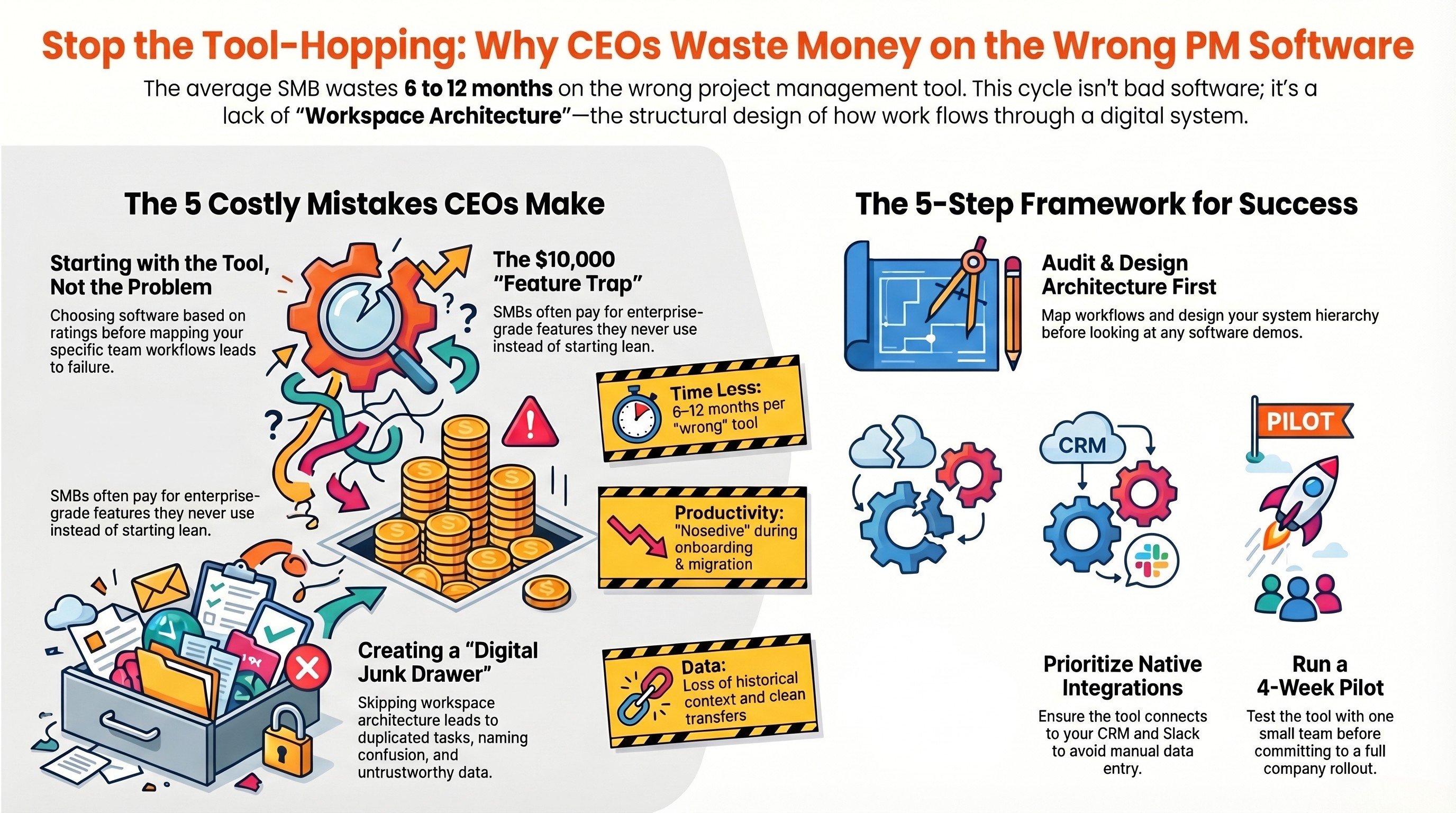
Why CEOs waste money on the wrong project management tools
The costly buying mistakes behind unused workspaces, and how to avoid them.
Read the guide →
The Foundation stage, built for you
One central workspace, designed around how your team actually operates.
See the offer →Not sure which tool fits your business?
Book a free 30-minute strategy call. We will audit your workflow and tell you exactly which tool to use, and how to set it up properly. If we are not the right team for you, we will say so and point you somewhere better.
Book a Free Strategy Call →Free 30-minute call. Honest take, even if that means "you do not need us yet."