Why most CEOs waste money on the wrong PM tools
Most SMBs choose project management software on hype, not fit. Here are the 5 mistakes that cost you, and the approach that actually works.
 By Ishan Vats · Founder of IV Consulting · 150+ ops transformations over 10+ years
Some links below are affiliate links. If you buy through them we may earn a commission, at no extra cost to you.
 Best for · Task-driven teamsClickUp
 Best for · Docs-heavy teamsNotion
 Best for · Visual, client-facingMonday
 Best for · Simple workflowsAsana
CEOs waste money on project management tools because they choose the software before they understand their own workflows. The fix is not a better tool. It is workspace architecture: map your bottlenecks, define your must-have features, design the structure, then shortlist 2 to 3 tools that fit. Do that and you stop tool-hopping for good.
The real cost
You did not pick the wrong tool. You picked it wrong.
You have probably bought, set up, and abandoned at least one project management tool in the past two years. You are not alone. The average SMB burns 6 to 12 months on the wrong project management software before switching. That window includes onboarding, data migration, retraining, and the productivity nosedive that comes with every transition.
The problem is not that good PM tools do not exist. ClickUp, Notion, Monday, and Asana are all genuinely capable. The problem is how most CEOs choose them. The five mistakes below are the ones we see again and again with new clients.
Avoid these
The 5 costly mistakes CEOs make
Starting with the tool instead of the problem
This is the single biggest mistake. A founder reads a "Top 10 PM Tools" article, signs up for the highest-rated one, and rolls it out company-wide. Two months later, the team is back in spreadsheets. The tool was never matched to the actual workflows.
Every business runs differently. A 15-person agency has completely different needs than a 30-person SaaS company. Before you look at a single tool, map your workflows, identify bottlenecks, and understand what information needs to move where. This is what we call workspace architecture, and it is the step most CEOs skip entirely.
Paying for features you will never use
Enterprise-grade tools come loaded with features. Impressive on a demo call. Completely unnecessary for a team of 12. Per-user pricing at 30 seats on a Business plan can mean $5,000 to $10,000 per year for features your team does not use.
Start lean. Pick the tier that covers your actual needs today, not the features you might need in 18 months. Tools like ClickUp, Notion, and Asana all offer free or low-cost tiers that handle 80 percent of what a growing SMB requires.
Ignoring integration with your existing stack
A PM tool that does not talk to your CRM or communication platform creates more work, not less. Your team ends up copying data between systems, the exact inefficiency you were trying to eliminate.
Before committing, check integrations. Does it connect natively with Slack or Google Workspace? Can you use Make or n8n to bridge the gaps the native connectors miss?
Skipping workspace architecture entirely
You pick ClickUp or Asana, create a few spaces, invite the team, and hope for the best. Within weeks, everyone has a different naming convention, tasks are duplicated, and nobody trusts the dashboards.
Workspace architecture is the structural design of how your tool is organised: hierarchy, naming conventions, status workflows, automations, and views. Without it, even the best tool becomes a digital junk drawer.
Switching tools every year
The most expensive mistake is not picking the wrong tool once. It is switching every 6 to 12 months because you keep blaming the software instead of the setup. Every migration costs you. Data transfer is never clean, historical context gets lost, and team momentum stalls.
If you are on your third PM tool in three years, the tool is not the problem. Your workspace architecture is.
The comparison
Notion vs ClickUp vs Monday vs Asana
There is no single best PM tool. There is only the tool that fits your workflows. Here is the short version of where each one wins.
| Tool | Best for | Strength | Watch out for |
|---|---|---|---|
| ClickUp | Task-driven teams | Automation and dependency tracking | Feature overload at higher tiers |
| Notion | Documentation-heavy teams | Flexible docs plus databases in one place | Weaker for strict task workflows |
| Monday | Visual, deadline-focused work | Client-facing boards and timelines | Per-seat cost climbs with the team |
| Asana | Simple, linear workflows | Clean task and project tracking | Limited depth for complex ops |
The fix
The approach that actually works
This is exactly the process we follow for every workspace setup. Notice that choosing a tool is step four, not step one.
1. Audit your workflows
Map how work actually moves through your business and identify where it breaks down. This is the diagnostic that everything else depends on. Skip it and every later decision is a guess.
2. Define must-haves
Separate the features you genuinely need from the nice-to-haves. This keeps you off the upsell path and on the tier that fits today.
3. Design the architecture
Plan your hierarchy, naming conventions, status workflows, and views before choosing any tool. The structure comes first, the software fills it.
4. Shortlist 2 to 3 tools
Only now do you look at software, and only at tools that fit your workflows, team size, and budget. The shortlist writes itself once the architecture is clear.
5. Pilot before rollout
Run a pilot with one team for 2 to 4 weeks before a full rollout. You catch the architecture gaps while they are cheap to fix, not after company-wide adoption.
FAQ
Questions CEOs ask before they switch tools
How do I know if I have the wrong project management tool?
What is workspace architecture and why does it matter?
Should I use Notion, ClickUp, or Monday for my team?
How long does it take to properly set up a project management tool?
What does a PM tool migration from one tool to another cost?
Ishan Vats
Founder, IV Consulting · operations & systems consultant
I build operating systems and automations for teams from startup to enterprise. 150+ ops transformations over 10+ years. If you want yours mapped and built right, I'll do it with you on a free call.
Book a free strategy call →Keep reading
Related guides and work
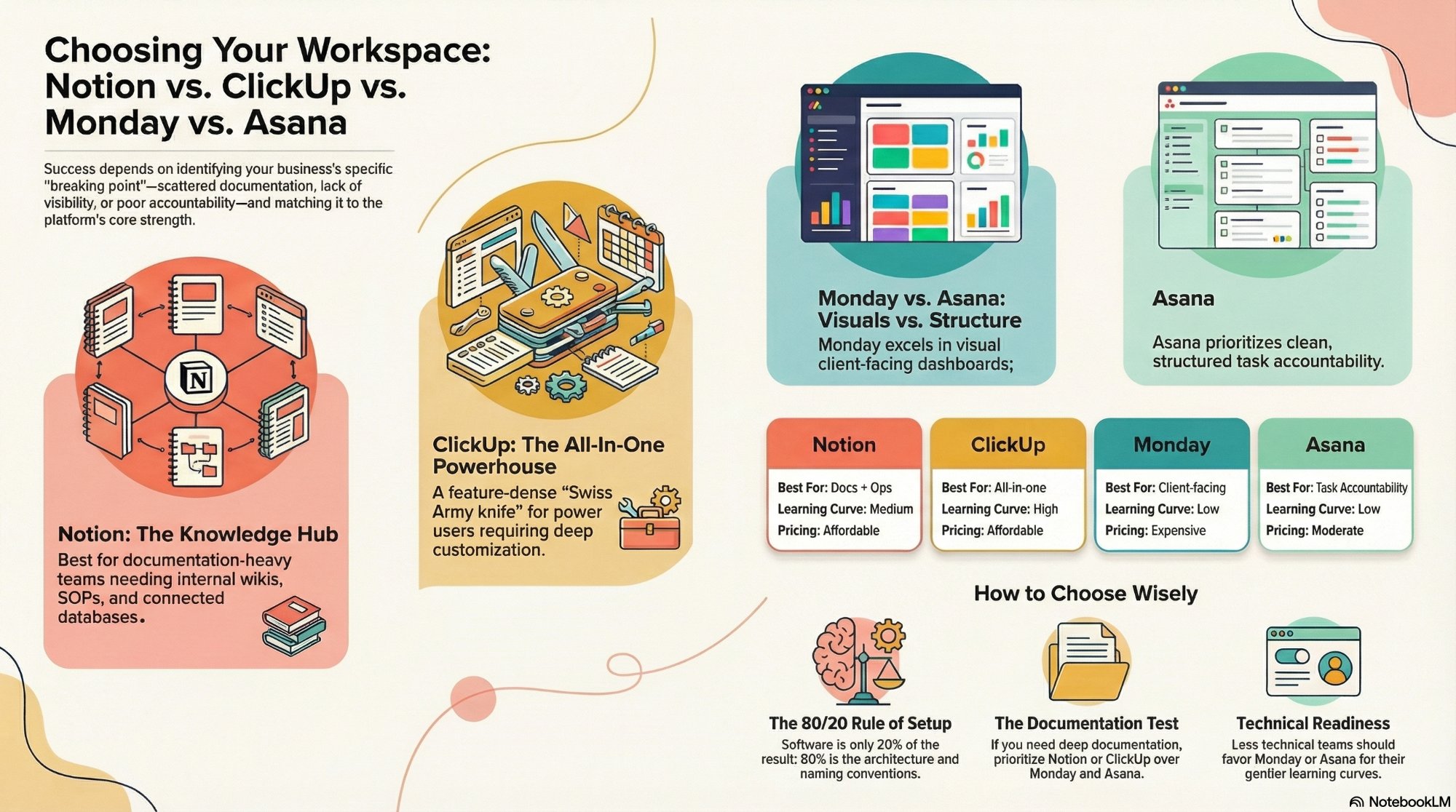
Notion vs ClickUp vs Monday vs Asana: how to choose
The full side-by-side, matched to team size and the way your work actually flows.
Read the comparison →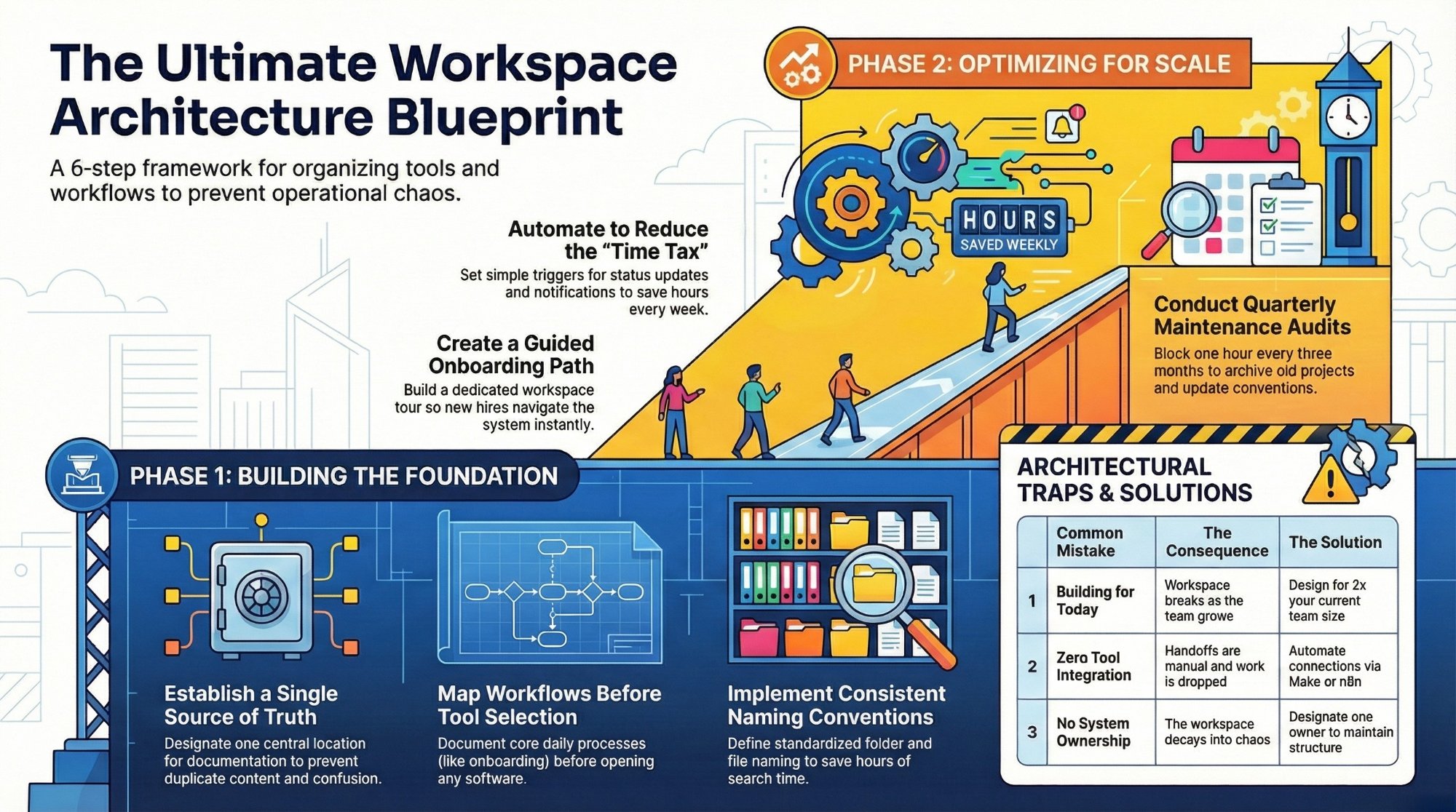
The ultimate workspace architecture checklist
The structural design step most CEOs skip, broken down into a build-ready checklist.
Read the checklist →
The Foundation stage, built for you
Workflows mapped, architecture designed, the right tool set up and handed over.
See the offer →Stop tool-hopping. Get the right setup.
Book a free 30-minute strategy call. We will map your bottlenecks, identify your highest-ROI opportunities, and give you a build roadmap on the spot. If we are not the right team for you, we will say so and point you somewhere better.
Book a Free Strategy Call →Free 30-minute call. Honest take, even if that means "you do not need us yet."