The ClickUp setup that gave a 20 person agency 10 hours back every week
Not a feature tour. The exact configuration that cut late delivery from 43% to 8% and handed the team back a full working day a week.
 By Ishan Vats · Certified ClickUp Consultant · builds ClickUp systems for 150+ teams
Some links below are affiliate links. If you buy through them we may earn a commission, at no extra cost to you.
 HubClickUp workspace
 AI layer · ClaudeStatus reports drafted
 NotionRisk register
 SlackAsync updates
 GmailClient recap
The ClickUp setup that reclaims 10 hours a week for an agency is not about more features. It is four configured habits: dependency tracking with critical path at every kickoff, a weekly resource capacity view, custom fields that enforce a scope change protocol, and AI assisted status reporting. Applied to a 20 person agency, this cut late delivery from 43% to 8% and recovered a full working day a week, without hiring anyone.
The problem
Why a growing agency outgrows its task list
There is a specific moment when an agency's project management stops working. It usually arrives somewhere between 12 and 25 people. Projects start running late, not because the team is working less hard, but because the coordination complexity has grown faster than the coordination system. One missed handoff cascades into three delayed deliverables. A single resource constraint that was easy to see on a 6 person team becomes invisible on a 20 person one. Scope creep that the founder used to catch personally now slips through because no one owns the scope.
The reflex is to reach for a new tool. Sometimes that helps. More often it adds a layer of complexity to the same underlying problem, which is not a tool problem but a technique problem. A sophisticated platform configured around unsophisticated habits produces sophisticated looking chaos.
This is why a default ClickUp install rarely changes anything on its own. ClickUp is the best all rounder for agencies running complex, multi team projects. It handles dependencies, resource views, custom fields, and automation in one platform. But out of the box it is not optimised for any specific team type. The value is entirely in how you configure it around the exact failure modes your agency is experiencing.
The diagnosis
The 3 points where agency delivery breaks
Understanding the specific failure modes tells you exactly which ClickUp features to configure first. Three breakdowns account for most agency slippage.
1. Dependency blindness
Basic task management treats every task as independent. In reality most project work is chains of dependencies: Task B cannot start until Task A is done, and Task D is blocked until B and C are both complete. When teams use task lists without dependency mapping, they discover blockers only when they hit them. At IV Consulting we estimate dependency driven delays account for 38% of all project timeline overruns in agencies that have not implemented dependency tracking. Most were structurally predictable at kickoff.
2. Resource capacity invisibility
Basic tools show you what needs doing. They rarely show you who has capacity to do it. When people are split across concurrent projects, decisions about what to start next are made on gut feel rather than data. Your three most capable people are consistently over-allocated, your less loaded people are under-utilised, and projects slip because the team assigned to them did not actually have the hours the plan assumed. Resource invisibility is the single largest cause of burnout in growing agencies.
3. Scope entropy
Scope creep rarely arrives as a large, obvious request. It arrives as a series of small, reasonable additions, each individually justified, collectively transformative. By the time a project is 70% complete it is 40% larger than the original scope. Without a formal scope log and a change impact step, every small addition is absorbed invisibly until the timeline collapses under its own weight.
The setup
The 6 step ClickUp setup, step by step
Sequenced from highest to lowest immediate ROI. Budget six to eight hours of configuration, then a one week run-in on live projects.
Turn ClickUp into a dependency engine, not a task list
Enable dependencies in ClickUp and make critical path identification a kickoff ritual. At every project kickoff, spend 20 minutes mapping the three to five longest dependency chains. Mark these as critical path tasks. Apply one rule: critical path tasks get reviewed at every status check, and any delay on one triggers an immediate impact assessment on the project end date. Non-critical tasks can slip without alarm. The team needs to know the difference.
Agencies that implement basic critical path identification reduce late delivery by an average of 31% within the first 60 days, because they stop being surprised by delays that were predictable from the project's structure.
Build a weekly resource capacity view
Use ClickUp's Workload view, or a simple weekly capacity grid: columns are team members, rows are projects, each cell shows hours allocated to that person on that project this week. Total the column. Compare to available hours, typically 30 to 35 productive hours per week after meetings and admin. Any team member over 90% capacity gets a flag. Any project with a flagged resource gets a conversation about timeline or scope before the week starts, not after it ends.
Add custom fields that enforce a scope change protocol
Every scope change request, however small, follows three steps: the change is documented, the impact is assessed against timeline and resource, and it is approved before execution. In ClickUp, add a Scope Change custom field and a linked task type so each request is logged, not absorbed. This does not need to be bureaucratic. A five minute conversation ending in a logged note saying "change approved, timeline extended by 3 days" is enough. What matters is that scope changes are visible and deliberate.
Stand up a risk register beside the workspace
At kickoff, identify the top five to eight things that could go wrong, score each on probability and impact from 1 to 5, and assign a mitigation owner for anything scoring above 12. A six column Notion table linked from the ClickUp project works perfectly: Risk, Probability, Impact, Score, Mitigation, Owner. Review it at every status check. The act of building the register surfaces assumptions the team did not realise they were making, often preventing risks before they need managing.
Automate status reporting with an AI layer
Weekly status reports are essential for client confidence but often take 30 to 45 minutes per project. The account manager updates the ClickUp board, which they are doing anyway, then passes the week's completions, blockers, and upcoming milestones to Claude with a status report template. A draft arrives in under two minutes and is reviewed in five. For a manager running four projects, this recovers about two hours a week, every week.
Add WIP limits and run the system end to end
Most agencies use Kanban boards as fancy to-do lists with no cap on the In Progress column. The most powerful Kanban feature is the Work In Progress limit. Set no more than three items per person in In Progress. When someone tries to start a fourth, they must finish or return one first. This feels restrictive. The effect is the opposite: teams finish things before starting new ones, which cuts context switching and makes bottlenecks visible. Agencies that add WIP limits report 25 to 35% faster task completion.
Run a real project through the configured workspace before rolling it out. Confirm dependencies fire, capacity flags appear on Monday, scope changes log, the risk register is reviewed, and the AI status draft reads well. Fix the field mappings, then scale to the rest of the team.
The comparison
ClickUp vs Asana vs monday for agencies
The right tool amplifies good technique. The wrong one imposes overhead good technique cannot overcome. Honest verdicts for the 10 to 60 person range.
| Tool | Best for an agency | Honest limitation |
|---|---|---|
| ClickUp | All rounder for complex, multi team delivery. Dependencies, resource views, custom fields, automation in one platform. | Real configuration overhead. Budget six to eight hours of setup before it is usable. |
| Notion | Knowledge intensive work where delivery is tied to docs, SOPs, and client notes. | Weaker native automation and timeline view. Best paired with a dedicated task manager. |
| Asana | Cross functional coordination where non-technical stakeholders need clear status visibility. | Gets expensive at scale and offers fewer customisation options than ClickUp. |
| monday | Visually oriented and sales led teams where adoption ease beats PM depth. | Limited depth on dependency tracking and resource management. Higher price for equivalent access. |
The proof
A 19 person agency, late delivery cut from 43% to 8%
A digital marketing agency running 8 to 12 concurrent client projects had managed, rather than solved, a two year problem: 43% of deliverables arrived late. Not catastrophically, usually two to five days, but consistently and reputationally damagingly.
The audit found the three failure modes exactly. The team used ClickUp as a task list, not a dependency tool, so blockers surfaced only when someone was ready to start. The four person strategy team was spread across all 11 active projects with no consolidated capacity view, so plans assumed 6 to 8 hours per project from people who actually had 2.5. And client feedback was absorbed without impact assessment, so the average project grew 28% beyond original scope with no timeline extension.
The 10 week intervention configured ClickUp around the setup above: dependency tracking with critical path at every kickoff, a weekly capacity grid reviewed each Monday, a scope change protocol written into every client contract, and AI assisted status reports replacing the ad-hoc update emails that consumed over three hours per account manager per week.
| Metric | Before | After (10 weeks) |
|---|---|---|
| Late delivery rate | 43% | 8% |
| Average days late on overdue work | 4.2 days | 1.1 days |
| Scope creep per project | 28% | 7% |
| Account manager time on status updates | 3.1 hrs / week | 0.9 hrs / week |
| Client satisfaction (post-project NPS) | 51 | 74 |
| Strategist over-allocation incidents | 6 to 8 / week | 0 to 1 / week |
| Contract renewal rate at 12 months | 61% | 82% |
Make it stick
Four rituals that keep the setup alive
The configuration is half the work. These four habits keep PM discipline in the team rather than locked inside one person.
1. The 20 minute kickoff standard
Every project, regardless of size, starts with four questions answered in writing in ClickUp: what is in and out of scope, who owns what deliverable, what are the three biggest risks, and what does done look like. The conversations that prevent scope and ownership confusion happen at kickoff, not after they materialise.
2. The Friday async update
Every active project gets three sentences in its channel: what was completed, what is blocked, what is planned next. Problems surface three to four days earlier than with scheduled status meetings.
3. The 15 minute PM pulse
A weekly team check focused only on project health: green on track, amber a specific concern, red needs intervention. No detail, just status and flag. Red projects get a dedicated slot later in the week.
4. The scope change protocol
Document, assess impact, approve before execution. A logged note saying "approved, timeline +3 days" is enough. Scope changes stay visible and deliberate rather than invisible and accumulated.
Want the team-performance side of this without micromanaging anyone? Our guide on tracking team performance without micromanaging pairs directly with this setup. And if you are weighing the automation layer, the ClickUp automations and AI playbook goes deeper.
FAQ
Questions agencies ask before they configure ClickUp
How long does it take to set up ClickUp for an agency?
Which ClickUp features actually save agencies time?
Is ClickUp better than Asana or monday for an agency?
Do we need a full time project manager to run this ClickUp setup?
How does the 10 hours a week saving actually break down?
Will the team actually adopt the new ClickUp structure?
Ishan Vats
Founder, IV Consulting · Certified ClickUp Consultant
I build ClickUp systems and operating models for teams from startup to enterprise. 150+ ops transformations over 10+ years. If you want yours mapped and built right, I'll do it with you on a free call.
Book a free strategy call →Keep reading
Related guides and work
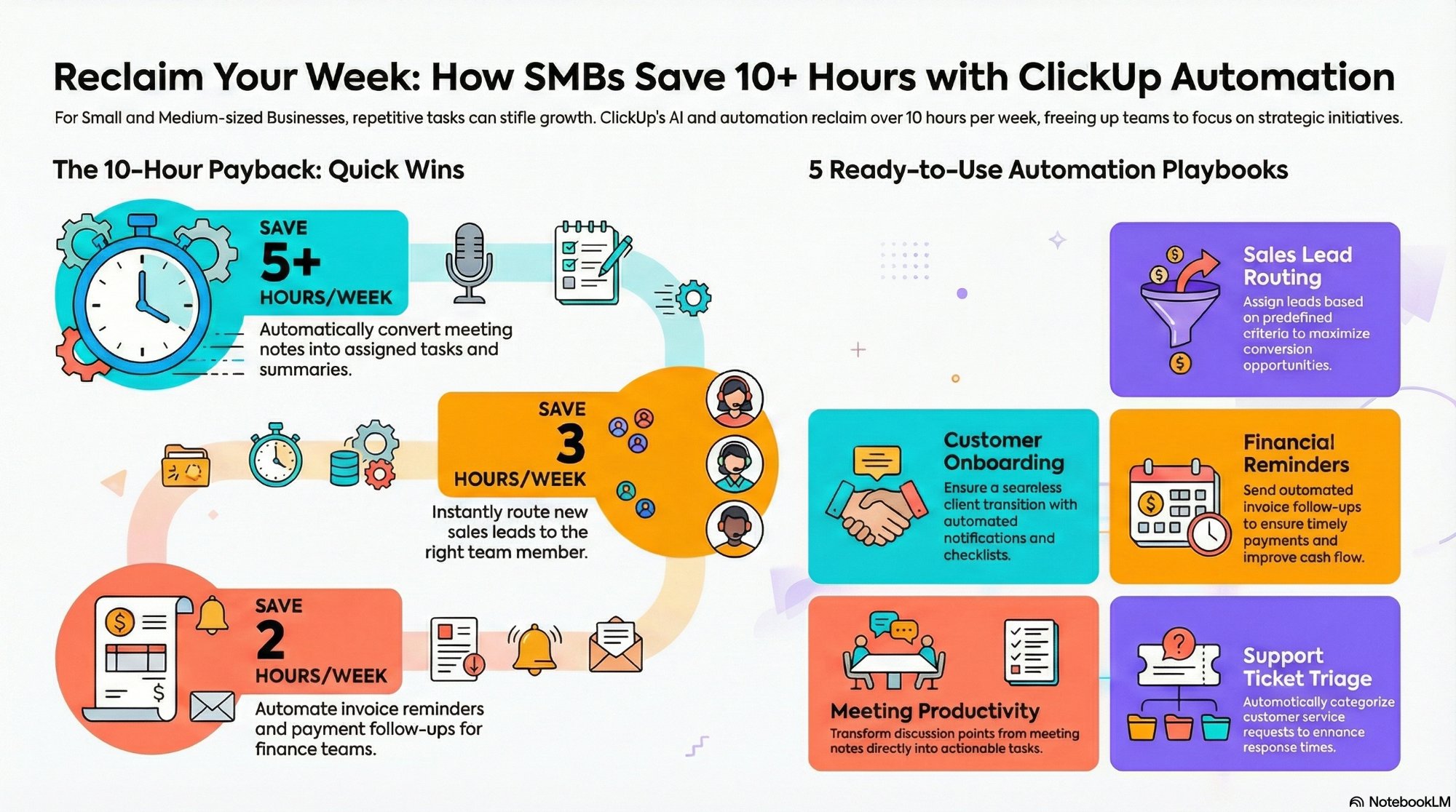
ClickUp automations and ClickUp AI to save 10 hours a week
The automation layer that sits on top of the setup in this guide.
Read the playbook →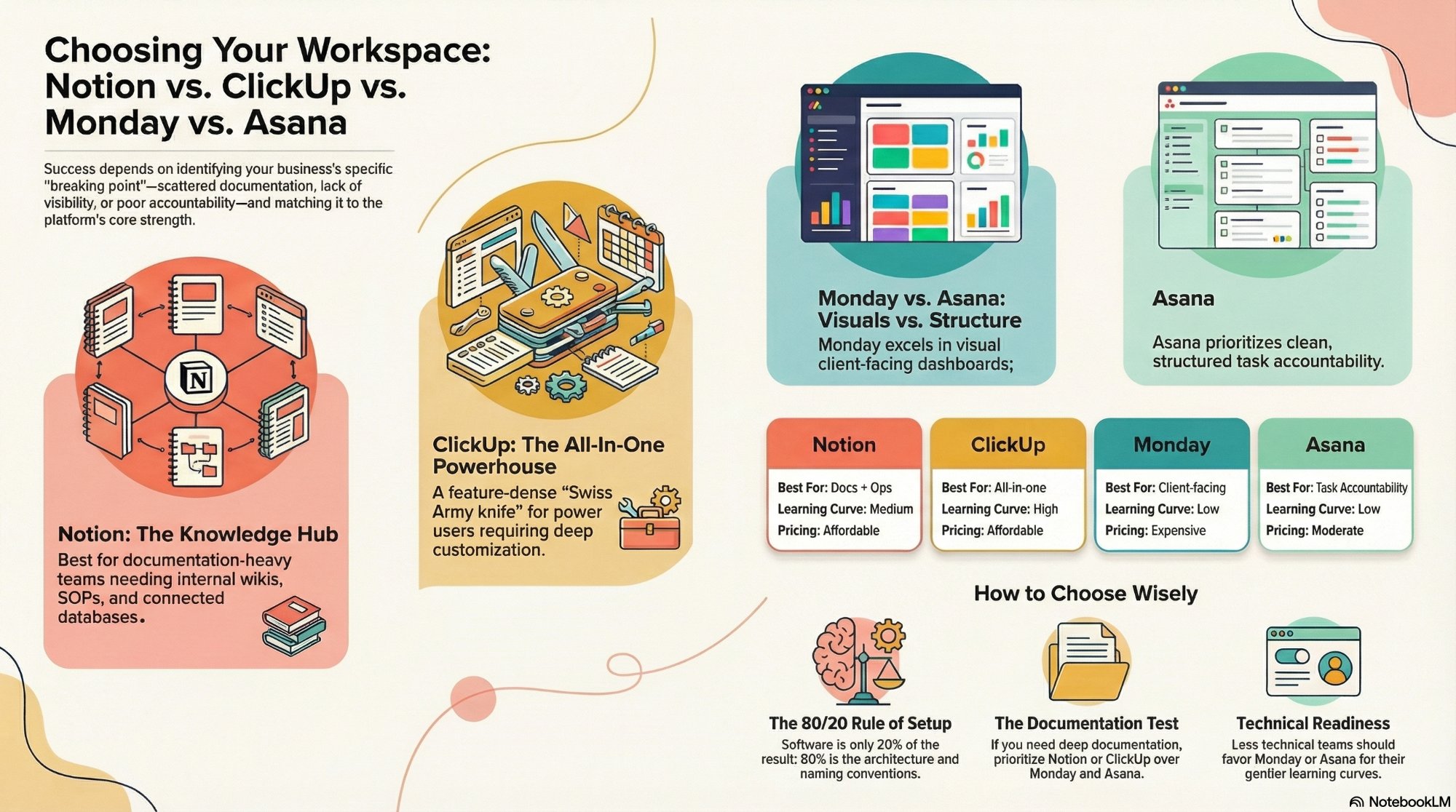
Notion vs ClickUp vs monday vs Asana
The honest head-to-head before you commit your agency to a platform.
Read the comparison →
The Foundation stage, built for you
Your ClickUp operating system configured, documented, and handed over.
See the offer →Want your ClickUp workspace built for you?
Book a free 30-minute strategy call. We will map your highest-ROI workflows and give you a build roadmap on the spot. If we are not the right team for you, we will say so and point you somewhere better.
Book a Free Strategy Call →Free 30-minute call. Honest take, even if that means "you do not need us yet."