Why execution-based pricing makes complex automations far cheaper
n8n bills per execution, Zapier per task, Make per operation. For multi-step automations that one difference can cut your bill by 10x or more.
 By Ishan Vats · Founder of IV Consulting · builds AI agents & automations for 150+ teams
 n8n · Executes all 10 stepsCounts as 1 execution
 NotionEnrich + log
 SlackTeam alerted
 GmailReply drafted
Execution-based pricing charges you once per workflow run, no matter how many steps it has. Task-based pricing charges for every single step. For a complex automation that gap is enormous: a 10-step workflow run 1,000 times is 1,000 executions on n8n but 10,000 tasks on Zapier. The more steps your automation has, the more execution-based tools like n8n save you, which is why they are the default for serious SMB automation.
The difference
What is the difference between execution-based and task-based pricing?
Automation pricing comes down to one question: what does the tool count as billable? That single choice decides whether a complex automation costs you a little or a lot. There are three models on the market, and the gap between them grows with every step you add.
- Execution-based (n8n). You are billed once per workflow run. A 2-step workflow and a 200-step workflow both count as one execution.
- Task-based (Zapier). You are billed for every action step inside the run. A 10-step workflow costs 10 tasks each time it fires.
- Operation-based (Make). You are billed for every module that runs, which behaves like task-based but with a usually lower cost per unit.
So the same automation, doing the same work, can carry a wildly different price tag depending on how the vendor counts. The thing being counted is not the value delivered. It is the plumbing. And task-based pricing charges you for every pipe.
For a small business running simple automations, this barely registers. For a growing team running long, multi-tool workflows hundreds or thousands of times a month, it is the single biggest line item in the automation budget. Knowing which model you are on is the first step to controlling that cost.
The mechanics
How do n8n, Zapier, and Make actually bill you?
Same idea, three different meters. Picture one workflow: a new lead comes in, you enrich it, log it to Notion, alert the team in Slack, and draft a reply in Gmail. Call it 10 steps end to end. Here is what each tool charges every time it runs.
Zapier: per task
Zapier charges per task, and each action in your workflow counts as one task. Your 10-step workflow is roughly 10 tasks per run. Triggers are usually free, but every action after that adds to the meter. Add a step, add a task, every single time it fires.
Make: per operation
Make charges per operation, where each module that runs is one operation. It behaves like the task model, your 10-step scenario is about 10 operations per run, but operations typically cost less per unit than Zapier tasks, so Make often lands cheaper for the same multi-step work.
n8n: per execution
n8n charges per execution, and the whole workflow run is a single execution no matter how many steps sit inside it. Your 10-step workflow is 1 execution. A 50-step workflow is still 1 execution. The step count stops mattering to your bill entirely.
The math
Why do complex automations get so expensive on task-based pricing?
Because the cost is your step count multiplied by your run count, and both grow as you scale. The deeper your automation, the harder that multiplication works against you. Walk through one realistic example.
Say you process 1,000 leads a month through that 10-step workflow. Here is the monthly meter on each model:
- n8n: 1,000 runs x 1 execution each = 1,000 executions.
- Zapier: 1,000 runs x 10 tasks each = 10,000 tasks.
- Make: 1,000 runs x ~10 operations each = about 10,000 operations.
Same automation. Same 1,000 leads. n8n meters 1,000 billable units while the task and operation tools meter 10,000. That is a 10x difference in counted usage, and it came entirely from how the vendor counts, not from any extra work.
Now make the workflow smarter. You add AI enrichment, a routing branch, and a second follow-up. The workflow goes from 10 steps to 20. On n8n, nothing changes: still 1,000 executions. On Zapier, you just doubled to 20,000 tasks. The better your automation gets, the more task-based pricing punishes you for it. Execution-based pricing does the opposite: it stays flat while your automations get more capable.
This is also the calculation to run whenever a platform forces your hand. Teams rebuilding elsewhere after the Relay.app shutdown are picking a billing model for the next several years under two weeks of time pressure, and multi-step workflows that were fine on one meter can get expensive fast on another.
The comparison
Execution vs task vs operation pricing, side by side
Execution-based pricing (n8n) charges one unit per workflow run, while task-based (Zapier) and operation-based (Make) charge one unit per step or module. The same 10-step workflow, run 1,000 times a month, costed three ways below. The numbers are billable units, not dollars, because plan prices change. The unit math is what stays true.
| What you pay for | Zapier (task-based) | Make (operation-based) | n8n (execution-based) |
|---|---|---|---|
| Billable unit | Each action step | Each module run | One whole workflow run |
| 10-step run, 1,000 times | ~10,000 tasks | ~10,000 operations | 1,000 executions |
| Adding a step | +1 task every run | +1 operation every run | No change to the count |
| Multi-step AI agent | Each tool call billed | Each module billed | One execution total |
| Cost behavior at scale | Multiplies with steps | Multiplies with modules | Flat per run |
| Best fit | Simple 1 to 2 step Zaps | Mid-complexity scenarios | Long, high-volume, agentic workflows |
The decision
When is task-based pricing actually the right call?
Execution-based is not automatically the answer for everyone. The right model depends on how long your workflows are and how often they run. Match your reality to one of these three.
Stay on Zapier (task-based) when work is simple
If most of your automations are one or two steps and you run a few thousand times a month, Zapier is the fastest path. It has the widest app library, the gentlest learning curve, and at low step counts the task meter barely moves. Do not over-engineer a problem you do not have. A solo founder wiring a form to a spreadsheet does not need execution-based anything. If the meter is what is pushing you off Zapier, the move itself has an order that matters: audit your Zaps before you open n8n.
Consider Make (operation-based) for mid-complexity
Once workflows reach a handful of steps and moderate volume, Make often costs less than Zapier for the same scenario because operations are cheaper per unit. It is a sensible middle ground when you want visual building and broad integrations without the full task-pricing penalty, but you are not yet running long agentic workflows.
Move to n8n (execution-based) when steps and volume climb
The moment your workflows get long, frequent, or AI-driven, execution-based pricing wins and keeps winning. Multi-tool pipelines, reasoning agents that call several tools, and anything you run thousands of times a month all bill flat per run on n8n. This is where the 10x gaps live, and where most growing teams should standardize.
The fix
How do I cut my automation bill without rebuilding everything?
You do not need a rip-and-replace project. You need to put the expensive workflows on the right meter and tidy the rest. Three moves, in order of impact.
1. Move your heaviest workflows to execution-based first
Find the workflow with the most steps and the highest run count. That single automation is where task-based pricing is bleeding you. Rebuild it on n8n and you capture most of the savings from one migration. Leave the simple, low-volume automations where they already work.
2. Consolidate steps and batch your runs
On task and operation pricing, fewer steps and fewer runs both lower the bill. Merge redundant actions, drop steps that do not earn their place, and where timing allows, batch records so one run handles many items instead of firing once per item.
3. Keep AI agents on execution-based infrastructure
Agents are the worst case for task pricing because one job can mean many tool calls. Run them where the whole agent loop counts as a single execution, and the economics of production AI suddenly work. This is the difference between an agent that pays for itself and one that quietly drains the budget.
FAQ
Automation pricing questions people ask
What is the difference between execution-based and task-based pricing?
Is n8n cheaper than Zapier?
How does Make pricing work compared to n8n and Zapier?
When is task-based pricing actually fine?
Does an AI agent count as one execution or many?
How do I lower my automation bill without rebuilding everything?
Ishan Vats
Founder, IV Consulting · AI & automation consultant
I build production AI agents, automations, and MCP servers for teams from startup to enterprise. 150+ ops transformations over 10+ years. If you want this mapped to your own stack, I'll do it with you on a free call.
Book a free strategy call →Keep reading
Related guides and work

Zapier vs Make vs n8n AI agents (2026)
Which automation platform to use now that all three ship native AI agents.
Read the comparison →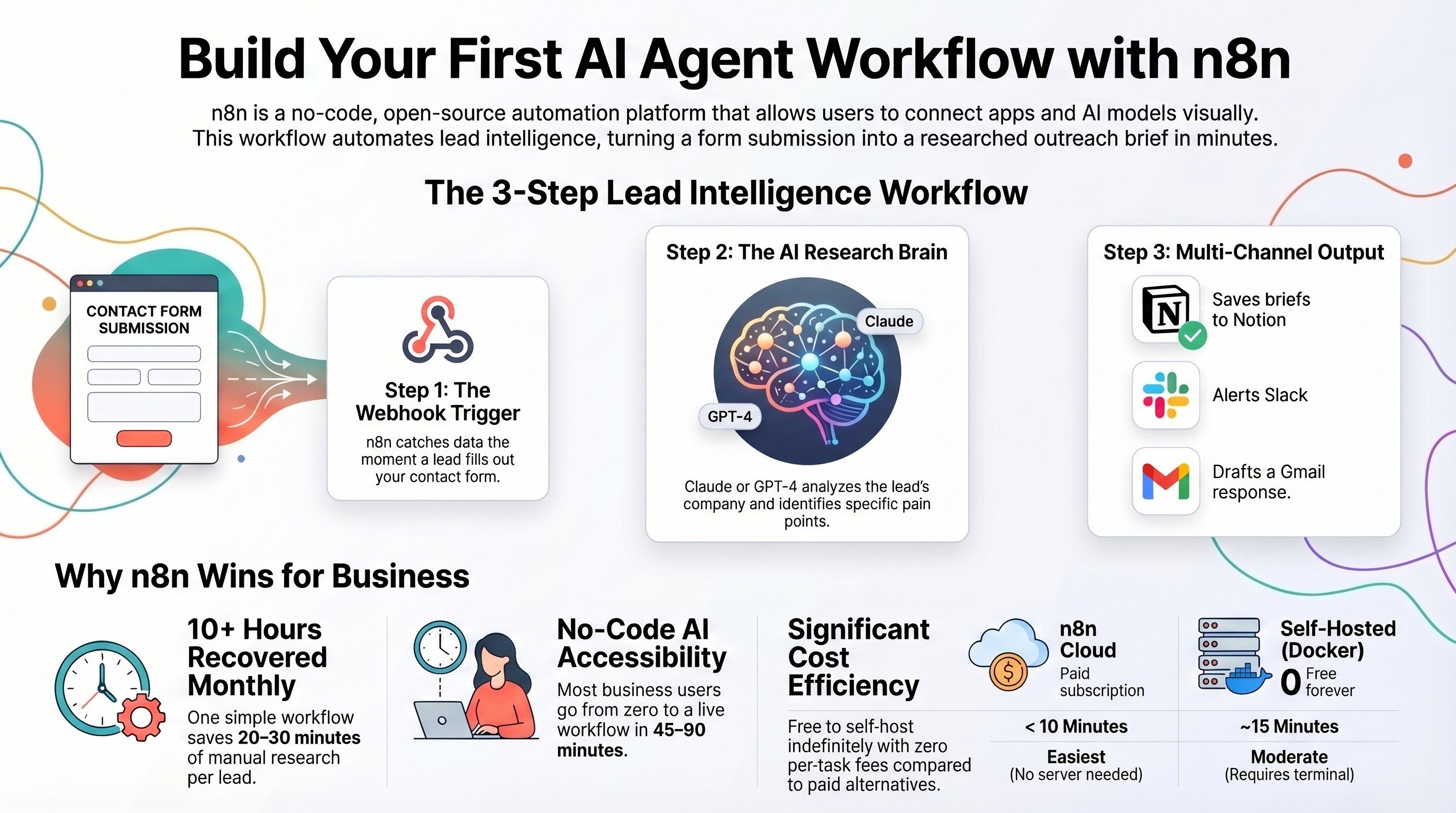
Build an AI agent workflow with self-hosted n8n
Run n8n on infrastructure you own, with no per-task fees, and ship a real agent.
Read the guide →
The Automation stage, built for you
We map your workflows to the cheapest meter and connect your tools end to end.
See the offer →Paying too much for your automations?
Book a free 30-minute strategy call. We will look at your real workflows, find where task-based pricing is costing you, and map the moves to a flatter bill. If you are already on the right setup, we will tell you so.
Book a Free Strategy Call →Free 30-minute call. Honest take, even if that means "you do not need us yet."