MCP for small businesses, explained
The Model Context Protocol is the quiet standard rewiring how AI connects to your tools. Here is what it is, and why it matters for your automations, without the jargon.
 By Ishan Vats · Founder of IV Consulting · builds AI agents & automations for 150+ teams
 NotionDocs & data
 SlackMessages
 GmailInbox
MCP, the Model Context Protocol, is an open standard from Anthropic that lets an AI agent connect to your tools and data through one common port, instead of a custom integration for each. For a small business it means AI automations are faster to build, cheaper to maintain, and easier to swap, because your agent speaks one language to Notion, Slack, Gmail, your CRM, and your database. You do not have to adopt MCP yourself. The platforms you already use, like Claude, n8n, Make, and Zapier, are adding it for you.
The basics
What is MCP, in plain English?
MCP for small businesses comes down to one idea: the Model Context Protocol is an open standard that lets an AI agent connect to all your tools and data through one shared port, instead of a custom build for each. Anthropic released it in late 2024, and the wider AI industry has since adopted it. It sounds like another acronym to ignore. It is the opposite, because it quietly decides how easily AI can plug into the apps you already run.
The cleanest way to picture it is a USB-C port for AI. Before USB-C, every device had its own cable and you kept a drawer full of them. One standard port replaced the mess. MCP does the same thing for AI: instead of a one-off connector for every tool your AI needs to touch, the AI speaks one protocol, and any tool that also speaks it just plugs in.
The three pieces, without the spec
- The AI app is the assistant or agent you talk to, for example Claude or an agent inside n8n. It is the device looking for a port.
- An MCP server is a small piece that sits in front of a tool, like your Notion, your Google Drive, or your database, and exposes what the AI is allowed to read or do. It is the port on the tool's side.
- The protocol is the shared language between them, so any AI app can talk to any MCP server without a bespoke build.
The point
Why does MCP matter for a small business?
Because integrations are where AI projects quietly die. The model is rarely the hard part. The hard part is wiring it into the dozen tools your business actually runs on, and keeping those wires from snapping every time a tool updates.
Picture the old way. You have five AI tools and ten apps you want them to reach. Connecting every AI to every app is up to fifty separate integrations, each built and maintained by hand. That is the integration tax, and for a small team it usually means the AI never gets past a demo.
MCP collapses that. Build an MCP connection to a tool once, and any AI agent that speaks the protocol can use it. Five tools and ten apps stop being fifty bespoke builds and become a handful of reusable connections. For a small business, three things change in practice:
- Builds get faster. Connecting an agent to your stack drops from a custom development project to plugging into connectors that already exist.
- Maintenance gets cheaper. When the connection is a shared standard, it is maintained at the protocol layer, not as a hundred fragile one-off scripts you own forever.
- You stop getting locked in. Swap the AI model behind the agent and your tool connections still work, because they were built to the protocol, not to one vendor.
This is the same shift our AI Engineering work is built around: getting an AI from a clever idea to something that safely acts inside your real tools. MCP makes that last mile dramatically shorter.
The difference
MCP vs custom integrations: what actually changes
The shift is from building one connector per tool to building to one shared standard. Here is what that looks like side by side.
| What matters | Custom integrations | With MCP |
|---|---|---|
| How a tool connects | A bespoke build for every tool and every AI | One standard protocol, reused across both |
| Adding the next tool | Another integration from scratch | Plug in an MCP server that already exists |
| Build time | Weeks of development per connection | Days, often hours, to wire up |
| Maintenance | Breaks when any single API changes | Maintained once, at the protocol layer |
| Switching AI models | Often a rebuild of the connectors | Connections carry over, swap the model freely |
| Who can run it | Developers, every time | Your platform or a partner wires it once |
In the wild
Where you already touch MCP without knowing it
You do not download MCP. You meet it through the tools you already use, as they quietly add support.
AI assistants like Claude
When an AI assistant can read your files, search your docs, or take an action in another app with a quick connection, that is often MCP underneath. It is what lets the assistant reach beyond its own chat window into your real data.
Automation platforms
n8n, Make, and Zapier all shipped native AI agents in 2026, and they lean on standards like MCP so those agents can call your tools. We compared the three in our Zapier vs Make vs n8n guide.
Your own tools and data
An MCP server can sit in front of your Notion workspace, your Google Drive, your CRM, or your internal database, and expose only what you allow. That is how an agent gets to act on your business, not a generic one.
Scoped, safe access
Because each MCP server decides exactly what it exposes, you can give an agent read-only access to one folder rather than the keys to everything. Scope it tightly and you keep the upside without handing over the whole business.
If the word agent itself is still fuzzy, start with our plain-English primer on what an AI agent actually is, then come back here.
The takeaway
What should a small business actually do about MCP today?
Almost nothing, and that is the good news. MCP is not a project you launch. It is a current running under the tools you buy. You get the benefit by making three calm decisions, not by standing up new infrastructure.
1. Treat MCP support as a buying signal
When you pick an AI assistant or automation platform, favor the ones that support MCP. You are not buying the protocol. You are buying the confidence that the tool will keep connecting to whatever you adopt next without an expensive rebuild.
2. Map the tools an agent would need to reach
Before any AI build, list the apps a useful agent would touch: your inbox, your project tool, your CRM, your docs. That list is your integration surface, and with MCP it is far cheaper to cover than it was a year ago. It also tells you where the real value is.
3. Scope access deliberately
The protocol makes connecting easy, which means the discipline shifts to permissions. Decide what each agent is allowed to see and do, and keep it narrow. An agent that drafts replies does not need delete rights on your whole inbox.
If you want this done properly, that is the work. Our Automation stage connects your tools and clears the busywork, and our AI Engineering stage builds the production agents and MCP connections on top, with the scoping and testing that keep them safe. You get the modern, plug-in stack without learning a single line of the protocol.
FAQ
Common questions about MCP
What does MCP stand for?
Do I need to do anything to use MCP in my business?
How is MCP different from an API or a Zapier integration?
Is MCP safe for my business data?
Should a small business care about MCP in 2026?
Can IV Consulting set up MCP-based AI for me?
Keep reading
Related guides and work
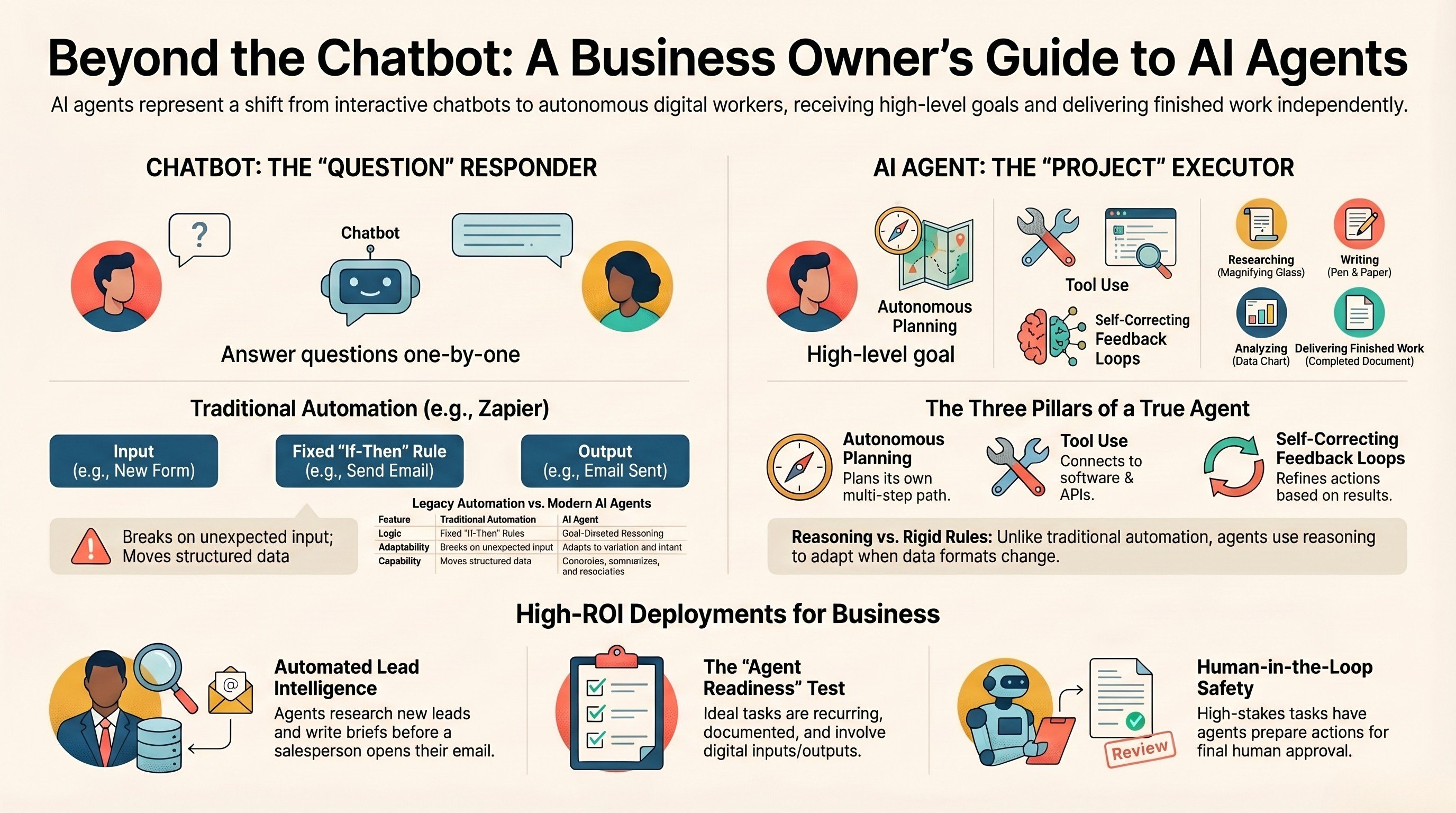
What is an AI agent, really
A plain-English guide to what agents are, before you wire one into your tools.
Read the guide →
Zapier vs Make vs n8n AI agents
The three platforms now reaching your tools through standards like MCP, compared.
Read the post →
The AI Engineering stage
Production agents and MCP connections, scoped and tested, idea to live in about a month.
See the offer →
Ishan Vats
Founder, IV Consulting · AI & automation consultant
I build production AI agents, automations, and MCP servers for teams from startup to enterprise. 150+ ops transformations over 10+ years. If you want this mapped to your own stack, I'll do it with you on a free call.
Book a free strategy call →Want AI that actually plugs into your tools?
Book a free 30-minute strategy call. We will map the tools an agent should reach, show you where MCP makes the build cheap, and recommend the right stack. If you do not need us yet, we will say so.
Book a Free Strategy Call →Free 30-minute call. Honest take, even if that means "you do not need us yet."