When NOT to use AI in your automations (and what to use instead)
The hype says put AI in everything. The teams getting results do the opposite. Here is the line.
 By Ishan Vats · Founder of IV Consulting · builds AI agents & automations for 150+ teams
 No · rulesn8n, Make
 Yes · AIClaude step
Do not use AI when a task is rule-based, repeatable, and has one correct output. Routing, scheduling, calculations, formatting, and simple notifications all run better as plain deterministic automation: cheaper, faster, and predictable. Save AI for the messy, judgment-heavy work where fixed rules cannot cope, like reading unstructured text, classifying fuzzy cases, or drafting language. The best systems are mostly rules, with AI added only where it earns its place.
The trap
Why teams keep bolting AI onto everything
One of the most upvoted automation stories this month was a developer explaining that a client paid him to rip the AI back out of a tool he had built for them. The AI was slower, more expensive, and less reliable than the boring rules it replaced. The client just wanted the thing to work.
That story is not an outlier. It is the mood. Across the automation community the same complaint keeps surfacing: people force-using AI for things that plain automation already solved, then reinventing the wheel with a few screws loose. Founders are openly asking how their product survives the "DIY AI age" when buyers can wire up a model themselves in an afternoon.
Here is the uncomfortable truth. Most of what gets sold as "AI automation" does not need AI at all. A trigger, a few conditions, and a delivery step will do the job. Adding a language model to that is not innovation. It is a tax: more cost per run, more latency, and a new failure mode where the system sounds confident while being wrong.
The no list
When should you NOT use AI in an automation?
If the task has one correct answer and you can describe the rule, AI is the wrong tool. Use deterministic automation instead.
Skip AI when the step is any of these:
- Routing and field mapping. Move this field to that field, send record A to system B. There is exactly one right answer. A rule does it perfectly, forever, for free.
- Scheduling and triggers. "Every Friday at 9am" or "when an invoice is 7 days overdue" is a clock and a condition, not a judgment call.
- Calculations and totals. Never ask a language model to do math you care about. Use a formula. Models approximate. Spreadsheets do not.
- Formatting and validation. Reformatting a phone number, checking an email is valid, enforcing a template. This is a regex or a rule, not a reasoning task.
- Exact lookups. Find the customer by ID, pull the matching price. You want a database query, not a best guess.
- Compliance-critical steps. Anything where a wrong output has legal, financial, or safety consequences and the logic is known. Hard-code the logic so it is auditable.
- Simple notifications. "Tell the team a lead came in" is a templated message with variables. It does not need a model to write it.
The common thread: structured input, single correct output, known logic. Whenever all three are true, a deterministic step beats AI on cost, speed, and reliability at the same time. There is no trade-off to make. Rules just win.
The yes list
When does AI actually earn its place?
AI is worth the cost when the input is messy, the categories are fuzzy, or the output is language. That is real work rules cannot do.
Reach for AI when the step is genuinely one of these:
- Understanding unstructured text. Reading a free-form support email, a meeting transcript, or a PDF and pulling out what matters. There is no clean field to map.
- Classifying fuzzy cases. "Is this lead a good fit?" or "what is the sentiment here?" where the boundary is judgment, not a rule. AI handles the gray area a fixed condition cannot.
- Drafting language. A first-pass reply, a summary, a personalised outreach note. Writing is exactly what models are good at, and a human still reviews before it ships.
- Summarising and synthesising. Turning ten updates into one digest, or a long thread into three bullet points. The value is in the compression.
- Extraction from inconsistent formats. Every supplier invoice looks different. A model can read intent across layouts where a rigid parser would break on each new template.
Notice the pattern. AI earns its place when a human would otherwise have to read, judge, or write. For everything mechanical around it, the trigger, the routing, the saving, the sending, you still use rules. The model is one node in the workflow, not the workflow. If you want production AI built this way, with the model scoped to exactly where it adds value, that is what our AI Engineering stage delivers.
The comparison
AI vs deterministic automation: what belongs where
Same question, six angles. Read down the column that matches your task and the answer is usually obvious.
| Signal | Deterministic automation | AI step |
|---|---|---|
| Input shape | Structured, predictable fields | Messy, unstructured, varies every time |
| Output | One correct answer | A draft, a judgment, a best guess |
| Predictability | Same input, same output, every run | Same input can vary run to run |
| Cost per run | Effectively zero | Tokens plus latency on every call |
| Fails by | Stopping loudly with a clear error | Sounding confident while being wrong |
| Best for | Routing, scheduling, math, formatting, alerts | Summaries, fuzzy classification, language, messy extraction |
The point of the table is not that one side wins. It is that they are good at opposite things. The teams that get burned treat AI as a general-purpose upgrade for every step. The teams that win use each tool for the column it owns.
The decision
A 4-step framework to decide AI or rules
Run every automation step through these four questions, in order. Stop at the first one that answers it.
Can you write it as if-this-then-that?
Try to state the step as a plain rule: "if the form has a budget over X, tag it hot." If you can write the rule, write the rule. You are done. No model needed. Most steps in most workflows stop right here.
Is the input structured and predictable?
Clean fields from a form, a database row, a webhook payload with known keys. If the shape is reliable, keep it deterministic. AI adds cost and variance with nothing to show for it when the data is already tidy.
Does it need language, judgment, or messy understanding?
Only now does AI become a candidate. If the step has to read free text, weigh a fuzzy call, or write something a human would otherwise write, a model is the right tool. Scope it to that one job and wire deterministic steps around it.
What does a wrong output cost?
If a mistake is cheap and reversible, let the AI run and spot-check it. If a mistake is expensive, public, or hard to undo, add a human review before it ships, or keep the step deterministic so it is fully auditable. Match the guardrail to the stakes.
Avoid these
The real failure modes we see in the wild
Using a model for exact work
Math, lookups, and data routing handed to an LLM. It will be right most of the time, which is the trap, because the misses are silent and you only notice them downstream. Use a formula or a query and the problem disappears.
Making AI the whole pipeline
One giant prompt asked to receive, decide, format, and deliver. It is hard to debug, expensive to run, and impossible to test reliably. Break it apart: deterministic steps for the plumbing, a single AI node for the one judgment call.
No fallback when the model is wrong or down
AI steps fail differently. They hallucinate, rate-limit, and time out. A production workflow needs a path for "the model gave garbage", whether that is a validation check, a retry, or a human queue. Deterministic steps rarely need this. AI steps always do.
Ignoring the cost and latency creep
A model call on every record feels free in testing and becomes a real line item at volume, while adding seconds of latency to steps that used to be instant. If a rule can do it, the rule is also the cheaper and faster option.
Keep these
Four principles for AI-honest automation
Rules first, AI second
Build the deterministic version first. It works, it is cheap, and it gives you a baseline. Only then ask which single step would be better with a model. You will be surprised how often the answer is none.
Scope AI to one job
The model reads, classifies, or writes one thing. Everything around it stays deterministic. A narrow AI node is easy to test, easy to swap, and easy to trust.
Human in the loop where it counts
Anything customer-facing or irreversible gets a review step. AI drafts, a person approves. Speed without the risk.
Measure before you trust
Check an AI step against real inputs before you let it run unattended. If you cannot measure that it is right, it is not ready to be load-bearing.
FAQ
Questions people ask before adding AI
When should you not use AI in an automation?
Is AI always better than rule-based automation?
What is deterministic automation?
Can you mix AI and deterministic steps in one workflow?
Why would a business pay to remove AI from a tool?
How do I decide between AI and automation for my business?
Ishan Vats
Founder, IV Consulting · AI & automation consultant
I build production AI agents, automations, and MCP servers for teams from startup to enterprise. 150+ ops transformations over 10+ years. If you want this mapped to your own stack, I'll do it with you on a free call.
Book a free strategy call →Keep reading
Related guides and work
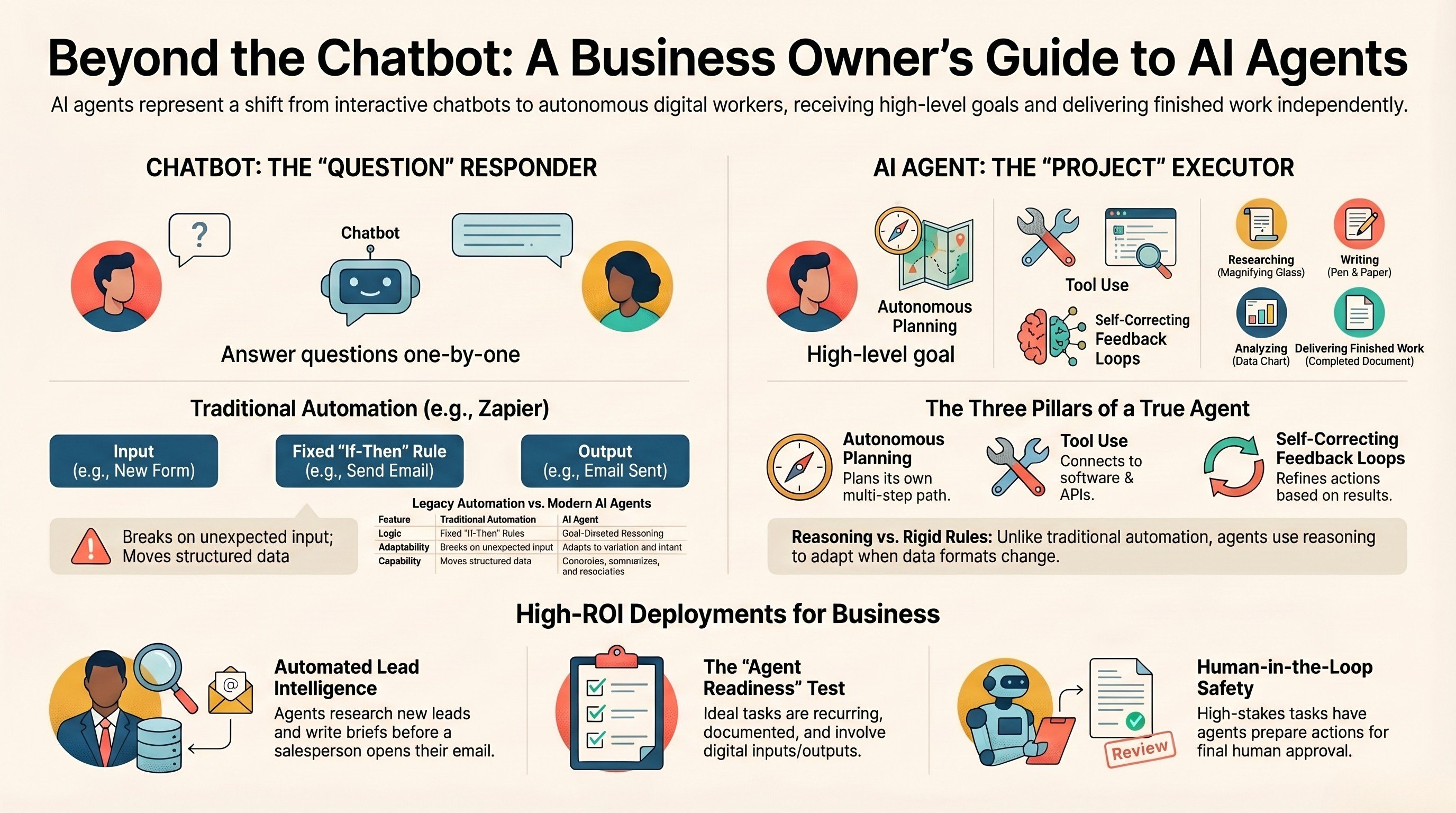
What is an AI agent? A guide for business owners
The plain-English version of what an agent actually is, and where it pays off.
Read the guide →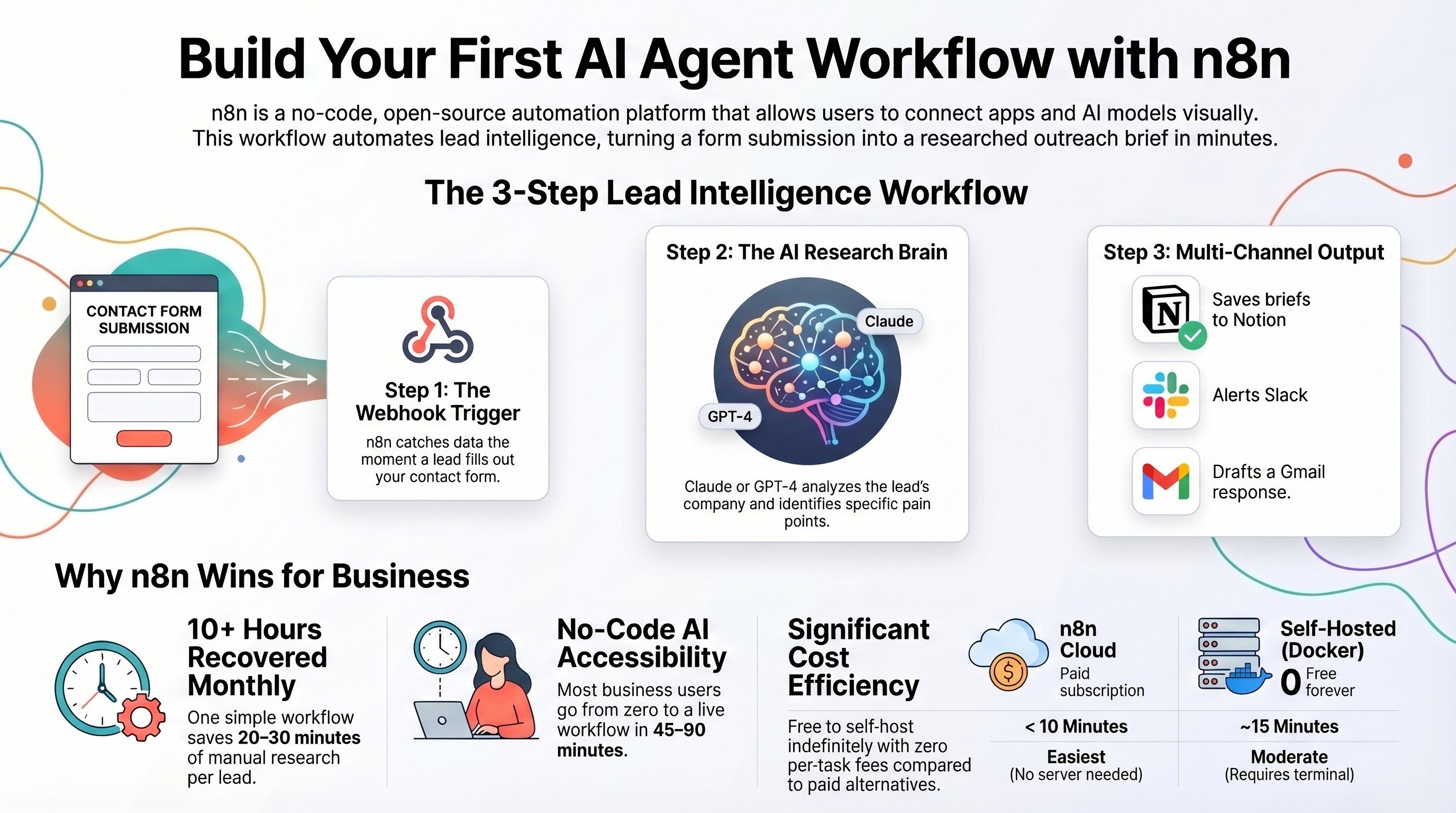
Build your first AI agent workflow with n8n
The zero-code build, with AI scoped to exactly one node and rules around it.
Read the tutorial →
The Automation stage, built for you
We map which steps should be rules and which deserve a model, then build it.
See the offer →Not sure which steps need AI and which need rules?
Book a free 30-minute strategy call. We will walk your highest-volume workflows, mark where AI earns its place and where it does not, and give you a build roadmap on the spot. If rules are all you need, we will tell you that too.
Book a Free Strategy Call →Free 30-minute call. Honest take, even if that means "you do not need AI for this."