What Google's no-code AI agent builder means for small businesses
Workspace Studio lets you build an AI agent by describing it in plain English inside Gmail, Docs, and Sheets. It is included in Business and Enterprise Workspace plans, not sold separately, so most teams reading this already pay for it. Here is what it does, where it stops, and whether you still need Zapier.
 By Ishan Vats · Founder of IV Consulting · builds AI agents & automations for 150+ teams
 Gemini · Builds itGenerates the agent
 GmailInbox triaged
 NotionLogged
 SlackTeam alerted
Google's no-code AI agent builder is Workspace Studio. It lets a non-technical person create an AI agent by describing a workflow in plain English inside Gmail, Docs, or Sheets, and Gemini 3 builds the flow. Google began rolling it out on 3 December 2025 and reached general availability across Workspace domains through March 2026. The important detail for a small business is the price: Workspace Studio is included in Business Starter, Standard and Plus, and in Enterprise Starter, Standard and Plus, rather than sold as a separate add-on, so if you pay for Google Workspace you almost certainly already have it. It connects to Gmail, Drive, Calendar and Chat, plus first-party connectors for Asana, Jira, Mailchimp and Salesforce, and it can call anything else through an Apps Script step or an external API call. It pays off most when the task is narrow, repetitive, and starts inside Google. If you are weighing whether to be on Google Workspace at all, the seat-level comparison against Microsoft 365 is in Copilot vs Gemini, priced at every tier.
The basics
What is Google's no-code AI agent builder?
Google's no-code AI agent builder is Workspace Studio, a tool that turns a plain-English description of a task into a working AI agent, with no code and no developer in the loop. You write what you want in normal language, Studio assembles the agent, and an admin signs off before it goes live. That is the whole idea: describe the job, get an agent.
It works in three plain steps:
- You describe the workflow in natural language, right inside Gmail, Docs, or Sheets where you already work.
- Studio generates the agent that can read, draft, and take actions across your Google Workspace.
- An admin approves it from a central registry, so nothing runs unreviewed and you keep a record of what each agent is allowed to do.
If the phrase "AI agent" still feels fuzzy, the short version is this: an agent is software that takes a goal and carries out the steps to reach it, instead of just answering one question and stopping. We unpack that in plain English in our guide on what an AI agent actually is. Workspace Studio is simply a faster on-ramp to building one.
The announcement
When did Workspace Studio launch, and is it included in my plan?
Google announced Workspace Studio on 3 December 2025, started with Rapid Release domains, and rolled end-user access out to Scheduled Release domains gradually from 2 March 2026. It is powered by Gemini 3: you describe what you want to automate in plain language and Gemini builds the flow.
The details that matter for an owner deciding whether to care:
- It is included, not an add-on. Per Google's own availability notes, Workspace Studio is available on Business Starter, Standard and Plus, on Enterprise Starter, Standard and Plus, and on Education Fundamentals, Standard and Plus, plus Google AI Pro for Education and Google AI Ultra for Business. That is the entry Business tier upward, which is why most small teams already have it without knowing.
- You build with triggers and steps. A trigger such as an incoming email or a calendar event starts the flow, then prebuilt steps summarize, translate, draft, label, or handle attachments. You can start from a template instead of a blank prompt.
- It reaches outside Google. Alongside Gmail, Drive, Calendar and Chat, Google ships first-party connectors for Asana, Jira, Mailchimp and Salesforce, and lets you add custom steps through Apps Script or an external API call.
- Admins keep a say. Agents are managed and shared from Studio rather than living privately in one person's account, and Google has since added further enterprise security controls for wider sharing.
Strip away the branding and the headline for a small business is simple: building a basic AI agent no longer requires a developer, and no longer requires a new line item on the invoice. The harder question is not whether to try it, it is which jobs to give it, which is the rest of this page.
The upside
What can a no-code AI agent actually do for a small team?
These are the kinds of jobs a Workspace-native agent is built for. Notice the pattern: each one is narrow, repetitive, and lives inside tools you already use every day.
Triage and reply in Gmail
The most common first agent for a small team. It reads incoming mail, sorts by urgency, and drafts replies for a human to glance at before they go out. Routine questions stop eating your morning, and nothing important slips because everything is labelled and logged.
Because it runs inside Gmail, there is no new app to learn and no copy-pasting between windows.
Summarize Docs and Sheets
Point it at a long document or a busy spreadsheet and get a clean summary, with the action items pulled out. Less time reading, more time deciding.
Build a weekly report
Turn the same recurring numbers into a short written update every week, on schedule, so the report writes itself instead of stealing a Friday afternoon.
Hand off to another agent
Because the agents are A2A-compliant, one can pass work to another approved agent. A triage agent can route a billing question to a finance agent, no manual relay.
Stay in one place
The win for a small team is not raw power, it is zero context-switching. The agent lives where the work already is, so adoption is almost free.
The limits
What a no-code AI agent cannot do yet
The demo always looks magical. Real life has edges. Before you bet your operations on it, know where a Workspace-native, no-code agent runs out of road.
- The trigger has to start in Google. This is the real boundary, and it is narrower than "it only works with Google." Studio has genuine connectors for Asana, Jira, Mailchimp and Salesforce, so it can act on outside tools. What it is built around is Workspace events: an email arriving, a calendar entry, a file landing in Drive. If the thing that should kick off your workflow is a Stripe payment, a form submission, or a webhook from your own app, that is not the shape Studio is designed for.
- You are on Gemini, and only Gemini. There is no model picker. Studio runs on Gemini 3, and that is the trade for the convenience. If a task needs a specific model, or you want to run a cheap model for classification and an expensive one for drafting, you need a platform that exposes model choice. We break that decision down in which AI model for which task. One genuine limit that has not changed: a free personal Gmail account is not covered, this is a paid Workspace feature.
- Deep, multi-tool logic still needs an orchestrator. When a job branches across many non-Google systems, with conditions, retries, and data shaped between steps, you want a real automation layer. That is where a stack like n8n and Claude earns its keep.
- It does not remove the need to scope the job. A vague prompt makes a vague agent. The thinking about what good looks like, what it should never do, and how you measure it, is still on you.
The comparison
How does Workspace Studio compare to Zapier, n8n, and Apps Script?
The real question is not "is Workspace Studio good," it is "does it replace the automation tool I already pay for." Here it is against the three things small teams actually weigh it against, then head to head with each one.
| Factor | Workspace Studio | Zapier | n8n + Claude | Apps Script |
|---|---|---|---|---|
| Who builds it | A business user, in plain English | A business user, step by step | You or a partner, visual plus prompts | Someone who writes JavaScript |
| What starts the work | Workspace events: mail, calendar, Drive | Almost anything, thousands of triggers | Anything, including webhooks you own | A trigger you code, or a time driver |
| Reach outside Google | Asana, Jira, Mailchimp, Salesforce, plus API steps | Widest app catalogue of the four | Hundreds of apps, plus any HTTP API | Anything you can call in code |
| Model choice | Gemini 3 only | Built-in AI, limited swapping | Any model, your own API keys | Any model you call yourself |
| Branching and retries | Light, sequential steps | Moderate, gets costly as it grows | Deep, branching, multi-step | Whatever you are willing to write |
| Governance | Managed and shared in Studio, admin controls | Vendor cloud, per-seat admin | You own the hosting and access | Scripts scattered across accounts |
| Cost shape | Included in your Workspace plan | Per task, scales with complexity | Per execution or self-hosted | Free, you pay in maintenance |
| Time to first agent | Minutes, if you live in Google | Minutes to an hour | Hours, but far more flexible | Days, and it never really ends |
Workspace Studio vs Zapier
This is the comparison most people actually mean, because Zapier is the line item they are hoping to cancel. Zapier's advantage is the trigger catalogue: it connects to thousands of apps and it will start a workflow from almost anything, which is exactly where Studio is narrow. Its disadvantage is the billing shape, because Zapier charges per task, so the bill grows with how complex your workflows get, not just how often they run.
Workspace Studio inverts both. It costs nothing extra because it is already in your Workspace plan, so an agent that runs a thousand times a month does not change your invoice. But it will only start from things that happen inside Google. So the honest split is this: if your automations begin with an email, a calendar event, or a file, Studio does that work for free and Zapier is being paid to do something you already own. If they begin anywhere else, Zapier is not replaceable here, and no amount of Gemini quality changes that. We go deeper on how per-task billing behaves as agents get chatty in Zapier Agents vs Make AI Agents vs n8n.
Workspace Studio vs n8n and Claude
These two are not really competing for the same job, which is why we rarely see a team choose between them and stop. Studio is for the narrow, repetitive task that lives in the inbox. An n8n and Claude stack is for the workflow that branches, retries, shapes data between steps, and calls five systems that have never heard of Google.
The two real dividing lines are model control and data control. Studio runs on Gemini 3 with no picker, and it runs in Google's cloud. n8n lets you route each step to whichever model fits, including a cheap one for classification and a strong one for drafting, and it can be self-hosted if the data cannot leave your infrastructure. Neither of those matters for triaging an inbox. Both matter a great deal the moment an agent touches client data or your margins depend on token cost.
Workspace Studio vs Google Apps Script
This is the comparison nobody makes, and it is the one that saves the most money, because a surprising number of small businesses are running a pile of aging Apps Script files that one former employee wrote. Apps Script can do more than Studio in raw terms, since it is real code with access to the whole Workspace API. That is also the problem: it needs someone who can read it, and those scripts fail silently, live in a personal account, and become unmaintainable the moment that person leaves.
The nuance most coverage misses is that these are not rivals at all. Apps Script is available as a custom step inside Workspace Studio. So the upgrade path is not "rewrite everything," it is to let Studio own the trigger, the Gemini reasoning, and the visible flow, and keep a small Apps Script step only for the one bit that genuinely needs code. That turns an invisible script into a documented, admin-visible agent, which is usually a bigger win than whatever the script does.
The verdict
Our verdict: is Workspace Studio enough, or do you still need Zapier?
Most write-ups end on "it depends on your needs." Here is the version with an actual position, based on how these builds go wrong rather than how the feature lists read.
If you pay for Google Workspace, build your next agent in Studio first, and do it before you buy anything. Not because it is the best tool on this page, it is not. Because it is the one you have already bought, and the cost of finding out it is enough is one afternoon. The common failure we see is not choosing wrong, it is a team paying for a second automation platform to do a job their Workspace plan already covers, then never revisiting it.
Keep Zapier if, and only if, your triggers live outside Google. Go and look at what your Zaps actually start from. If most of them begin with a form, a payment, a CRM change, or a webhook, Studio cannot replace them and you should stop reading comparison posts about it. If most of them begin with an email or a file arriving in Drive, you are paying per task for something now included in your plan, and that is worth an hour of audit.
Do not try to make Studio your automation backbone. This is the mistake in the other direction. It runs sequential steps on one model with light branching. The moment you find yourself wanting conditions inside conditions, retry logic, or a cheaper model for the boring steps, you have outgrown it, and forcing it will cost more than moving that workflow to a real orchestrator.
The decision
How should a small business decide which to use?
You do not have to pick a camp. Match the tool to the job, start small, and prove it before you scale.
Start with Workspace Studio if Google is your home
If your team already lives in Gmail, Docs, and Sheets and the task is narrow, sort this inbox, summarize this sheet, draft this update, Workspace Studio is the fastest way to your first working agent. Low effort, low risk, quick proof that an agent can help.
Reach for an orchestration stack when the work spans tools
If the job touches your CRM, billing, Notion, Slack, or a custom app, or it needs branching logic and retries, a stack like n8n and Claude fits better. It connects hundreds of apps, runs any model, and does not care whether you live in Google or Microsoft. This is the heart of our Automation stage.
Go custom when you need production agents
When you need agents wired deep into your real systems, with APIs, MCP servers, and proper guardrails, that is engineering work, not a no-code prompt. Our AI Engineering stage takes an idea to a live, production agent in about a month.
Scope one agent, prove it, then expand
The honest rule that beats every platform debate: pick the smallest tool that does the job, ship one or two high-ROI agents, measure the hours saved, and only then add more. A clean single source of truth makes all of this easier, which is what our Foundation stage sets up first.
FAQ
Questions people ask about Google's no-code agents
What is Google's no-code AI agent builder?
Is Workspace Studio free?
Is Workspace Studio included in Google Workspace Business Standard?
Does Workspace Studio replace Zapier?
Workspace Studio vs Apps Script: which should I use?
Can a no-code Google agent use Claude?
Do I need Workspace Studio if I already use n8n and Claude?
What happened to Vertex AI?
What is the A2A protocol?
Ishan Vats
Founder, IV Consulting · AI & automation consultant
I build production AI agents, automations, and MCP servers for teams from startup to enterprise. 150+ ops transformations over 10+ years. The question I get asked most about tools like this one is not "can it do it" but "is it worth doing at all."
Size your own automation →Keep reading
Related guides and work
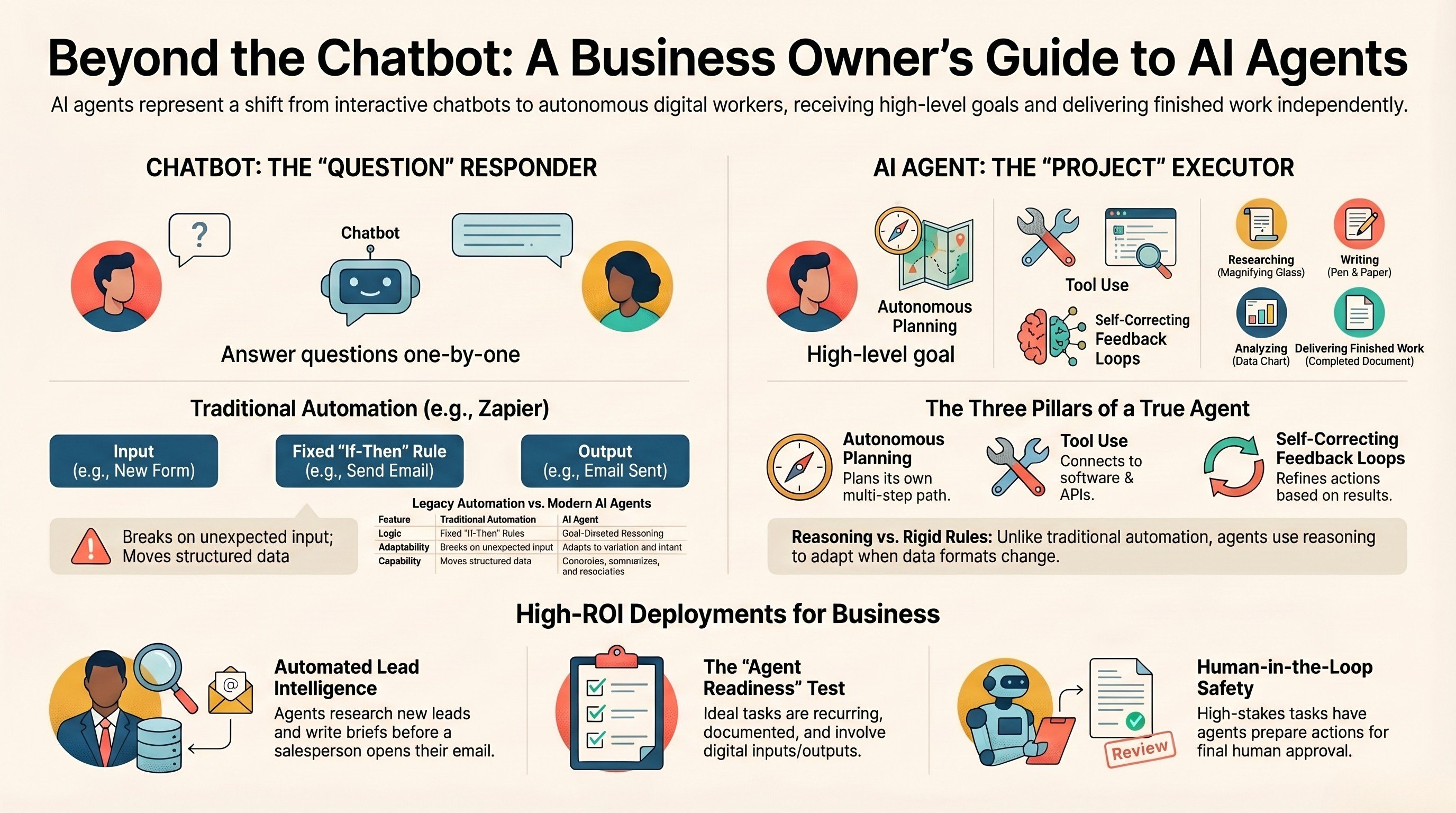
What is an AI agent? A guide for business owners
The plain-English version of what an agent actually is, and where it pays off.
Read the guide →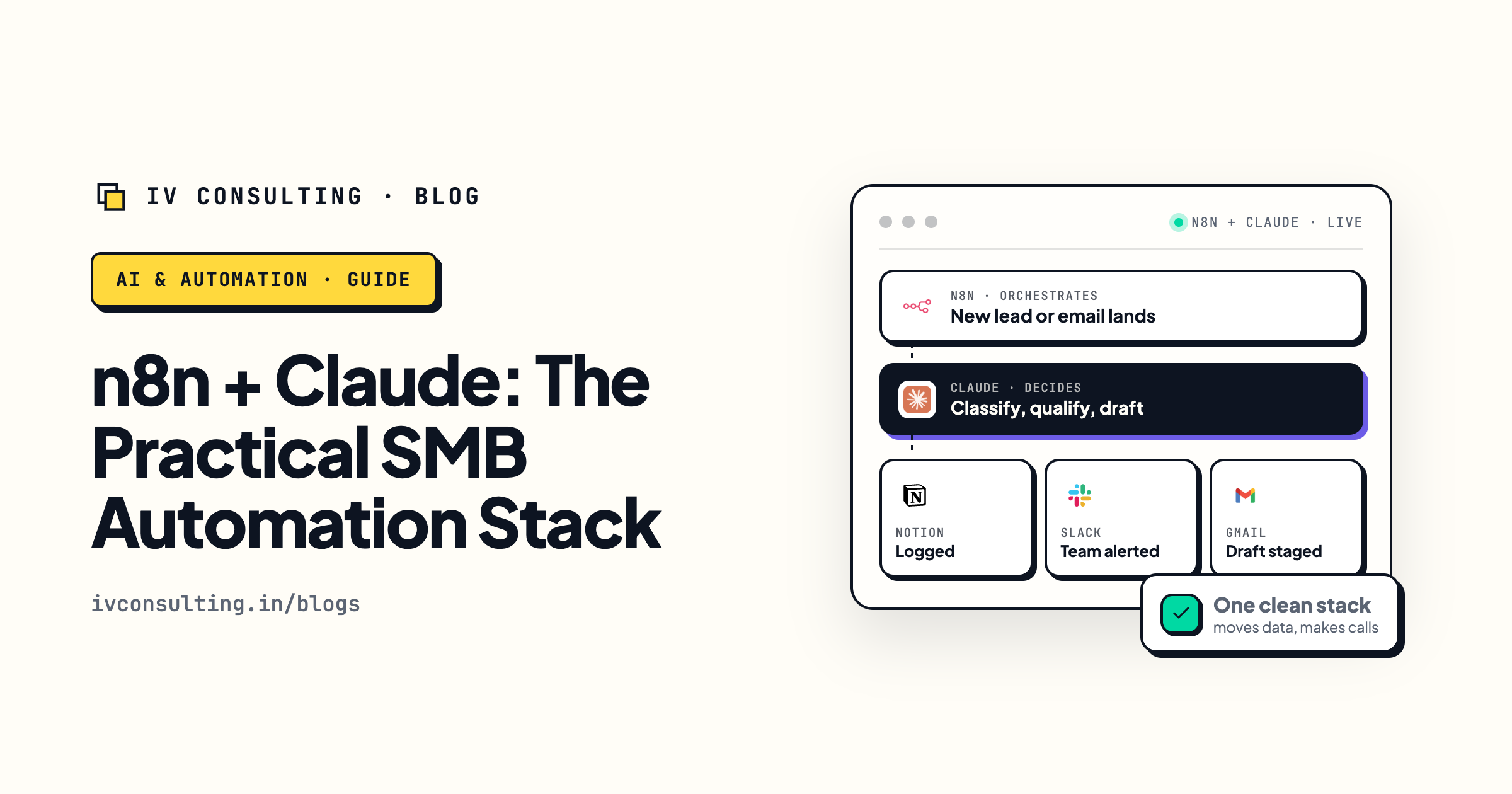
n8n + Claude: the practical SMB automation stack
When to reach for rules and routing, when to reach for judgment, and why pairing them wins.
Read the playbook →
The AI Engineering stage, built for you
Production agents wired into your real stack, from idea to live in about a month.
See the offer →Want AI agents built into your real stack?
Book a free 30-minute strategy call. We will map your highest-ROI agents, tell you whether no-code or a custom build fits, and give you a roadmap on the spot. If we are not the right team for you, we will say so and point you somewhere better.
Book a Free Strategy Call →Free 30-minute call. Honest take, even if that means "you do not need us yet."