Introduction
You did not start a business to spend your mornings copy-pasting data between apps, sending the same follow-up email for the tenth time, or chasing invoices that were due last week. But for most business owners, that is exactly what happens. Workflow automation for small business is not complicated or expensive. With tools like Make, n8n, and Zapier, you can eliminate the most time-consuming manual tasks in a single afternoon. These six automations alone save most teams 10 to 15 hours every week.
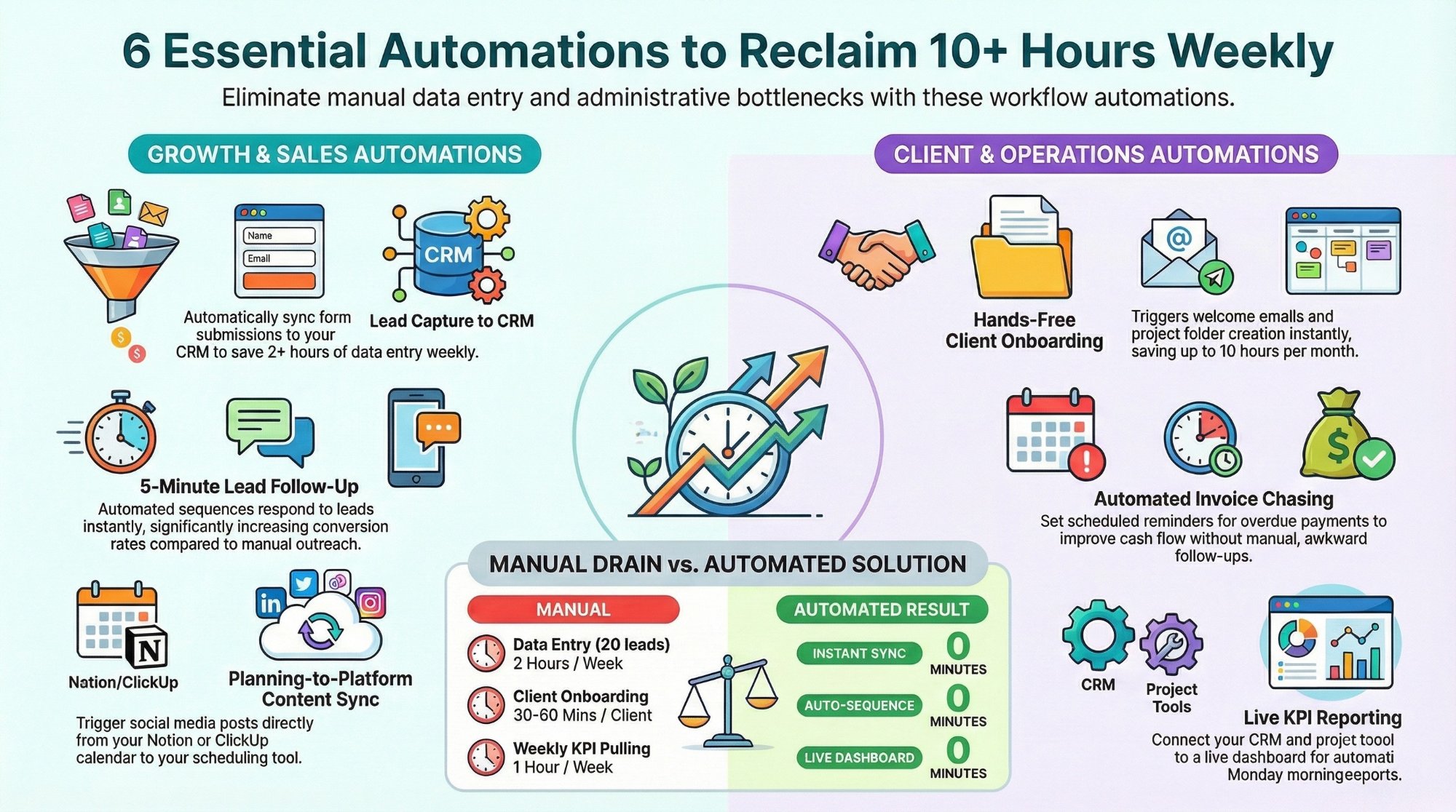
1. Lead Capture to CRM: Stop Manual Data Entry for Good
Every time a potential client fills out your contact form, books a call, or sends a LinkedIn message, that information needs to land somewhere immediately. Most business owners manually copy lead details into their CRM. That takes 3 to 5 minutes per lead. At 20 leads a week, that is two full hours lost to data entry alone.
The automation: connect your form tool directly to your CRM (Pipedrive, HubSpot, or Notion) using Make or Zapier. The moment someone submits, a contact is created, tagged with the source, and assigned to the right owner. Zero manual effort. Zero leads falling through the cracks. Build this one first. The ROI is immediate.
2. Client Onboarding on Autopilot
If your onboarding involves manually sending a welcome email, creating a project folder, setting up tasks, and sending an intake form, you are spending 30 to 60 minutes per new client on pure admin. At ten new clients a month, that is up to ten hours gone.
Set a single trigger (a payment confirmed, a contract signed, or a status change in your CRM) and automate the entire sequence:
- A personalised welcome email goes out within minutes
- A project folder is created in ClickUp or Notion with the right template applied
- Tasks are assigned to the right team members automatically
- An intake questionnaire is sent to the client
Every client gets the same professional, consistent experience. See how we build these on our AI and automation services page.
3. Invoice Follow-Up Without the Awkward Chasing
Automate your follow-up sequence instead of manually tracking overdue invoices. Connect your invoicing tool to your communication stack:
- Day 1 overdue: a polite, automatic reminder email
- Day 7 overdue: a firmer follow-up with the invoice attached
- Day 14 overdue: a Slack or email notification to you for a personal call
The tone stays professional. Nothing falls through the gaps. Your receivables move faster.
4. Content Publishing From Your Planning Workspace
The automation: when a post is marked "Ready to Publish" in your content calendar in Notion or ClickUp, Make or Zapier automatically pushes the copy and image to your scheduling tool. Your team writes the content once and never touches it again.
5. Lead Follow-Up That Converts Without a Sales Team
Speed wins. A lead who gets a response in 5 minutes is significantly more likely to convert than one who waits an hour. Build a follow-up automation that works like this:
- Lead submits your form or books a call
- A personalised email lands in their inbox within 5 minutes
- If no reply after 48 hours, a second email fires automatically
- After 5 days with no response, the lead is tagged in your CRM for manual outreach
Tools for this stack: Smartlead or Instantly.ai for email sequences, Apollo or Clay for enriching lead data, and Make for connecting the logic across your tools. This pairs directly with our Lead Gen + CRM service.
6. Weekly Business Reports Without Manual Data Pulls
Connect your project management tool, CRM, and analytics source into a live dashboard. Set up a scheduled automation that pulls the latest KPIs, formats them into a clean weekly summary, and delivers the report to your inbox or Slack channel every Monday morning before your first meeting. You walk into the week with complete visibility. No manual effort. No outdated information.
Where to Start
Start with two: lead capture to CRM and client onboarding. These typically save 5 to 8 hours per week. Once running, you will immediately see the next bottleneck. Also worth reading: how to choose the right workspace tool and how much inefficient processes are costing your SMB.
Conclusion
Six automations. Ten to fifteen hours saved every single week. Not sure which automations make the most sense for your business? Book a free strategy call at IV Consulting. We audit your current workflows, identify your highest-ROI automation opportunities, and build the systems that run while you sleep.
FAQs
Do I need a developer to set these automations up?
No. Make, n8n, and Zapier are no-code tools. Most of these automations take under an hour to configure with no technical skills required.
Which automation should I build first?
Lead capture to CRM. It delivers immediate ROI, is quick to set up, and eliminates one of the most common sources of lost leads.
Can I connect different tools together?
Yes. Make and n8n are specifically designed to connect different tools. They support hundreds of integrations including ClickUp, Notion, Pipedrive, Stripe, and more.