AI and automation use cases for tech teams that actually ship
Ten use cases that cut review time, catch defects earlier, and keep infrastructure healthy, plus how to roll them out without the risk.
 By Ishan Vats · Founder of IV Consulting · builds AI agents & automations for 150+ teams
Some links below are affiliate links. If you buy through them we may earn a commission, at no extra cost to you.
 PlanLinear
 TrackJira
 BuildCursor
 ShipVercel
 DataSupabase
 Automaten8n
The highest-impact AI and automation use cases for tech teams are automated code review, intelligent test automation, predictive infrastructure management, automated incident response, and CI/CD optimisation. Together they cut review time, catch defects before production, and keep systems healthy. Teams that adopt them typically see 30 to 50 percent productivity gains and 20 to 40 percent lower infrastructure costs. The trick is to start with two or three low-risk pilots, prove the ROI, then scale.
The use cases
Ten AI and automation use cases for tech teams
Tech teams are under constant pressure to ship faster, with fewer defects, on infrastructure that does not fall over. AI and automation are now practical tools for hitting all three at once. They are no longer a research project. They are how development, operations, and infrastructure teams stay competitive.
At IV Consulting we have seen these technologies reshape tech operations: lower costs, faster delivery, and developers freed from the tedious work that drains a sprint. Below are the ten use cases with the clearest payback, with the benefits and the kind of tools that deliver each one. Whether you are a CTO optimising the stack, a development manager chasing productivity, or an IT leader scoping what is possible, this is where to look first.
| Use case | What it does | Typical impact |
|---|---|---|
| 1. Automated code review & QA | Scans code for bugs, security issues, and standards violations, with real-time feedback as developers write. | Up to 40% less manual review time |
| 2. Intelligent test automation | Creates, maintains, and runs tests that self-heal when the UI changes and flag gaps in coverage. | 60 to 70% less manual test effort |
| 3. Predictive infrastructure management | Predicts failures, optimises resource allocation, and scales systems on forecast demand. | Less downtime, lower cloud cost |
| 4. Automated incident response | Detects, diagnoses, and resolves common incidents with intelligent root cause analysis. | Up to 50% lower MTTR |
| 5. CI/CD pipeline optimisation | Predicts build failures, tunes configurations, and automates rollback on bad metrics. | Faster, safer deployments |
| 6. Documentation generation | Generates and maintains docs, API references, and comments that stay current with the code. | 10 to 15 hours saved per dev per month |
| 7. Security detection & remediation | Continuously scans code, dependencies, and infra for vulnerabilities and suggests or applies fixes. | 80% better vulnerability detection |
| 8. Database optimisation | Analyses performance and auto-tunes queries and indexes. | 30 to 50% faster queries |
| 9. Intelligent log analysis | Parses millions of log lines to surface patterns, anomalies, and correlations no human could. | 60 to 70% less troubleshooting time |
| 10. Resource provisioning | Provisions, configures, and manages cloud resources from application needs and usage patterns. | 80% less manual infra management |
Where each use case earns its keep
Code review and QA catch security vulnerabilities before they reach production and keep quality consistent across teams. Test automation improves coverage, catches edge cases, and gives developers faster feedback loops with tests that adapt rather than break. Predictive infrastructure reduces downtime by spotting failures before they happen and trims cloud spend through smarter allocation.
Incident response resolves common issues without human intervention and cuts alert fatigue through intelligent filtering. CI/CD optimisation finds the bottlenecks slowing your builds and prevents deployment failures before they ship. Documentation stays accurate and current automatically, which pays off most during onboarding and knowledge transfer.
Security detection identifies zero-day issues faster and patches known ones automatically. Database optimisation prevents performance degradation proactively and automates routine maintenance. Log analysis predicts issues before they hit users. Resource provisioning keeps environment configurations consistent and accelerates scaling.
The rollout
How to implement without the risk
The teams that succeed do not flip a switch across everything at once. They start small, train the people, and measure relentlessly.
Start small and scale gradually
Begin with pilot projects in non-critical areas to build confidence and expertise. Focus on use cases that deliver quick wins and measurable ROI. Once the approach is validated, expand to more critical systems.
- Identify 2 to 3 high-impact, low-risk use cases.
- Run pilot programs for 3 to 6 months.
- Measure and document the results.
- Refine processes based on what you learn.
- Scale the successful implementations across teams.
Invest in training and change management
AI and automation tools are only as effective as the teams using them. Invest in comprehensive training and build a culture that embraces automation and continuous improvement. The tool is the easy part. The adoption is where most rollouts succeed or stall.
Establish clear metrics and KPIs
Define success metrics before implementation so you can track progress and prove value. Baseline them first, otherwise you cannot demonstrate the improvement later.
- Deployment frequency and lead time.
- Mean time to detection (MTTD) and resolution (MTTR).
- Code quality metrics: bug density and security vulnerabilities.
- Infrastructure costs and resource utilisation.
- Developer productivity and satisfaction scores.
The payback
Benefits and ROI you can measure
The numbers below are the ranges we see most often across tech teams that implement these use cases well. Your starting point sets the exact figure.
Productivity gains
Organisations typically see 30 to 50 percent improvements in developer productivity as automation removes repetitive work and frees people for high-value tasks: 40% less time on code reviews, 60% less manual testing, 50% faster incident resolution, and 30% less documentation time.
Cost reduction
20 to 40% lower cloud infrastructure costs, 50% lower incident management costs, and 30% lower quality assurance expenses.
Quality improvements
50 to 70% fewer production defects, 80% better security vulnerability detection, and 60% fewer critical incidents.
Faster time to market
50% reduction in deployment time, 40% faster bug fixes and patches, and a 2 to 3x increase in deployment frequency.
The hard parts
Common challenges and how to solve them
Challenge 1: resistance to change
Communicate clearly that automation enhances rather than replaces human expertise. Involve team members in tool selection and implementation. Highlight how automation removes tedious work and opens up more interesting challenges.
Challenge 2: integration complexity
Prioritise tools with robust API and integration capabilities. Start with pilot projects to surface integration issues early. Build internal expertise or partner with implementation specialists.
Challenge 3: data quality and availability
Conduct a data audit before implementation. Invest in data quality improvement initiatives. Start with use cases that work with the data you already have.
Challenge 4: maintaining human oversight
Establish clear escalation paths for automated systems. Keep human review for critical decisions. Build feedback loops to continuously improve the automation.
What is coming
Future trends to watch
1. AI-powered code generation
Next-generation AI coding assistants will move beyond completion to generating entire applications from natural language descriptions. App builders like Lovable are an early version of this for product and internal tools today. Expected timeline: 2 to 3 years for mainstream adoption.
2. Autonomous DevOps systems
Fully autonomous DevOps platforms will manage the entire application lifecycle with minimal human intervention. Expected timeline: 3 to 5 years for enterprise adoption.
3. Self-healing infrastructure
Advanced AI systems will predict and prevent infrastructure failures, automatically implement fixes, and continuously optimise performance. Expected timeline: 2 to 4 years for widespread implementation.
4. Natural language operations
Tech teams will interact with systems using natural language commands, making complex operations accessible to non-technical stakeholders. Expected timeline: 1 to 2 years for initial implementations.
FAQ
Questions tech leaders ask before they start
Where should a tech team start with AI and automation?
Will AI and automation replace developers?
What kind of ROI can a tech team expect?
What are the most common challenges when rolling this out?
How do we measure whether automation is actually working?
Can IV Consulting build this for our tech team?
Ishan Vats
Founder, IV Consulting · AI & automation consultant
I build production AI agents, automations, and MCP servers for teams from startup to enterprise. 150+ ops transformations over 10+ years. If you want this mapped to your own stack, I'll do it with you on a free call.
Book a free strategy call →Keep reading
Related guides and work
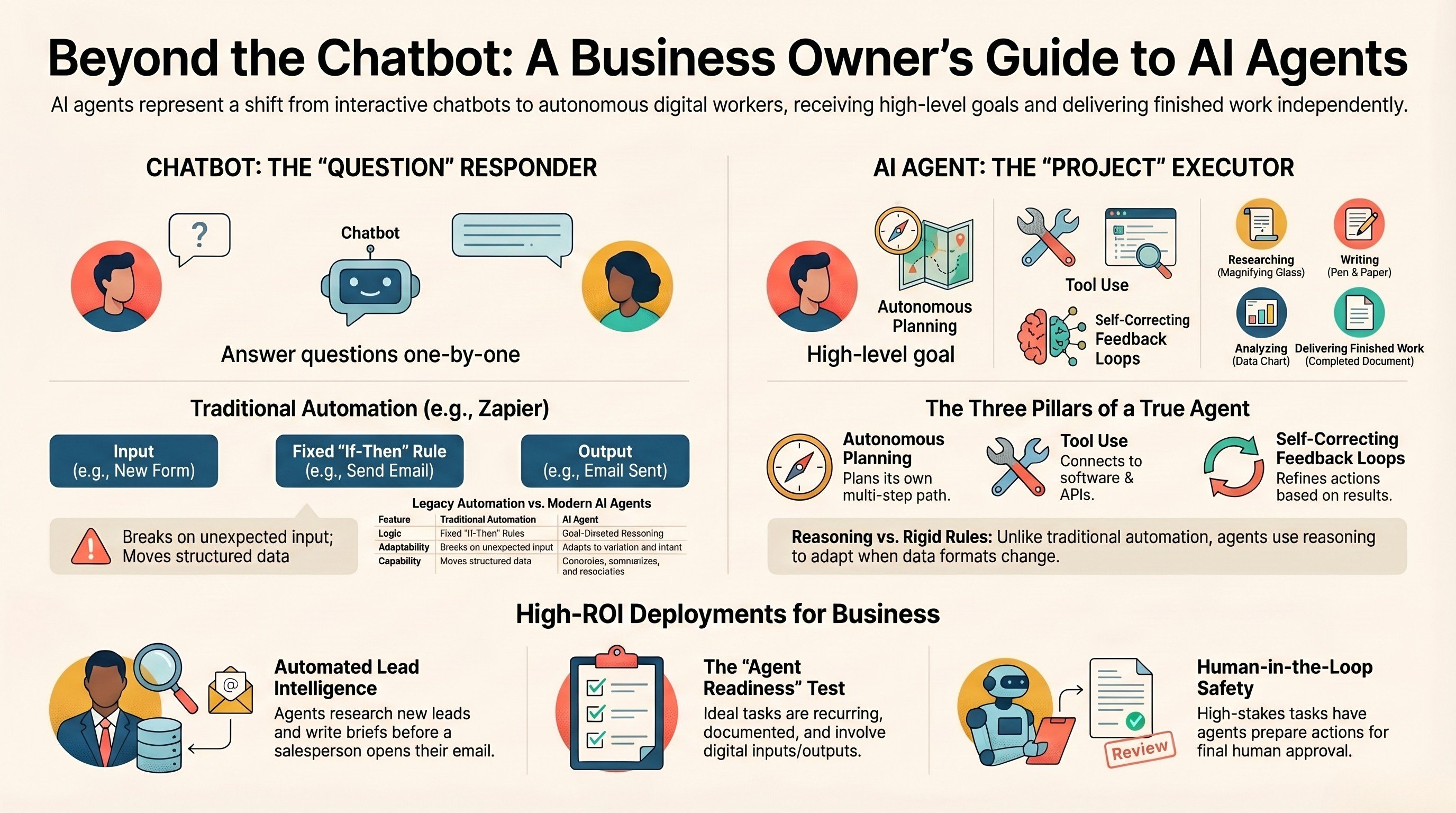
What is an AI agent? A guide for business owners
The plain-English version of what an agent is, and where it pays off for a technical team.
Read the guide →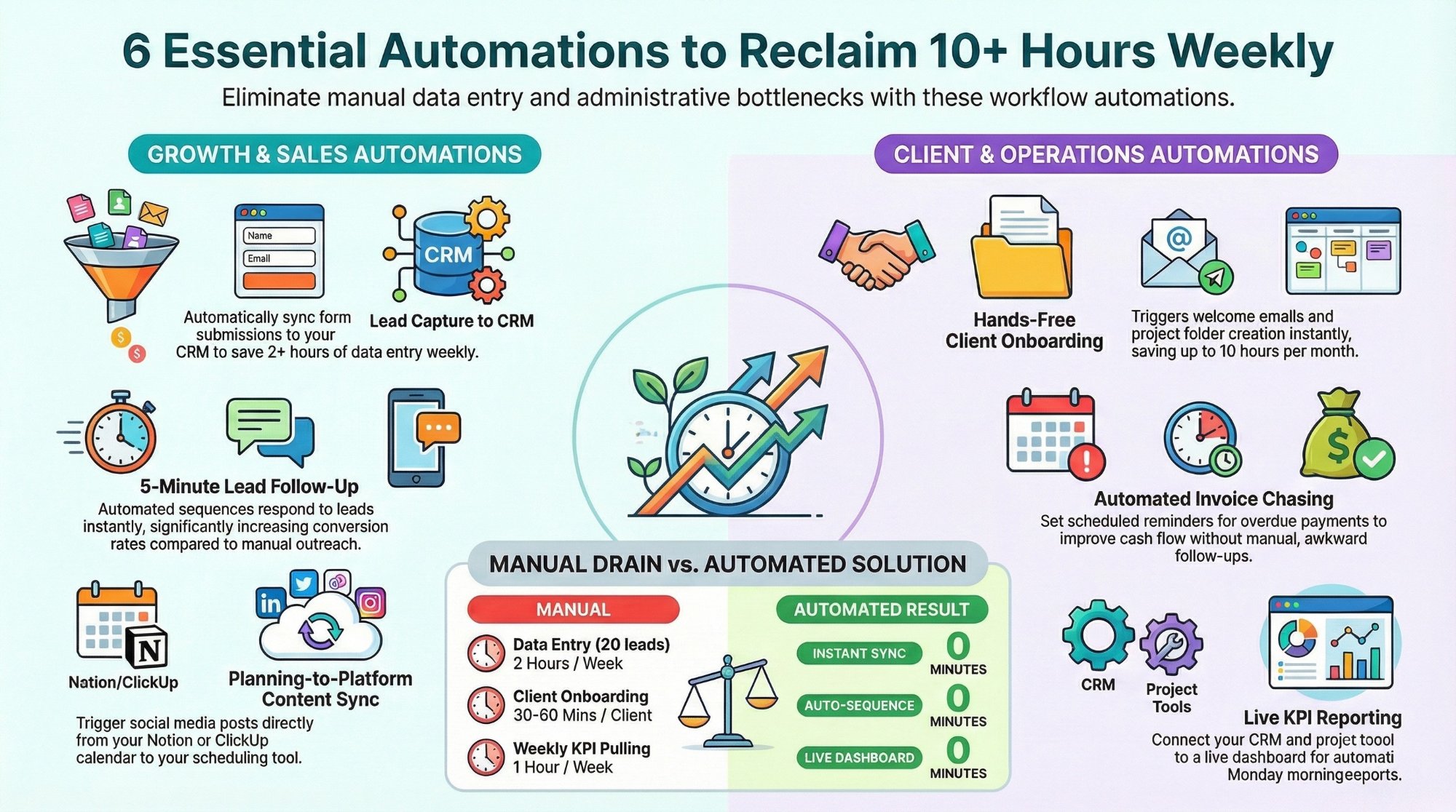
Workflow automations every business owner must set up
The starter automations that reclaim 10+ hours a week with Make, n8n, and Zapier.
Read the playbook →
The AI Engineering stage, built for you
Production AI agents and automation wired into your stack, designed, built, and handed over.
See the offer →Want your automation stack built for you?
Book a free 30-minute strategy call. We will map your highest-ROI workflows and give you a build roadmap on the spot. If we are not the right team for you, we will say so and point you somewhere better.
Book a Free Strategy Call →Free 30-minute call. Honest take, even if that means "you do not need us yet."