The right tools for a resilient and efficient business
Most businesses are not failing despite their tools. They are failing because of them. Here is the framework that fixes it.
 By Ishan Vats · Founder of IV Consulting · 150+ ops transformations over 10+ years
Some links below are affiliate links. If you buy through them we may earn a commission, at no extra cost to you.
 Work coordinationClickUp
 Knowledge + reportingNotion source of truth
 CRMPipedrive
 DeliveryMonday
 IntegrationMake
You build a resilient and efficient business with the right tools by deliberately selecting, implementing, and governing software that fits your team's actual workflows. The right tools are not the newest or the most featured. They are the ones that score well on Scalability, Continuity, Integration, and Return on Friction, the SCIR framework. Get fit right across five core categories and you remove the daily friction that quietly taxes every growth stage.
The real problem
The problem is not that you need more tools
There is a specific kind of operational exhaustion that afflicts businesses between 15 and 50 people. It looks like a people problem. It presents as a communication problem. Leadership often calls it a culture problem. But when you trace it back far enough, it almost always has the same root cause: the wrong tools embedded in the wrong workflows, creating friction that nobody has specifically identified and no one has been given the mandate to fix.
Your project manager is maintaining status in three different places because the project tool, the client tool, and the leadership dashboard do not talk to each other. Your account manager is re-entering the same data in the CRM and the delivery platform because there is no integration between them. Your operations lead is spending 90 minutes every Monday compiling a weekly report from five different sources because there is no single source of truth.
None of these people are inefficient. The tools are the wrong fit. And wrong-fit tools do not just slow a business down. They drain the energy, attention, and motivation of the people who have to work around them every single day.
What "the right tools" actually means
The right tools are the specific set of software and operational systems that match the actual workflow patterns of your team, integrate with each other to eliminate manual data transfer, scale with your business without forcing a platform change at every growth stage, have documented backup options in case of outage or vendor failure, and deliver a measurable return on the time and money invested in them.
Notice what that excludes. It is not about having the most tools, the most features, or the tools your competitors use. It is about fit. A best-in-class project platform running in a business whose team has never been trained on it, and that stores tasks they also keep in email, is the wrong tool. A simple shared sheet that every team member maintains consistently, feeding a reliable weekly report, is the better tool for that business. Because it fits.
The hidden cost
Why wrong-fit tools get more expensive the longer you keep them
Workarounds do not eliminate the cost of wrong-fit tools. They obscure it, distributing it across hundreds of micro-inefficiencies absorbed by people too busy firefighting to flag the root cause. And it compounds.
The sunk cost trap
IV Consulting consistently finds that businesses hold onto wrong-fit tools for 6 to 18 months longer than is rational, because of sunk cost reasoning. We have already spent the implementation time. We have already trained the team. We have built workflows around this tool. The cost of switching feels larger than the cost of staying.
This is economically backwards. The implementation time is gone whether you switch or not. The only relevant question is what keeping this wrong-fit tool costs per month going forward, versus what switching to a right-fit tool costs. Done honestly, the wrong tool almost always costs more to keep than to replace, because the cost of the wrong tool is hidden in daily friction and the cost of replacement is visible as a one-time project.
The scaling multiplier
Wrong-fit tools are not a static problem. They are a scaling problem. A tool that creates 20 minutes of avoidable friction per day for a team of 10 creates 3.3 hours of friction. The same tool at 30 people creates 10 hours. At 50 people, 16.7 hours. The friction scales with headcount. The tool cost stays flat. The ratio between what the tool costs to run and what it costs in absorbed friction gets worse with every hire.
This is why the most significant tool-related costs are discovered in businesses that have grown past 20 people without auditing their stack. The wrong tools they adopted at 8 people are now running, unchanged, at 28 people, creating operational drag that is orders of magnitude larger than when they were first adopted, but that has been normalised as just how things work here.
The resilience deficit
Right-fit tools are designed for the operational context they are used in. Wrong-fit tools are forced into a context they were not built for. Under normal conditions, this creates manageable friction. Under pressure, a client crisis, a sudden growth surge, a team member departure, an unexpected disruption, it creates operational failure. Wrong-fit tools are resilience deficits waiting to reveal themselves at the worst possible moment.
The framework
The SCIR framework for selecting the right tools
After 150+ business transformations, IV Consulting has distilled tool selection to four criteria that consistently predict whether a tool creates resilience and efficiency, or becomes another source of friction: Scalability, Continuity, Integration, and Return on Friction.
S, Scalability: does this tool grow with you or force a rebuild?
Will this tool still be the right fit when your team is 2x its current size? Not just technically capable of more users, but actually fit for the operational complexity, workflow volume, and coordination requirements of a larger team? The test has three parts: user and volume scalability (does pricing and feature set stay appropriate as workload doubles?), complexity scalability (can it handle the multi-team, multi-project coordination of a larger group?), and permission and governance scalability (does it support role-based access, audit trails, and admin oversight?). A tool everyone has full admin access to is a governance risk at 30+ people.
C, Continuity: what happens if this tool disappears?
If this tool became unavailable tomorrow, outage, vendor shutdown, pricing change, account suspension, what happens to your operations? Can you continue to deliver for clients? Can you access your data? Continuity-aware selection does not mean avoiding cloud tools. It means selecting tools where your critical data is exportable in a usable format, the vendor has demonstrable stability, you have identified a viable fallback before building deep workflows, and the tool is not the only place mission-critical operational information lives. A tool that passes every other criterion but fails continuity is a business risk dressed as a productivity gain.
I, Integration: does this tool connect or create silos?
Every point of manual data transfer is an error opportunity, a time cost, and a resilience gap. Right-fit tools reduce these points. Wrong-fit tools add them. Ask: does this tool have a native integration with the 2 to 3 tools it will most frequently exchange data with? If not, does it support API connections via middleware like Zapier or Make that your team can manage? Can data be exported in standard formats? Is there a documented integration architecture, or are you assuming the connections will work?
The last question matters most. A majority of integration failures result not from missing integrations, but from integrations that were assumed to exist and never set up, or set up by a team member who has since left and never documented.
R, Return on Friction: is the value worth the adoption cost?
Every new tool creates adoption friction: learning curve, workflow adjustment, integration setup, team training, documentation updates. The Return on Friction criterion asks whether the value this tool delivers exceeds the adoption cost and the ongoing cognitive overhead of one more system in the stack. The calculation is not just financial. A tool that saves on subscription fees but adds 4 hours per week of team friction is costing human capital to save SaaS fees. When that happens, the right decision is to pay the higher subscription and eliminate the friction.
The coverage map
The 5 essential tool categories
A resilient, efficient business needs its operational infrastructure covered across five distinct functional domains. The right choice in each is business-specific. What matters is that each category is deliberately covered.
1. Work coordination and project delivery
How work is planned, tracked, assigned, prioritised, and delivered, in tools like ClickUp, Monday, or Asana. For most businesses this is the single most important category, because it sits between a client commitment and its fulfilment. Right-fit means visibility at team and leadership level, clear ownership for every item, and status updated by the people doing the work, not curated by an ops lead.
2. Client relationship and revenue
The CRM layer, in tools like Pipedrive or HubSpot, that tracks pipeline, contracts, and account health. A simpler CRM that every account manager updates consistently is worth 10 times a sophisticated one nobody maintains. Complexity kills CRM adoption.
3. Communication and knowledge
Synchronous chat in Slack, async documentation, and an institutional knowledge base, often a Notion workspace, that preserves knowledge beyond any individual's tenure. Businesses where knowledge lives in people's heads are one resignation away from a crisis.
4. Financial operations and reporting
Invoicing, expenses, and financial reporting, in tools like QuickBooks or Xero. This category has the highest cost of wrong-fit and the highest vendor-lock risk. Accuracy and auditability come above all else, and vendor stability should be evaluated rigorously before commitment.
5. Data, reporting, and operational intelligence
The layer that aggregates data from across the stack into a leadership view. For most businesses under 40 people this is a well-designed dashboard, not a heavy BI platform. The common gap: excellent data in individual tools, but nothing connecting it into one operational picture.
The pre-purchase test
6 questions to ask before adopting any tool
Recommendations, demos, pricing comparisons, and gut feeling do not reliably predict fit. These six questions do. A tool that cannot be answered confidently across all six is not ready to be adopted.
| Evaluation question | What a poor answer looks like |
|---|---|
| What specific workflow problem does this tool solve, and how does it solve it better than what we have? | Answer is feature-based (it has X and Y) rather than workflow-specific (it solves the handoff gap between A and B) |
| Who on our team will use this daily, and have we confirmed it fits how they actually work? | Decision made by leadership without input from the daily users who will maintain it |
| How does this tool connect to the 2 to 3 other tools it needs to exchange data with? | Answer is assumed, not tested, or relies on an integration never verified for your use case |
| What is the realistic total cost of adoption including setup, training, and workflow migration? | Analysis limited to subscription cost; implementation time and adoption cost not factored in |
| What happens to our operations and data if this tool becomes unavailable or the vendor changes terms? | No answer; continuity implications have not been considered before adoption |
| What does success look like at 90 days, and how will we measure it? | No defined success metrics; adoption judged by subjective sentiment rather than measurable impact |
Running this evaluation before every significant tool decision takes 30 minutes and prevents the kind of expensive wrong-fit adoption that costs months to reverse.
The implementation trap
Why good tools fail in bad environments
The most expensive mistake in tool adoption is not choosing the wrong tool. It is choosing the right tool and deploying it into an environment that was never prepared to receive it. The trap operates through three mechanisms.
Deploying the tool without defining the workflow first
Tools do not create workflows. They support workflows that already exist or have been deliberately designed. Deploy a new project tool without first defining what a project lifecycle looks like, who owns each stage, and what a completed handoff requires, and you get the same broken workflow running in a more expensive platform.
The fix: before deploying any new work coordination or client management tool, document the actual current workflow with its gaps identified. Redesign the workflow to eliminate those gaps. Then configure the tool to support the redesigned workflow. The tool is the last step, not the first.
Training on features instead of use cases
The default approach is feature walkthroughs: here is what this button does, here is what this view shows. This produces teams that understand capabilities abstractly and cannot apply them to their actual work. The result is low adoption, not because the team is unwilling, but because the connection between features and daily tasks was never made explicit.
Right-fit training focuses on use cases: here is how you update a project status, here is how you hand off to the next team, here is what you do when a task is blocked. It takes the same time as a feature walkthrough and produces dramatically higher adoption, because it answers the only question the daily user cares about: how do I do my job with this tool?
No defined success criteria or review checkpoint
A tool deployed without defined success criteria is judged by subjective impression rather than operational impact. Define success before deployment: what specific metric will improve, by how much, measured how, by when? Set a 30-day check-in and a 90-day review.
If the tool is not delivering the defined improvement at 90 days, you have enough information to decide whether it needs configuration, the workflow needs redesign, or the decision needs reconsidering. Without this, wrong-fit tools persist for years because nobody has the data to make the case for change. This is also why a quarterly tool review, 15 minutes per tool, four times a year, prevents the accumulation of wrong-fit legacy tools. If you want this governance built and run with you, that is what our Automation stage delivers.
Proof
How a 26-person firm recovered 19 hours per week
A 26-person management consulting firm with strong client relationships was struggling to grow. Senior consultants were consistently overloaded. Junior consultants were frequently idle or under-directed. Project delivery timelines were slipping an average of 12 days per engagement. Leadership suspected a resourcing problem. IV Consulting was engaged to assess operational health.
The diagnostic revealed the resourcing problem was real but secondary. The primary issue was a tool stack assembled over five years with no strategic intent: client data lived in 3 different places, project status was maintained in both the project tool and a separate spreadsheet considered the real source of truth, consultants spent an average of 2.3 hours per day on administrative coordination rather than billable work, and the leadership team's weekly reporting took 4 hours to compile from 6 different data sources.
The SCIR evaluation of the existing stack
- Scalability: the project tool was built for software teams and was a poor fit for consulting delivery. Extensive workarounds slowed every new project kickoff.
- Continuity: the primary client database was maintained in a tool owned by one senior partner, with no backup or export protocol. If that partner had left, the client history would have left too.
- Integration: there were 0 automated integrations between the CRM, the project tool, and the financial platform. All data movement was manual, consuming 7 hours per week of senior operational capacity.
- Return on Friction: two tools were paying for enterprise features the 26-person team had never used.
| Tool category | Change made |
|---|---|
| Work coordination | Replaced dev-focused PM tool with a consulting-native delivery platform. Eliminated the parallel spreadsheet by designing the workflow directly into the new tool. |
| Client relationship | Migrated client data to a shared CRM with role-based access. Established data ownership protocols and automated export backups. |
| Communication / knowledge | Built a structured Notion knowledge base with engagement templates, consultant playbooks, and client onboarding documentation. |
| Financial operations | Retained the existing financial tool (right fit, well-adopted) but built an automated CRM-to-invoicing integration, eliminating 4 hours/week of manual billing prep. |
| Operational reporting | Built a unified leadership dashboard pulling from all 4 primary tools. Eliminated the 4-hour weekly manual report compilation. |
| Metric at 90 days | Result |
|---|---|
| Weekly team hours recovered | 19 hours/week across the consulting team |
| Average project delivery slip | 12 days to 3 days, a 75% reduction |
| Client delivery quality scores | +41% improvement at the 90-day review |
| Weekly leadership reporting time | 4 hours to 25 minutes via automated dashboard |
| Single points of failure in client data | Reduced from 3 to 0 |
The 19 hours per week of recovered capacity was reallocated to billable consulting work. The tool rebuild cost less than one month of that recovered revenue in combined consulting fees and implementation time. The firm did not invent a new service, hire more senior talent, or change its market. It replaced wrong-fit tools with right-fit tools and built the governance to keep them right.
FAQ
Questions businesses ask before they fix their stack
What are the right tools for a small business to be efficient?
How do I know if my current business tools are the wrong fit?
What is the SCIR framework for tool selection?
How do I get my team to actually adopt a new business tool?
How do right tools contribute to business resilience?
How often should I review my business tools?
Ishan Vats
Founder, IV Consulting · operations & systems consultant
I build operating systems and automations for teams from startup to enterprise. 150+ ops transformations over 10+ years. If you want yours mapped and built right, I'll do it with you on a free call.
Book a free strategy call →Keep reading
Related guides and work
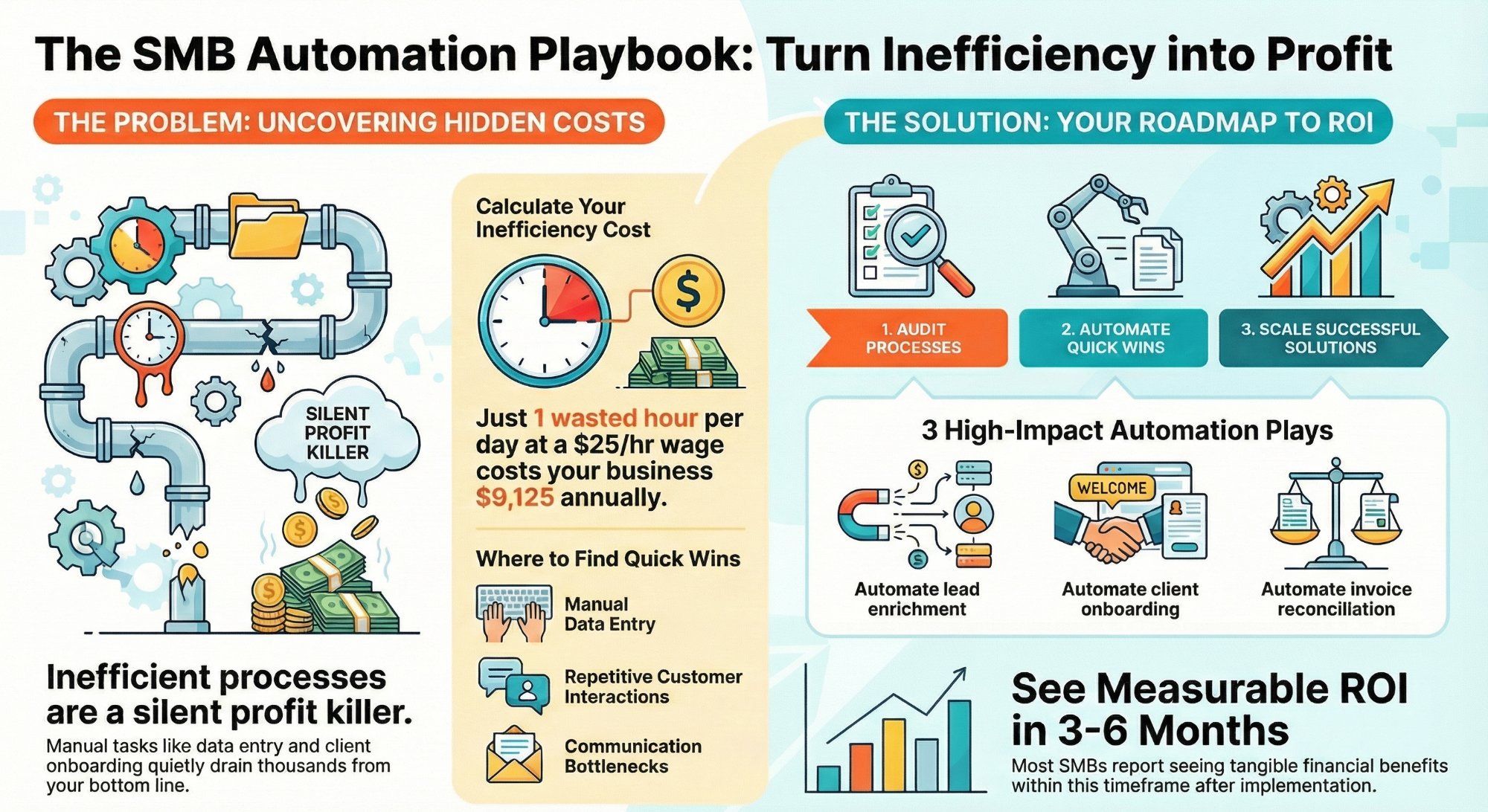
How much are inefficient processes costing your SMB?
Put a number on the friction tax, then see exactly where to fix it fast.
Read the guide →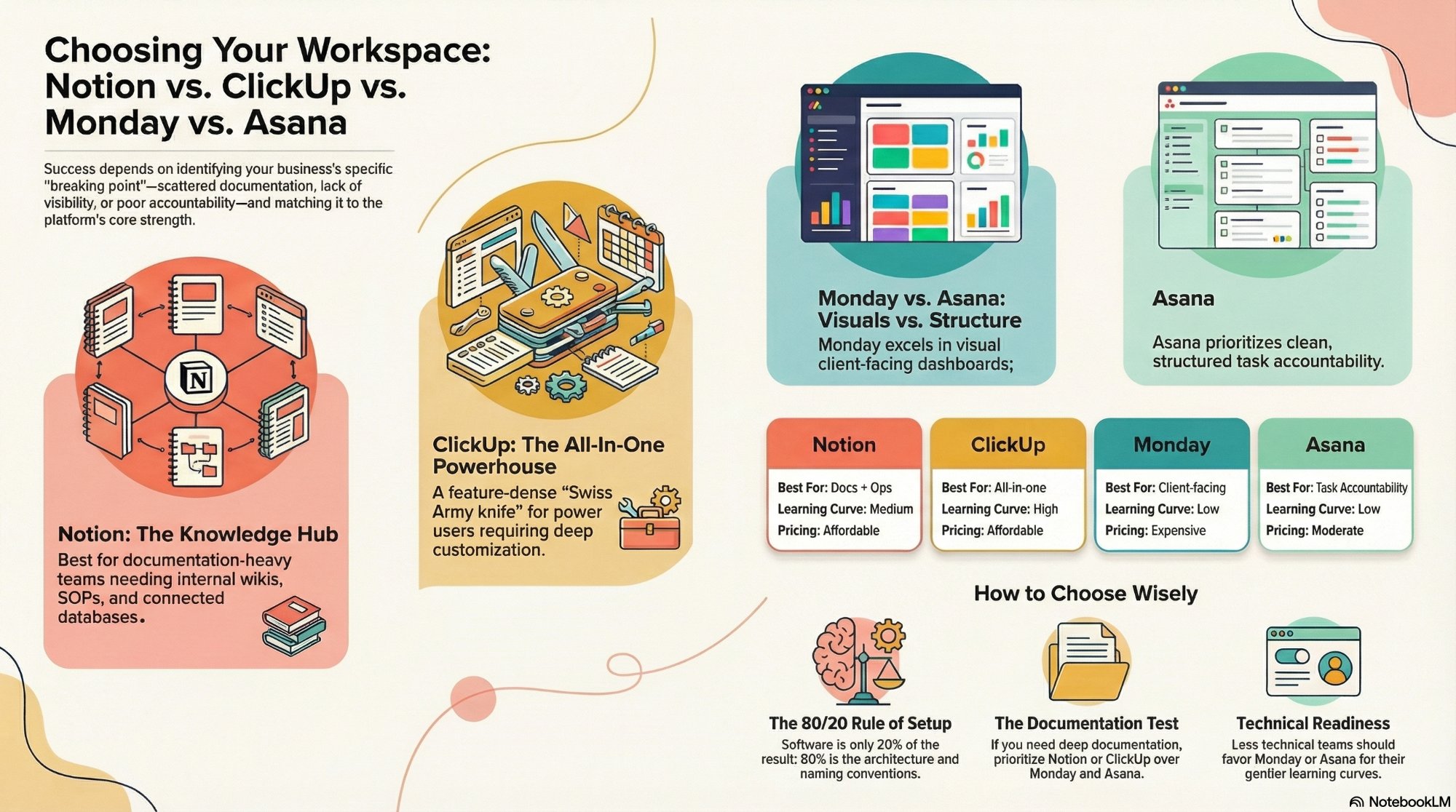
Notion vs ClickUp vs Monday vs Asana
A fit-first breakdown of the four work coordination tools most teams choose between.
Read the comparison →
The Foundation stage, built for you
Your right-fit stack selected, configured, and adopted, with the governance to keep it right.
See the offer →Want your automation stack built for you?
Book a free 30-minute strategy call. We will map your highest-ROI workflows and give you a build roadmap on the spot. If we are not the right team for you, we will say so and point you somewhere better.
Book a Free Strategy Call →Free 30-minute call. Honest take, even if that means "you do not need us yet."