How to build a Notion CRM: the exact 4-database setup we ship to clients
Most Notion CRMs die in week two. This is the build that survives, field for field: four linked databases, thirty-six fields, five views, one weekly ritual.
 By Ishan Vats · Certified Notion Consultant · builds Notion systems for 150+ teams
Some links below are affiliate links. If you buy through them we may earn a commission, at no extra cost to you.
 Hub · Notion4 linked databases
 SlackNew lead ping
 MakeStale deal alert
 PipedriveIf you outgrow it
Build your CRM in Notion only if you are 2 to 8 people, under roughly 2,000 contacts, and selling by relationship rather than volume. Inside that band Notion beats a real CRM, because the pipeline sits next to the delivery work instead of in a tab nobody opens. Outside it, Notion loses and you should move. The build we ship is four linked databases (Contacts, Companies, Deals, Activities), thirty-six fields in total and not one more, five views, and a 15 minute Monday review. The review is the part that decides the outcome: skip it and the CRM is a ghost town inside a month, whatever the architecture looks like.
The pain you know
Why do most Notion CRMs get abandoned in week two?
You built one before. Maybe it was in Notion. Maybe it was a spreadsheet that grew too complex, or a CRM tool that cost too much and got used by nobody. You put in the work: the columns, the tags, the pipeline stages. You showed the team. Everyone nodded.
Two weeks later, half the contacts were missing their last-touch date. Four deals had been stuck in Proposal Sent for six weeks. And when you asked the team why they stopped updating it, the answer was always some version of the same thing: it takes too long, or I was not sure what to fill in.
The cause is almost never Notion itself. It is one of four structural mistakes.
Mistake 1: too many fields
The builder adds every field they can imagine: industry, company size, lead source, referral partner, deal value, close probability, next action, last contact, and a dozen others. The team opens a contact record, sees 22 empty fields, closes it, and goes back to their inbox. A usable CRM has ten fields per database at most. Every field not checked weekly should be removed or moved to a secondary view.
Mistake 2: no clear update trigger
In a well-run CRM the team knows exactly when to open it: after a call, after sending a proposal, after a deal closes. With no trigger, updating the CRM becomes optional. Optional means it does not happen.
Mistake 3: built for the founder, not the team
The person who builds the CRM is usually the most organised person in the room. They design it for how they would use it, not for how a sales rep, an account manager, or a freelance contractor with three other clients would use it. The result is a system that only makes sense if you built it.
Mistake 4: no maintenance ritual
Even a perfectly built CRM degrades without a weekly review. Contacts go stale. Deals sit in the wrong stage. Without a 15 minute weekly ritual baked into someone's calendar, entropy wins every time.
The architecture
What are the four databases a Notion CRM needs?
A functional Notion CRM is not one database. It is four linked databases that talk to each other. The connections are what make it intelligent.
| Database | What it stores | Why it exists separately |
|---|---|---|
| Contacts | Individual people: leads, clients, prospects, partners | The core record every other database links back to |
| Companies | Organisations those people belong to | Critical for B2B: the account relationship outlives any one contact |
| Deals | Active opportunities with stage, value, and close date | Your pipeline, built for speed of update and scanning |
| Activities | Every logged interaction: calls, emails, meetings, proposals | The history that stops the CRM feeling hollow after a few weeks |
The reason these are four separate databases rather than one big spreadsheet is relations. Notion's own documentation describes relations and rollups as the way to connect the data between two tables and aggregate it across those connections, which is exactly the behaviour a CRM lives on. When a Deal links to a Contact, and that Contact links to a Company, you can answer questions like show me all open deals where the last activity was more than 14 days ago, in one filtered view, in three seconds. You cannot do that in a spreadsheet.
Think of it this way: a spreadsheet is a flat filing cabinet where every drawer is independent. A relational database is an org chart. Every person knows who they report to, which team they are on, and which projects they own. The CRM only becomes intelligent when the connections exist.
The exact fields we ship, database by database
This is the field list we hand over on a client build, and it is deliberately short. Thirty-six fields across four databases, nothing else. Every field below survived the same test: somebody looks at it at least once a week, or it goes. The right-hand column is the field teams most often leave out or fill in badly, which is usually the one that decides whether the CRM is worth opening.
| Database | The exact fields we ship | The one that decides whether it gets used |
|---|---|---|
| Contacts 10 FIELDS | Full Name, Company (relation), Role, Email, Phone, Lead Status, Owner, Last Activity Date, Linked Deals, Notes | Last Activity Date. Without it there is no Contacts to Follow Up view, and follow-up goes back to being a memory exercise. |
| Companies 8 FIELDS | Company Name, Industry, Company Size, Account Status, Account Owner, Website, Contacts (rollup), Total Deal Value (rollup) | Account Status. It is the field that stops a two-year client getting cold outreach from someone who joined last month. |
| Deals 10 FIELDS | Deal Name, Contact, Company, Stage, Deal Value, Expected Close Date, Deal Owner, Probability, Last Activity Date, Close Reason | Close Reason. Almost nobody fills it in, and it is the only field in the whole system that tells you why you lose. |
| Activities 8 FIELDS | Activity Title, Type, Date, Contact, Deal, Owner, Summary, Next Step | Next Step. Written as an owned, dated sentence. "Follow up" is not a next step and never becomes one. |
If you are looking at that list and reaching for an extra field, the honest answer is that you probably do not need it yet. Every field we have ever cut from a client build was added on day one for a report nobody ended up running. Fields are cheap to add later and expensive to carry, because each one is another blank box a rep has to decide about at the exact moment they are least patient.
The build
How do you build a Notion CRM, week by week?
Do not try to build all four databases in one afternoon. Build in order, validate each layer, then add the next. The pace matches the team's readiness to adopt it.
Week 1: Contacts and Companies
Start with Contacts. Keep it to ten fields, no more: Full Name, Company (relation), Role, Email, Phone, Lead Status, Owner, Last Activity Date, Linked Deals, and a lightweight Notes field. Full history lives in Activities later; Notes here is just context.
For B2B teams, the Companies database is non-negotiable. When a contact leaves their company you still hold the account relationship, and when a new contact joins you can link them without rebuilding context. Add Industry, Company Size, Account Status, Account Owner, a Contacts rollup, a Total Deal Value rollup, and Website. Import your existing contacts and set up the Needs Follow-Up view immediately.
Week 2: Deals (your pipeline)
The Deals database is the one your team looks at most, so build it for speed. Fields: Deal Name, Contact, Company, Stage, Deal Value, Expected Close Date, Deal Owner, Probability, Last Activity Date, and Close Reason.
Create a Board view grouped by Stage, filtered to hide Closed Won and Closed Lost, sorted by Expected Close Date ascending, with Deal Value, Contact, and Last Activity Date shown on each card. This is the pipeline board your team opens every morning. Add a Table view sorted by Last Activity Date ascending to surface deals that have gone quiet.
Week 3: Activities (the log everyone skips)
The Activities database is why most Notion CRMs feel hollow after a few weeks. Without a proper log you have a snapshot of current state and no context about how you got there. Log every meaningful touchpoint: calls, emails, meetings, proposals, check-ins. Two to three sentences is enough.
Fields: Activity Title, Type, Date, Contact, Deal, Owner, Summary, and Next Step. The Next Step field is the most important in the whole CRM. Not follow up, which means nothing, but Send revised proposal to James by Thursday. Specific, owned, dated. Build a Notion template with Summary and Next Step pre-populated so reps know exactly what to fill in.
Week 4: Connect relations and rollups
Now wire the four databases together. Contacts links to Companies, Deals, and Activities. Companies gets a rollup counting linked Contacts and a rollup summing Deal Value. Deals links to Activities and gets a rollup for the date of the most recent Activity.
Once these exist, set up the five standard views and formalise the 15 minute Monday ritual in the team calendar. From Week 5, evaluate what is working, prune any fields nobody is filling, and only then consider adding automation.
The interface
Which Notion CRM views will your team actually use?
Databases are the infrastructure. Views are the interface. Most Notion CRMs have too many views, which creates decision paralysis. These five each answer one question at one moment in the week.
1. My Deals Pipeline
Board view, filtered to Owner is Me, grouped by Stage. This is the view that opens every morning. It is the single screen a rep needs during a weekly pipeline review: what is mine, where is it, and what moves next.
2. Deals Gone Cold
Table view on Deals, filter: Last Activity Date more than 14 days ago, Stage not Closed. Opens every Monday. The deals quietly dying get pulled into the light.
3. Contacts to Follow Up
Filter on Contacts: Status is Lead or Active, Last Activity Date more than 14 days ago. Opens every Monday. A name here is a reminder, not a failure.
4. This Week's Activities
Gallery or table view on Activities, filter: Date is this week. Used during the team standup so everyone sees what actually happened, not what was promised.
5. All Active Clients
Filter on Companies: Account Status is Active Client. Used for account health checks, so no client is two years deep and still getting cold outreach from a junior rep.
The part everyone skips
How do you stop a Notion CRM from being abandoned?
Building the CRM is the easy part. What makes it survive the first month is a 15 minute Monday morning ritual that becomes as non-negotiable as the team standup. Put it in the calendar, recurring, every Monday at 9am.
- Minutes 1 to 3. Open Deals Gone Cold. For every deal idle more than 14 days, either log a planned outreach activity or move it to Closed Lost if it is genuinely dead. No deal stays active without a logged next step.
- Minutes 4 to 6. Open Contacts to Follow Up. For every contact with no activity in 14+ days, log a planned touchpoint or change their status to Dormant. A dormant contact is an honest data point, not a failure.
- Minutes 7 to 10. Review the pipeline board. Check expected close dates, flag anything overdue, update the stage on any deal that moved since last Monday.
- Minutes 11 to 13. Log any activities from last week that were not entered in real time. The Monday catch-up is the safety net.
- Minutes 14 to 15. Identify the top three priority actions for the week, note them in the standup doc, and leave the CRM.
Automation: the three things worth building (later)
Once the manual ritual is stable, three automations pay immediate dividends. A new lead notification to the assigned owner via Make or Zapier, because response speed is one of the highest-impact variables in sales conversion. A deal stage change alert to the team channel when a deal moves to Closed Won, because visible wins build adoption. And a weekly stale deal reminder that filters Deals idle more than 10 days and emails the owner every Friday.
The honest verdict
When is Notion the wrong CRM, and what should you use instead?
There are scenarios where Notion is a genuinely poor CRM choice, and it is worth being honest about them before you invest time building.
- More than 5,000 contacts. Notion databases get sluggish at scale, and the first crack shows up much earlier than that: Notion documents that once a database passes 1,000 items, newly created pages may appear in the middle of the collection rather than at the end. That is survivable at 1,000 and infuriating at 5,000. Consider HubSpot Free or Pipedrive at that volume.
- You need deep email integration. Notion does not natively log emails or sync with Gmail or Outlook. If email is the primary channel and the team expects automatic tracking, the manual input will not be sustainable.
- A sales team larger than 8 people. Quota tracking, forecasting, and rep performance reporting go beyond what Notion's rollups handle cleanly. A dedicated CRM serves you better.
- You need two-way calendar sync. Notion does not natively sync meetings to Google Calendar or Outlook. If automatic meeting logging matters, this gap becomes a daily frustration.
A real example of what this looks like when it works
One IV Consulting client, a six-person operations consulting firm, came to us with a spreadsheet three people used and three people ignored. Deals fell through the gaps. A client they had served for two years got a cold outreach email from a junior team member who did not know the relationship existed. That was the moment they knew something had to change.
We built them this exact architecture: four databases, five views, the 15 minute Monday ritual, two automations. In the first four weeks, they surfaced seven prospects inactive for over 60 days, three of whom reconverted to clients that quarter after a re-engagement sequence. The team stopped asking each other where are we with that company in Slack. And the founder went from 45 minutes preparing the Friday pipeline review to 10 minutes walking the board. The CRM did not replace human judgment. It made the judgment faster, better-informed, and more consistent. A CRM kept current like this is also the cheapest source of buying signals you own, because past clients and former champions already live in it; we rank the signals worth acting on, and how fast each one goes stale, in buying signals worth acting on.
That build took four weeks of their time and ours. If you would rather not run it yourself, it is the same scope we deliver as a fixed engagement: here is what a Notion consultant actually hands over to a small business, including the field spec above, the five views, and the ritual written into someone's calendar rather than left as advice.
FAQ
Questions people ask before they build
How many databases does a Notion CRM need?
Why do most Notion CRMs get abandoned?
What is the weekly Notion CRM maintenance ritual?
How many fields should each Notion CRM database have?
When is Notion the wrong choice for a CRM?
Should I automate my Notion CRM from day one?
How long does it take to build a Notion CRM?
Is a free Notion CRM template enough, or should you build your own?
Ishan Vats
Founder, IV Consulting · Certified Notion Consultant
I build Notion CRMs and operating systems for teams from startup to enterprise, then hand them over documented. 150+ ops transformations over 10+ years. The build is rarely what breaks. What breaks is the automation bill nobody priced before switching it on.
Price my Notion AI credits →Keep reading
Related guides and work
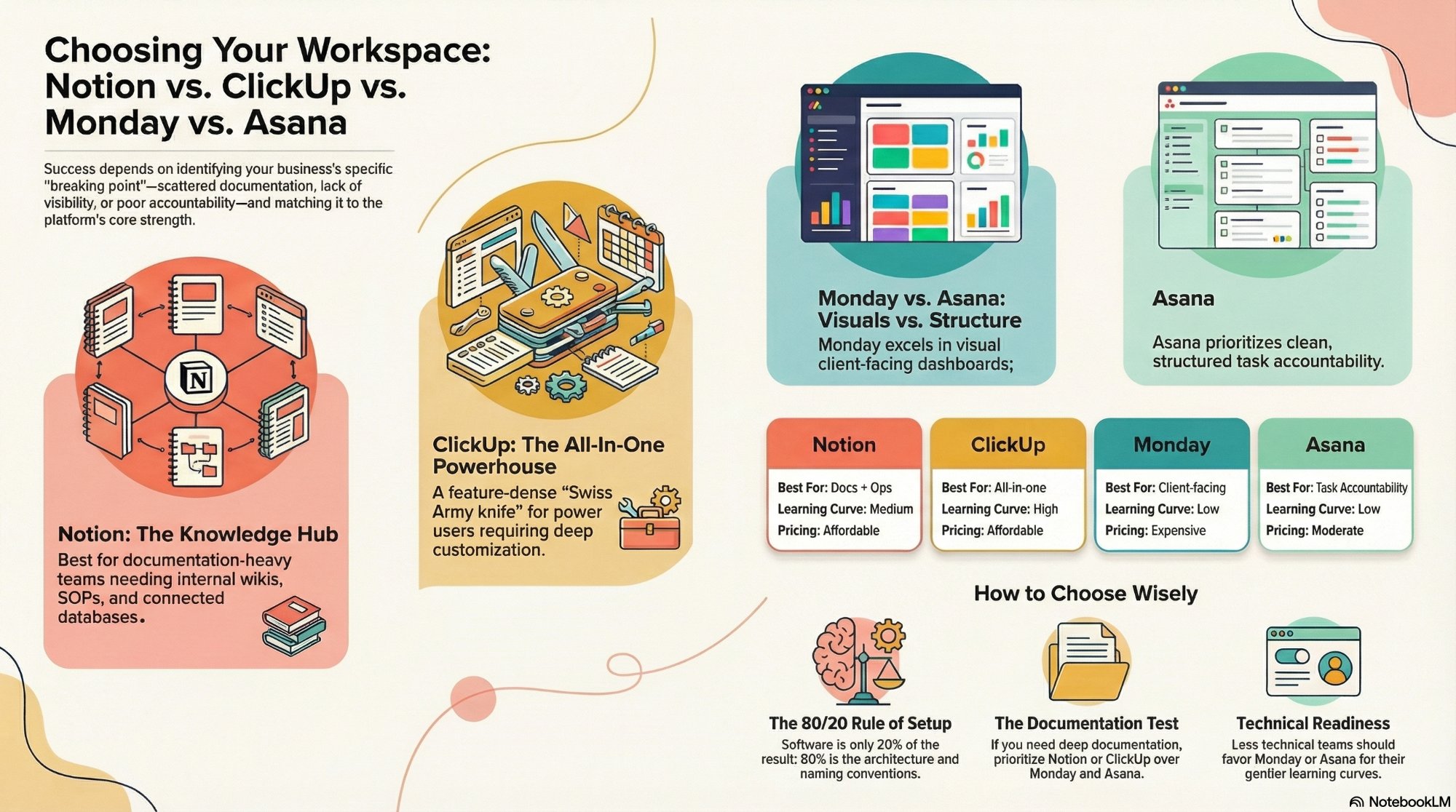
Notion vs ClickUp vs Monday vs Asana
Which workspace tool fits your team, and where each one quietly falls apart.
Read the comparison →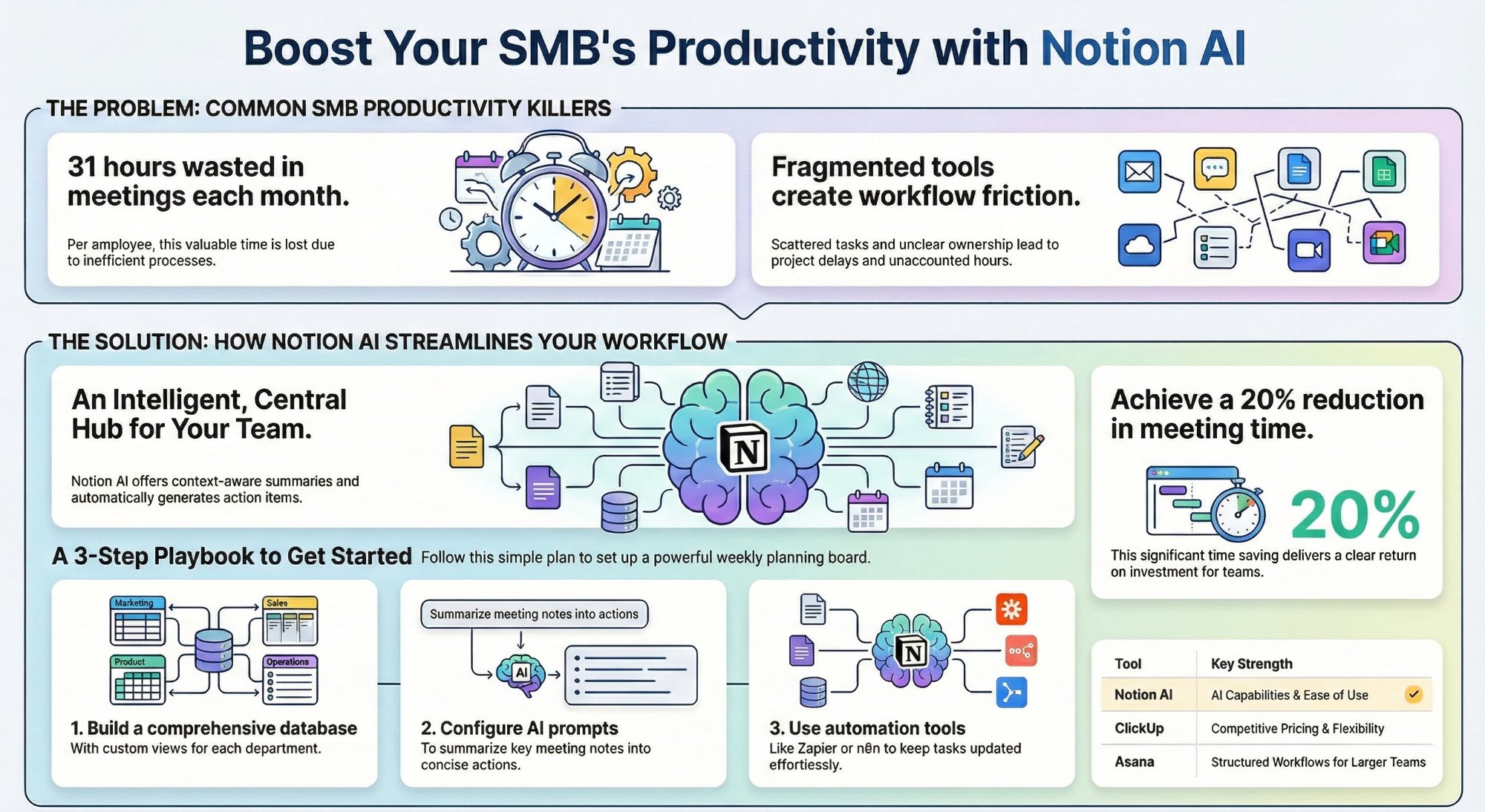
Can Notion AI and workspace views replace your PM tool?
A practical SMB playbook for pushing Notion further before you buy another tool.
Read the playbook →
The Foundation stage, built for you
Your Notion workspace and CRM designed, built, and handed over, ready to run.
See the offer →Want your Notion CRM built for you?
Book a free 30-minute strategy call. We will audit your current setup, map the three changes that make the biggest difference, and give you a build roadmap on the spot. If we are not the right team for you, we will say so and point you somewhere better.
Book a Free Strategy Call →Free 30-minute call. Honest take, even if that means "you do not need us yet."