










 Case Study
A real Workspace Architecture, not a dump-and-pray migration
How we moved SVJ Brands off Slack and Asana into one automation-driven ClickUp workspace, migrating their operations projects without losing data, owners or history.
Built by Ishan Vats — Certified Notion + ClickUp Consultant, Claude Partner Network, PMP® · 150+ clients · 10+ years
The client
About SVJ Brands
SVJ Brands is a multi-brand consumer products company that develops, manufactures and markets brands like Sauce and Bliss across 43+ US states, with expansion into Europe. Behind the brands runs a heavy operations engine: product launches, inventory and stock-out control, PO approvals in Acumatica, and cross-functional projects.
That engine was running on Slack and Asana. As the company scaled, leadership lost a single reliable view of the work, while teams drowned in notifications and duplicate tasks.

The transformation
From tool chaos to one connected operating system
Every team worked, but nothing connected, and no one had the full picture. Here's the shift we delivered.
Tool chaos across Slack & Asana
- The company ran on Slack and Asana, with no single source of truth across teams.
- Teams overlapped inside the same projects, so ownership blurred.
- Leadership had no reliable view of status, priorities or bottlenecks.
- People were buried in notifications and duplicate tasks.
- Asana has no bulk export, so the data was effectively trapped.
One ClickUp operating system
- Operations and Projects run in one connected ClickUp workspace.
- 17 projects migrated project-by-project with data integrity intact.
- A clean Spaces/Folders/Lists structure replaced the overlapping Asana setup.
- Role-specific views give leadership visibility and end notification overload.
- Automation and reporting cut the noise, ready to connect Acumatica & HubSpot.
The brief
What success looked like
- One connected ClickUp workspace, built as a long-term operating system.
- A clean architecture (Spaces, Folders, Lists, custom fields, statuses, permissions), not a 1:1 copy.
- Migrate Operations and Projects (17 projects) with data integrity: counts, owners, dates and tags.
- Role-specific views, so each person sees "their world" instead of a wall of lists.
- Automation that reduces noise, and a change-managed rollout the team actually adopts.
The approach
Workspace Architecture, not dump-and-pray
SVJ did not want their old mess copied into a new tool. We designed the destination first, then migrated into it, starting with a tested pilot so the rollout felt like an upgrade, not a disruption.

The "dump and pray" path: export everything from Asana and recreate it 1:1 in a new tool. Fast to start, but you just move the chaos, broken data, duplicate tasks and no real ownership.

Design the destination first: Spaces, Folders, Lists, fields and permissions mapped to how SVJ actually works. Then migrate into it, pilot-first and integrity-checked. A real operating system, not a relabeled task list.
- Diagnose what truly needs to move from Slack and Asana, and what "success in ClickUp" looks like.
- Migrate in a structured, pilot-first way, protecting data integrity and access control.
- Automate with ClickUp's native automations plus Make.com and AI to cut noise, not add it.
- Deploy & refine with light training and a defined stabilisation window after go-live.
The migration map
How Asana mapped into ClickUp
We mapped every Asana concept to its ClickUp home before moving anything: projects and sections became Spaces, Folders and Lists, tasks and subtasks were preserved, and custom fields were carried over and enhanced (Business Unit, Department, Priority and more), so the structure made sense instead of being copied 1:1.
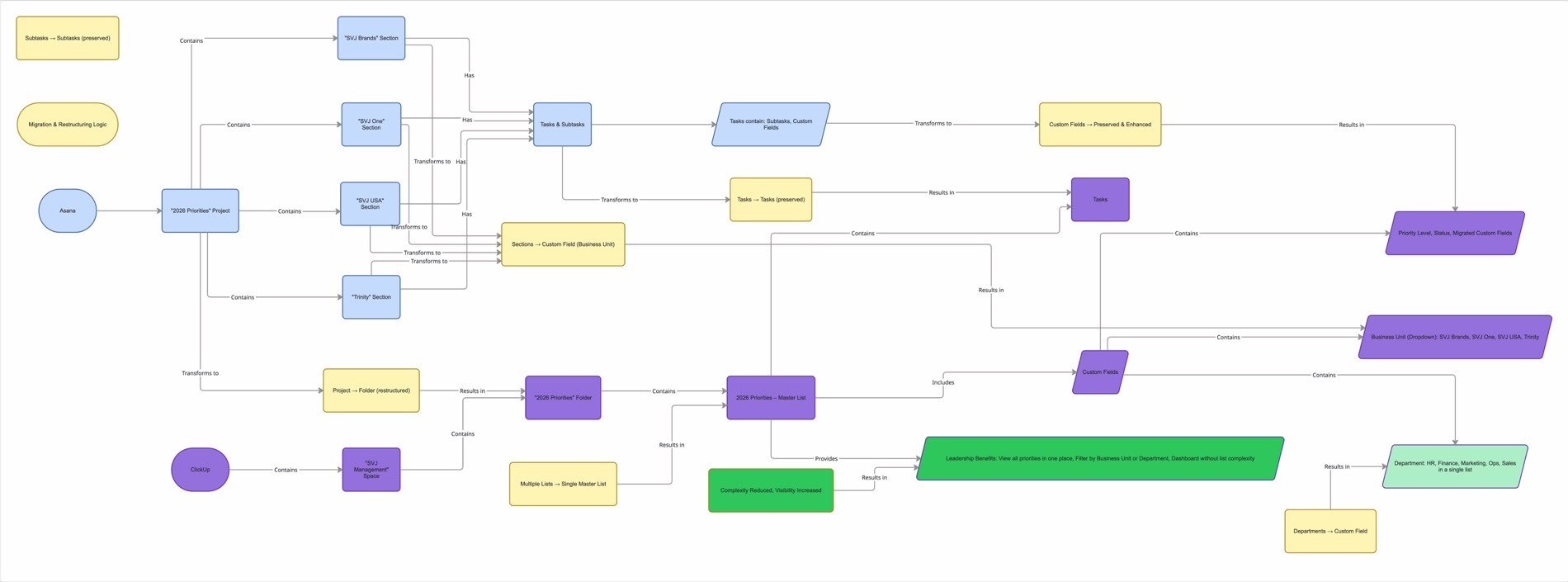
The Asana to ClickUp migration map: projects, sections, tasks and custom fields transformed into a clean ClickUp structure.
The solution
A migration done right
Architecture-first design
Spaces, Folders, Lists, custom fields, statuses and permissions mapped to how SVJ actually works, designed and approved before a single task moved. The call that makes it an operating system instead of a relabeled task list.
Integrity-checked migration
Asana has no bulk export, so each of the 17 projects was migrated project-by-project and checked for counts, owners, dates and tags. Nothing lost in the move.
Role-specific views
Each person opens ClickUp to "their world," not a wall of lists, which ends the notification overload that came with Slack and Asana.
Pilot migration
A focused, representative slice migrated and validated first, structure, views and automations, then used as the blueprint for the full rollout. The team experiences an upgrade, not a disruptive go-live.
Automation that reduces noise
ClickUp's native automations plus Make.com and AI for routing, reminders, summaries and reporting, with room to connect Acumatica and HubSpot.
Change management & stabilisation
Clear cutover dates, light training (Looms, quick-reference docs, a Q&A loop) and a defined stabilisation window after go-live, so the team adopts it.
Inside the build
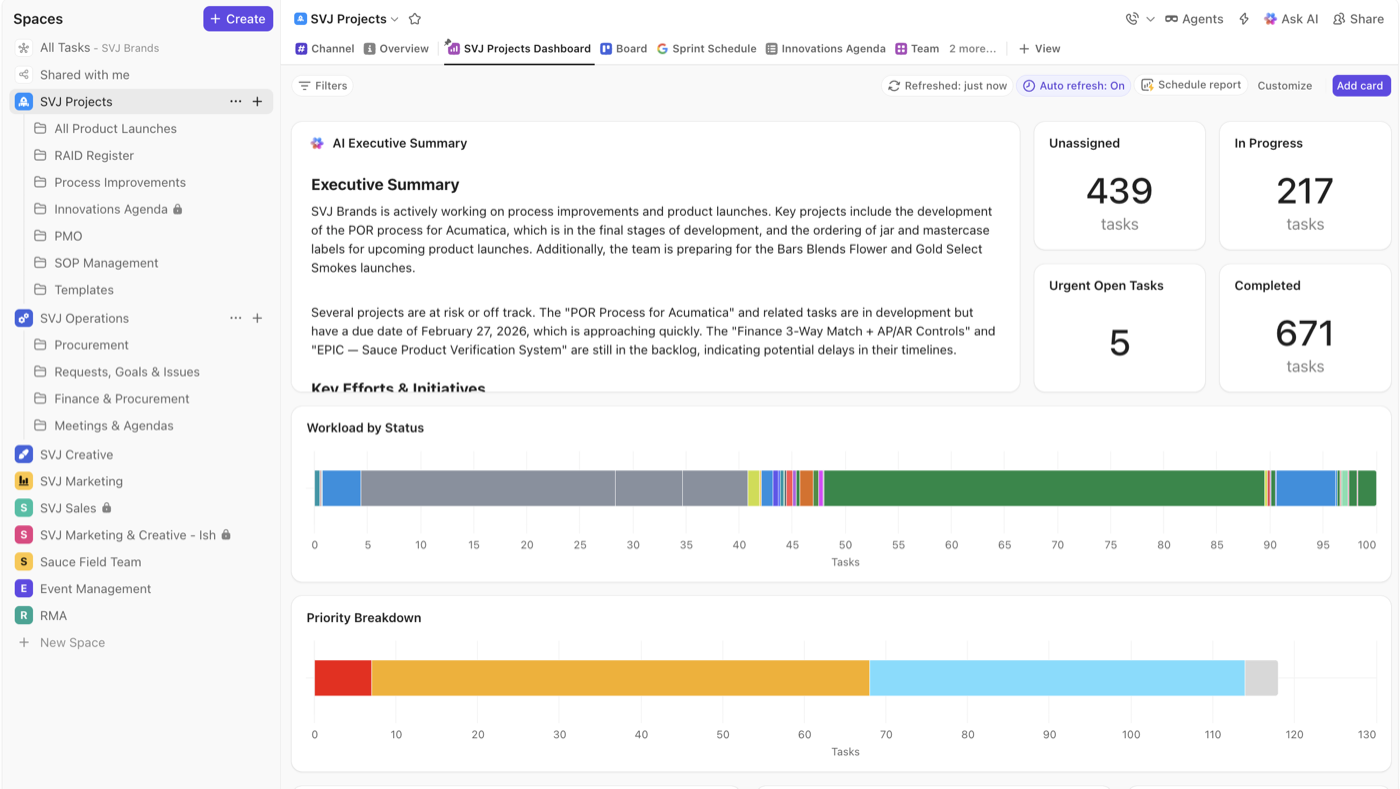 ClickUp Spaces & Folders
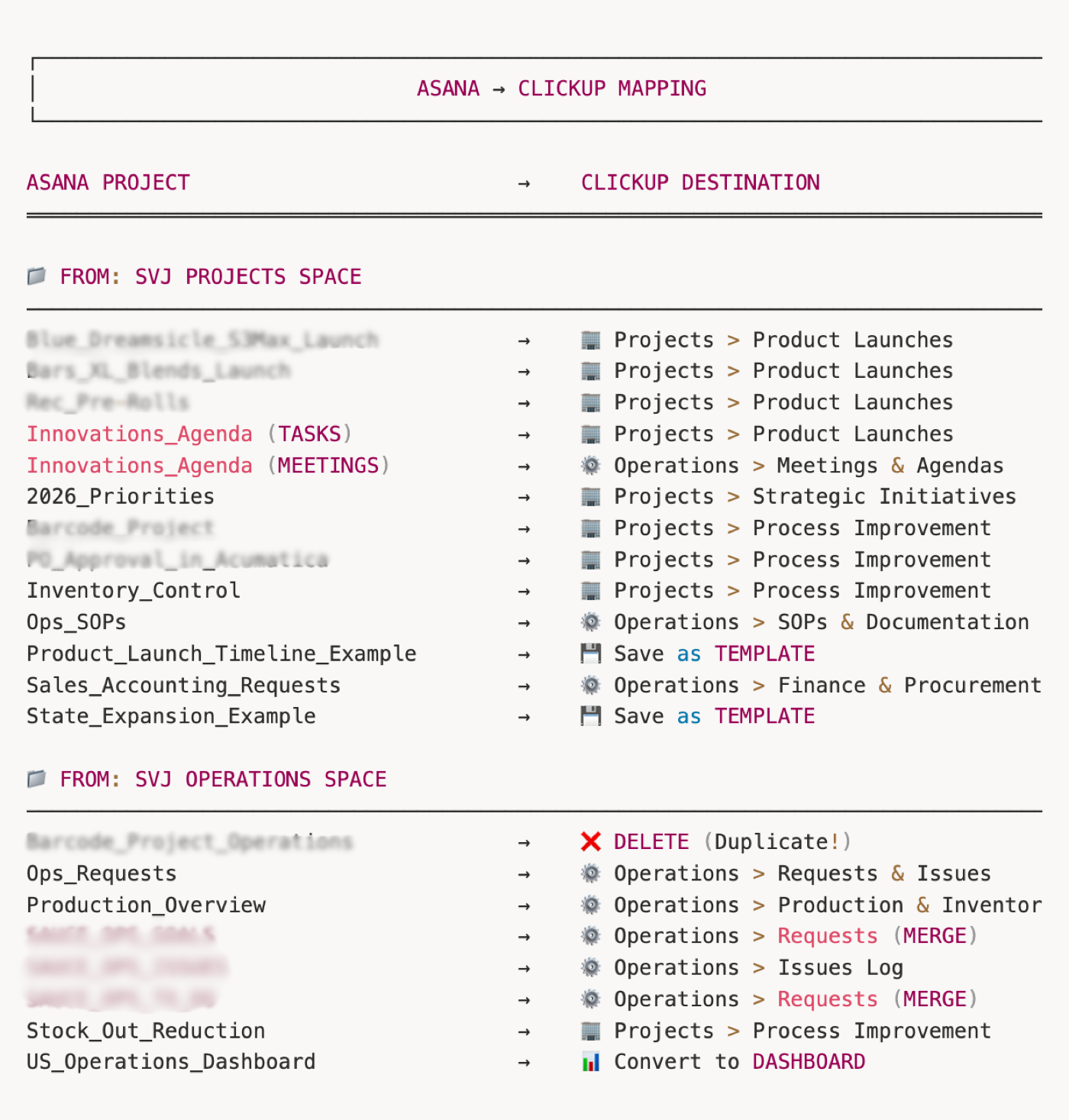 Migrated project (Lists & fields)
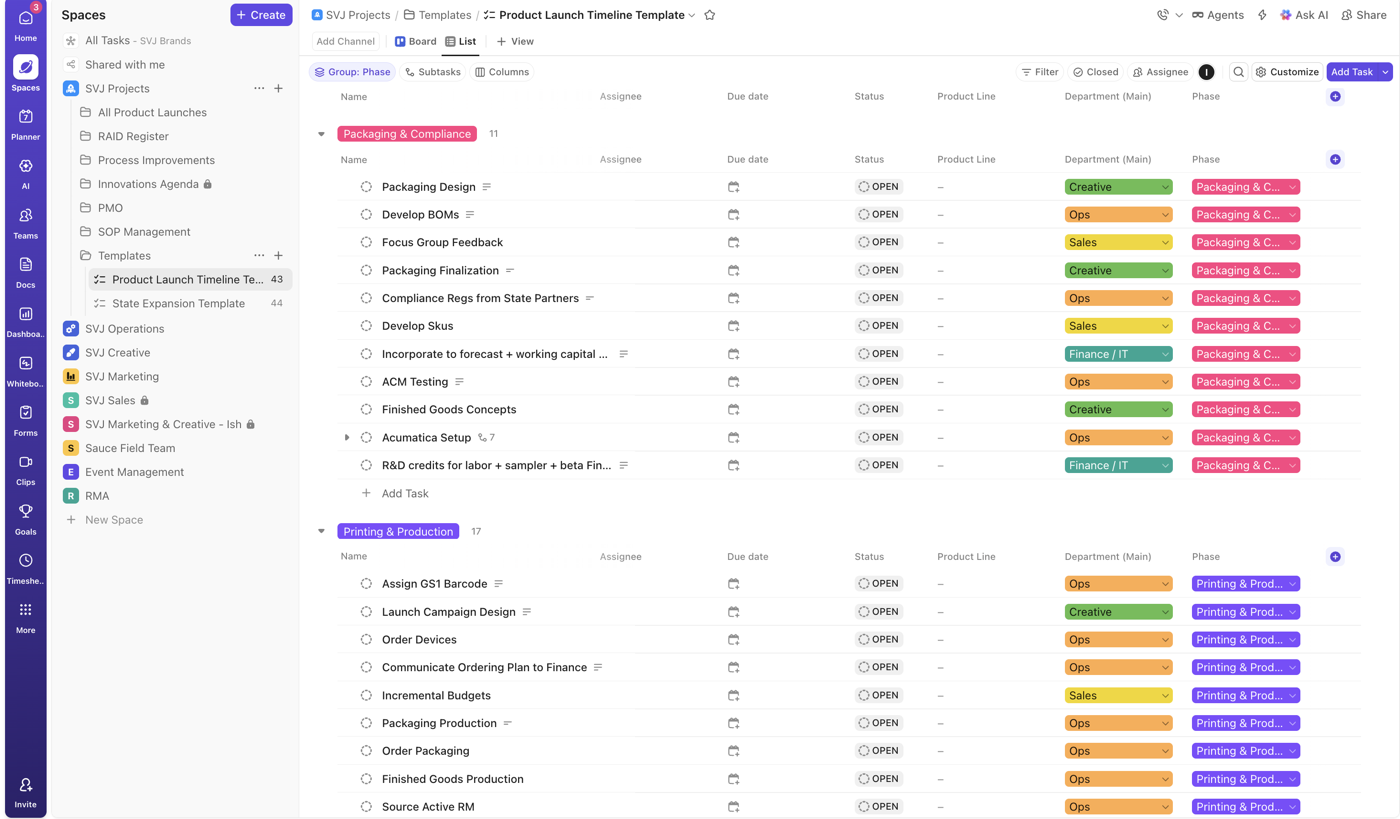 Templates
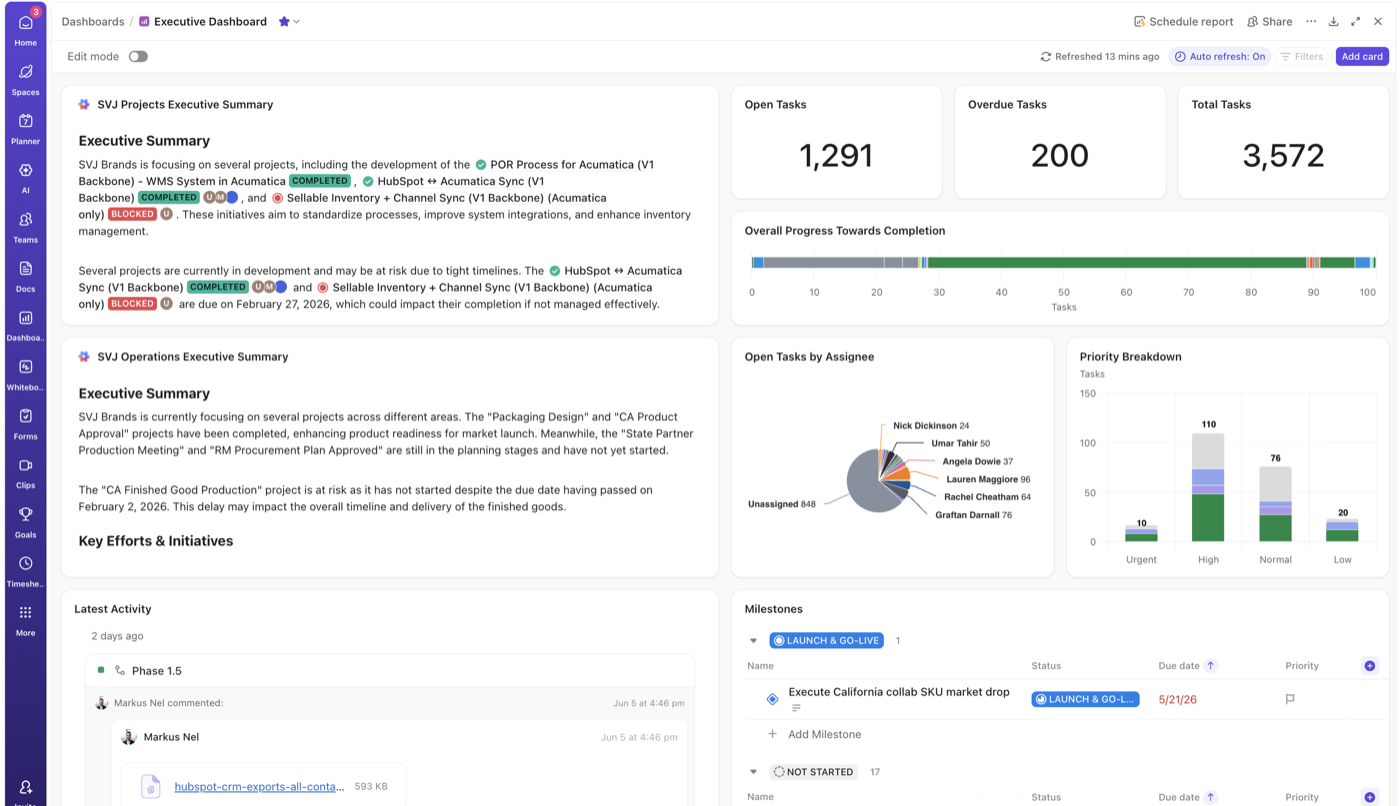 Dashboard & reporting
The consulting value
Hard calls, made honestly
Designed the destination, not a copy
The call that makes it an operating system instead of a task list: design the Spaces, Folders, fields and permissions first, then migrate into them.
Protected the data
Integrity checks on every migrated project, counts, owners, dates and tags, with proper access control. A switch, not a data loss event.
Built for adoption
Role-specific views and a defined stabilisation window, so the team experiences an upgrade rather than a disruptive go-live.
Honest about the constraints
Flagged Asana's no-bulk-export reality up front and planned a project-by-project migration around it. No surprises mid-project.
Your distinction between a 'dump and pray' migration versus designing a proper Workspace Architecture is exactly what we're looking for. We need this to be a long-term operating system, not just a task list. I particularly appreciate the focus on role-specific views to prevent team overwhelm, and the realism regarding the stabilisation window.

Tools & stack
What it runs on


More client work
More systems we've built

Your turn
Give your business one system to run on.
Tell us where it hurts. In 30 minutes we'll map the system that fixes it, what to build first and in what order. If we're not the right team for you, we'll say so on the call and point you somewhere better.
Free 30-minute call. Honest take, even if that means “you don't need us yet.”
Loading the calendar… If it does not appear, book on cal.com.