One Notion plan, automatically scheduled in Float
We connected Lumora Studio's planning, resourcing and HR with five Make automations, so projects, phases, owners and time off stay in sync across Notion, Float and Personio without anyone re-keying a thing.
Built by Ishan Vats — Certified Notion + ClickUp Consultant, Claude Partner Network, PMP® · 150+ clients · 10+ years
Client name and identifying details have been anonymized at the client's request. The system, scenarios and results shown are real.

The client
About Lumora Studio
Lumora Studio is an award-winning experiential marketing and brand experience agency with a global footprint across Europe, the Middle East and Asia Pacific. Active for over a decade, they've delivered hundreds of live productions, from large-scale ceremonies to intimate brand activations, for some of the world's best known automotive, gaming and technology brands.
An operation that size runs on three tools: Notion to plan projects and phases, Float to resource and schedule the team, and Personio for HR and absences. The problem was keeping all three in sync without the team re-entering the same thing in each one.

The transformation
From re-keying across three tools to one synced system
Lumora Studio planned in Notion and scheduled in Float, but the two never talked, so the team kept everything in sync by hand. Here's the shift we delivered.
Synced by hand
- Every Notion project had to be re-created by hand in Float to schedule the team.
- Phases, dates and project owners were re-keyed into Float, and drifted out of sync.
- Time off lived in Float and Personio, but the Notion "Team Away" view was updated manually.
- One change in Notion meant several edits across tools, or it simply got missed.
- Capacity planning ran on data that was always slightly stale.
Synced by Make
- A new Notion project auto-creates the client and project in Float, with the Float ID written back.
- Phases and owners push from Notion into Float automatically, and update in place when they change.
- Float time off and Personio absences flow into one Notion "Team Away" view, deduplicated.
- A change in Notion ripples to Float on its own. Nothing is re-keyed.
- Schedules and capacity reflect reality, because the tools never disagree.
The brief
What success looked like
- Keep Notion the single place to plan, and Float the live schedule, automatically.
- Auto-create projects (and their clients) in Float from Notion, with no duplicates.
- Push project phases and dates from Notion into Float, and keep them updated on change.
- Sync each project owner from Notion to the right Float account.
- Pull time off from Float and absences from Personio into one Notion "Team Away" view.
- End all manual double entry across the three tools, with nothing duplicated or lost.
The build
Five Make scenarios that keep it all in sync
Notion is the planning hub. Each scenario moves one kind of data where it belongs and writes IDs back so nothing is ever created twice. Every one is webhook- or schedule-triggered, with routers and filters handling each edge case, client exists or not, owner found or not, duplicate or not.
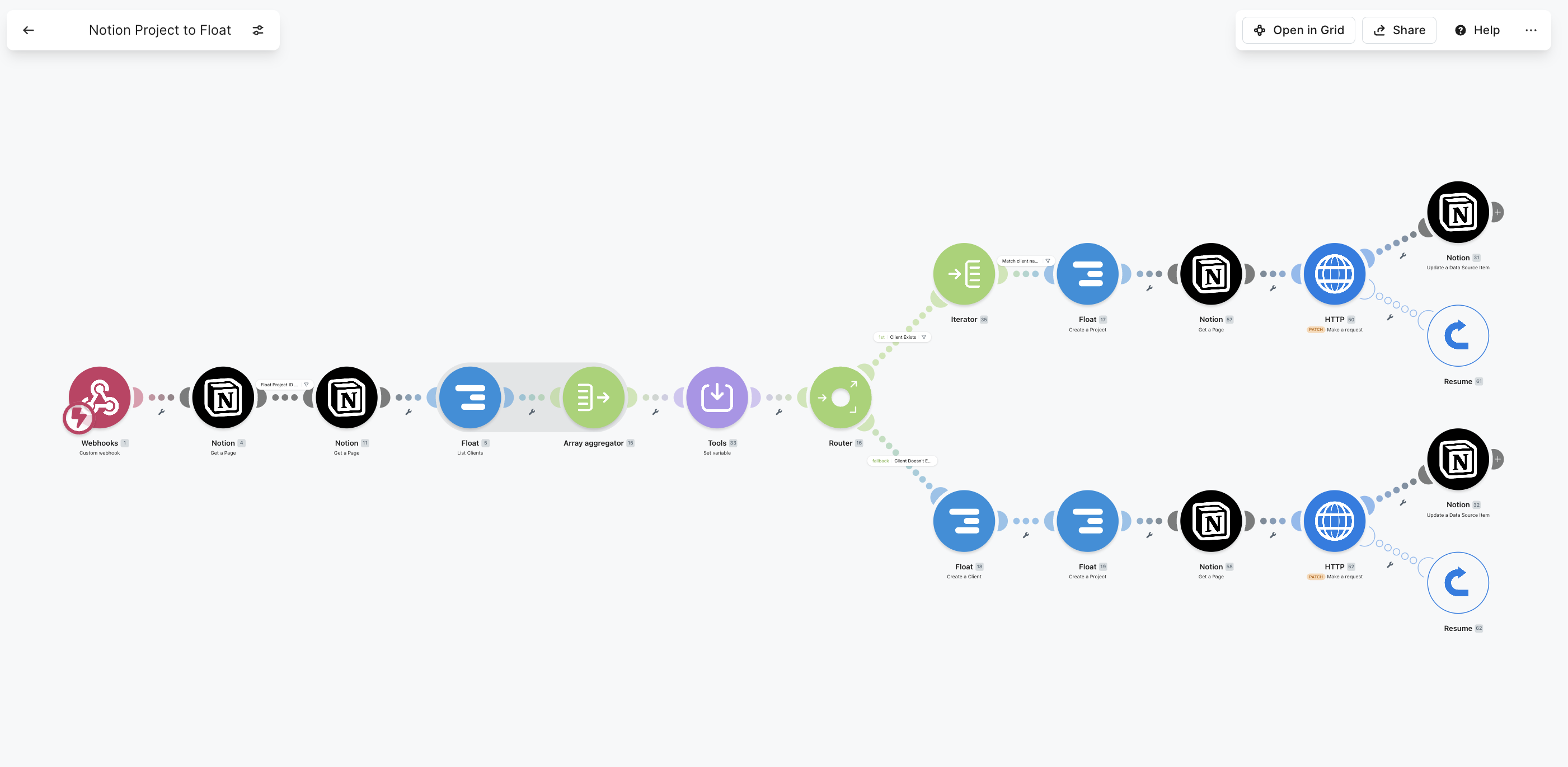
Notion Project → Float
When a project is created in Notion, Make finds the matching Float client (or creates it), creates the Float project, then writes the Float Project ID back to Notion so it never duplicates.
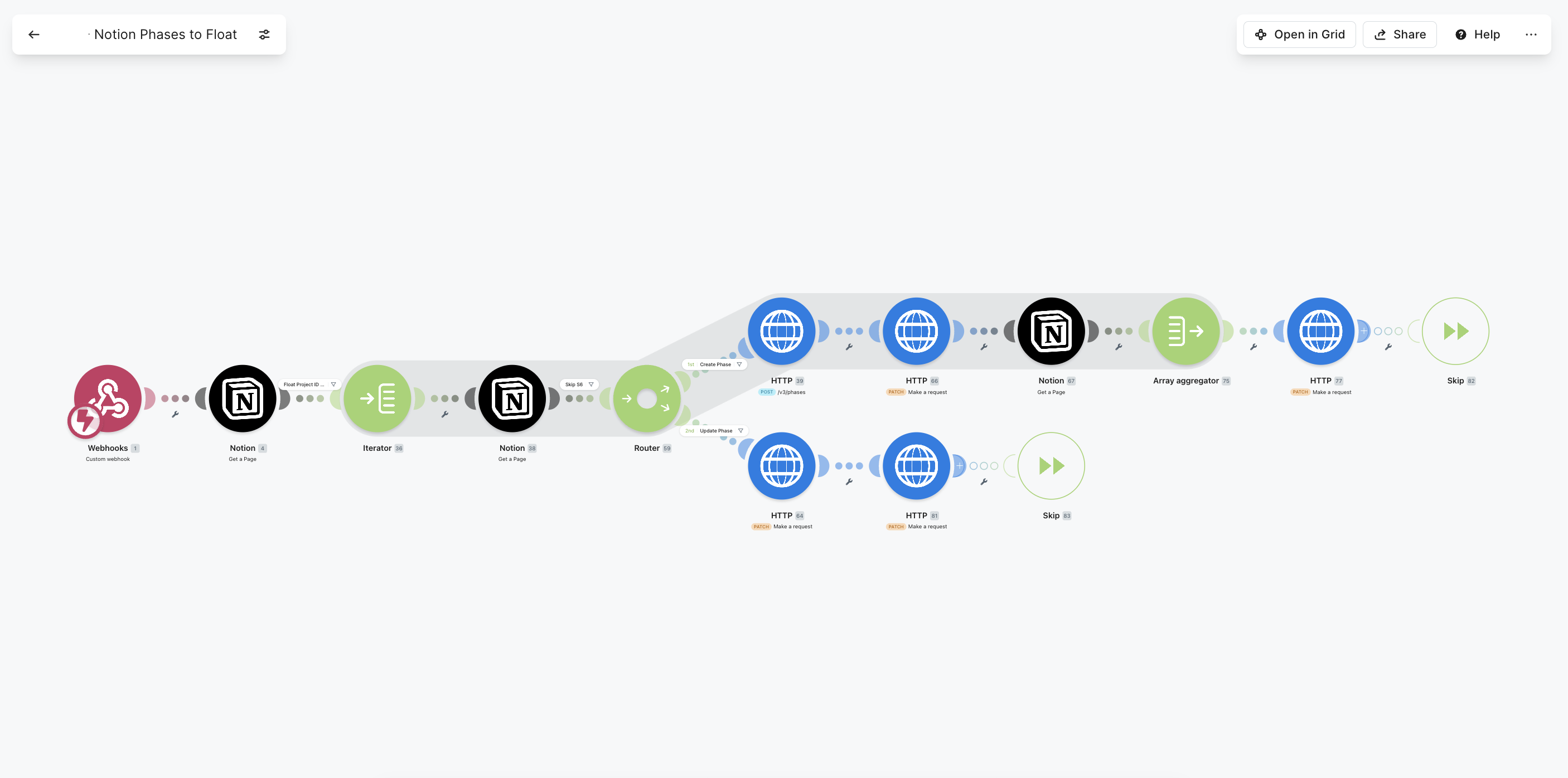
Notion Phases → Float
Each project stage in Notion becomes a Float phase with its name and dates. The Float Phase ID is written back, and existing phases update in place whenever the Notion dates change.
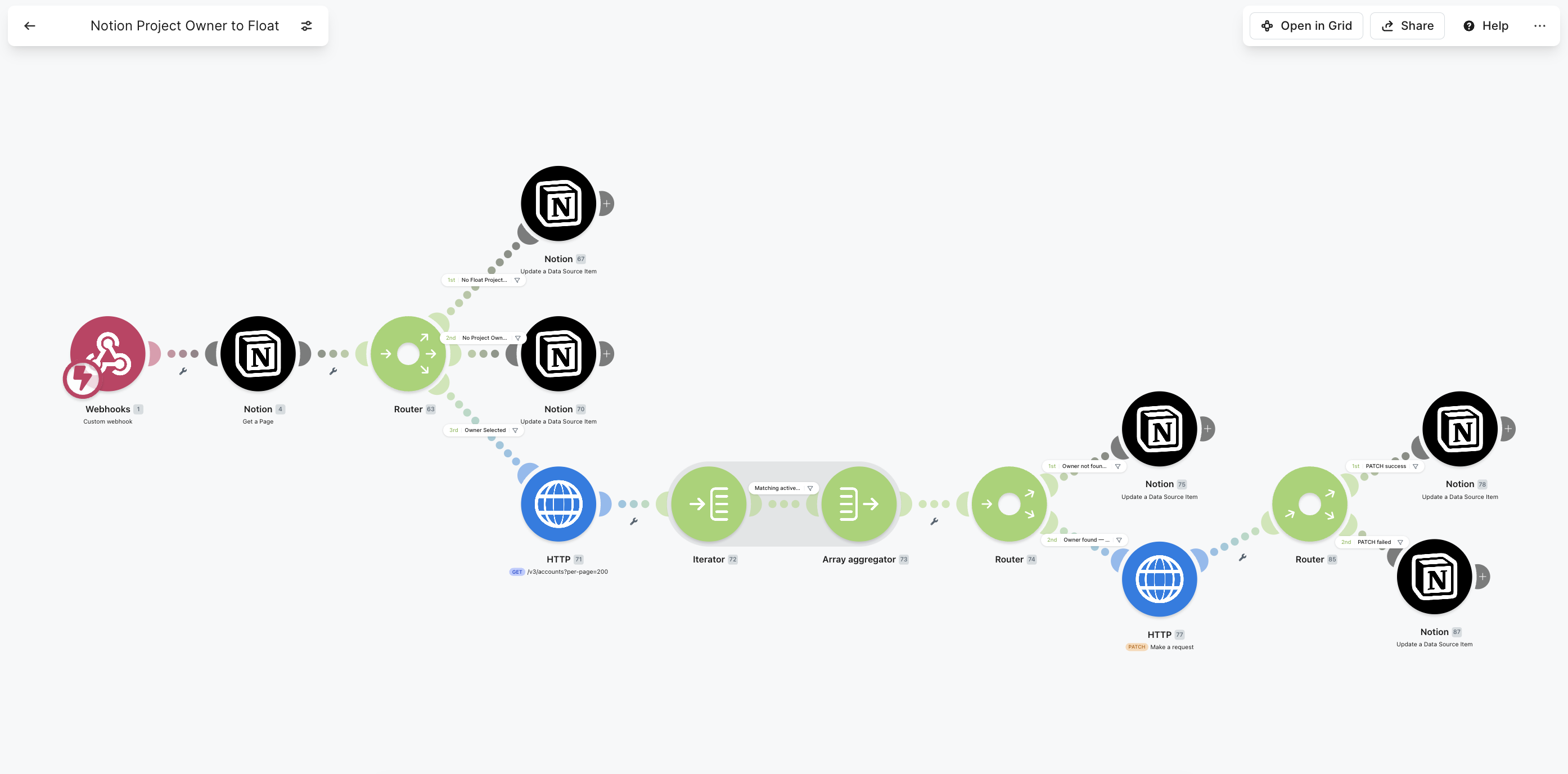
Notion Project Owner → Float
Syncs the selected project owner from Notion to the matching active Float account, patches the Float project, and flags it back in Notion if the owner can't be matched.
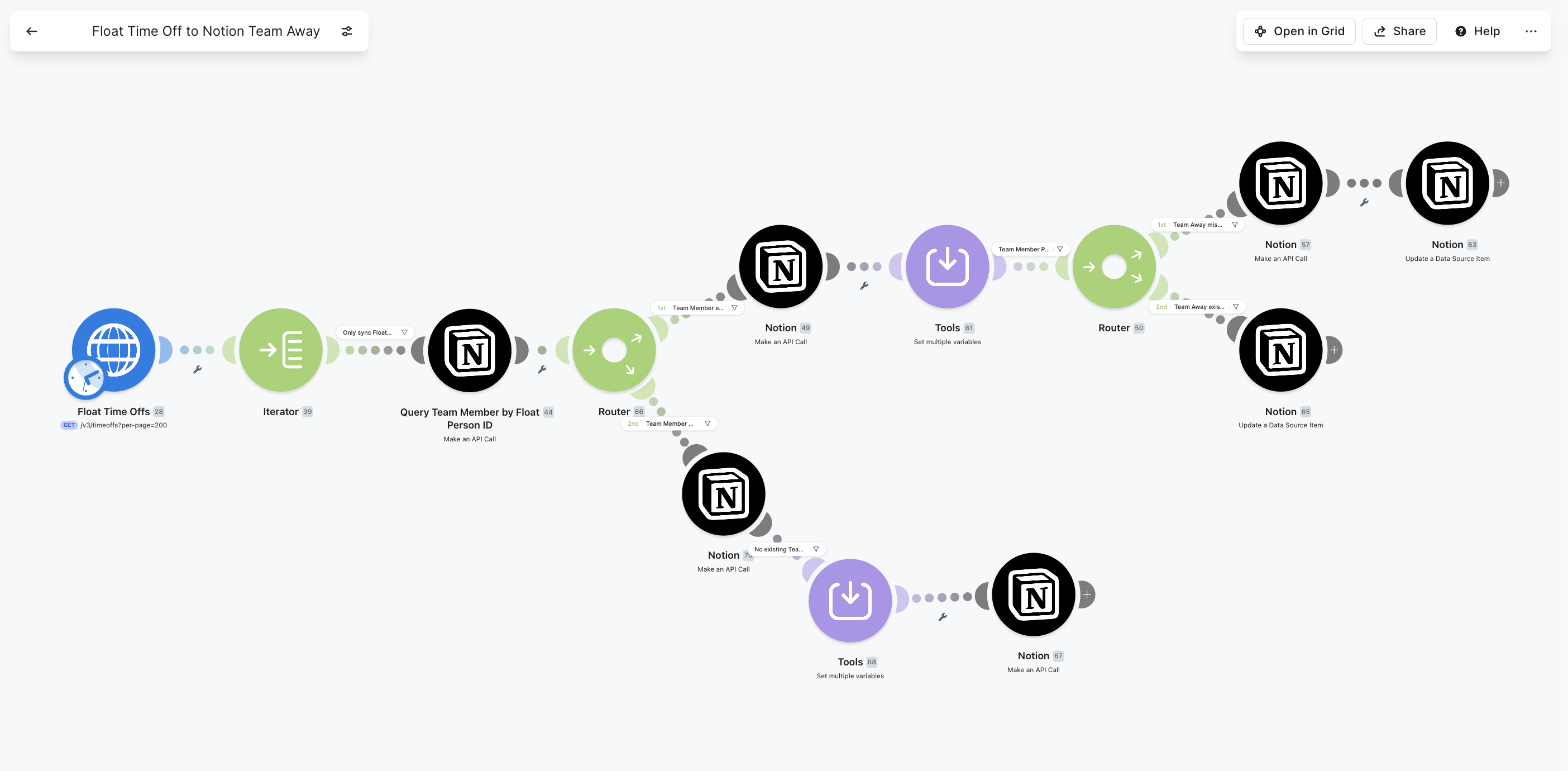
Float Time Off → Notion Team Away
Pulls time off from Float into the Notion "Team Away" database, creating or updating each record and flagging any that need a human review.
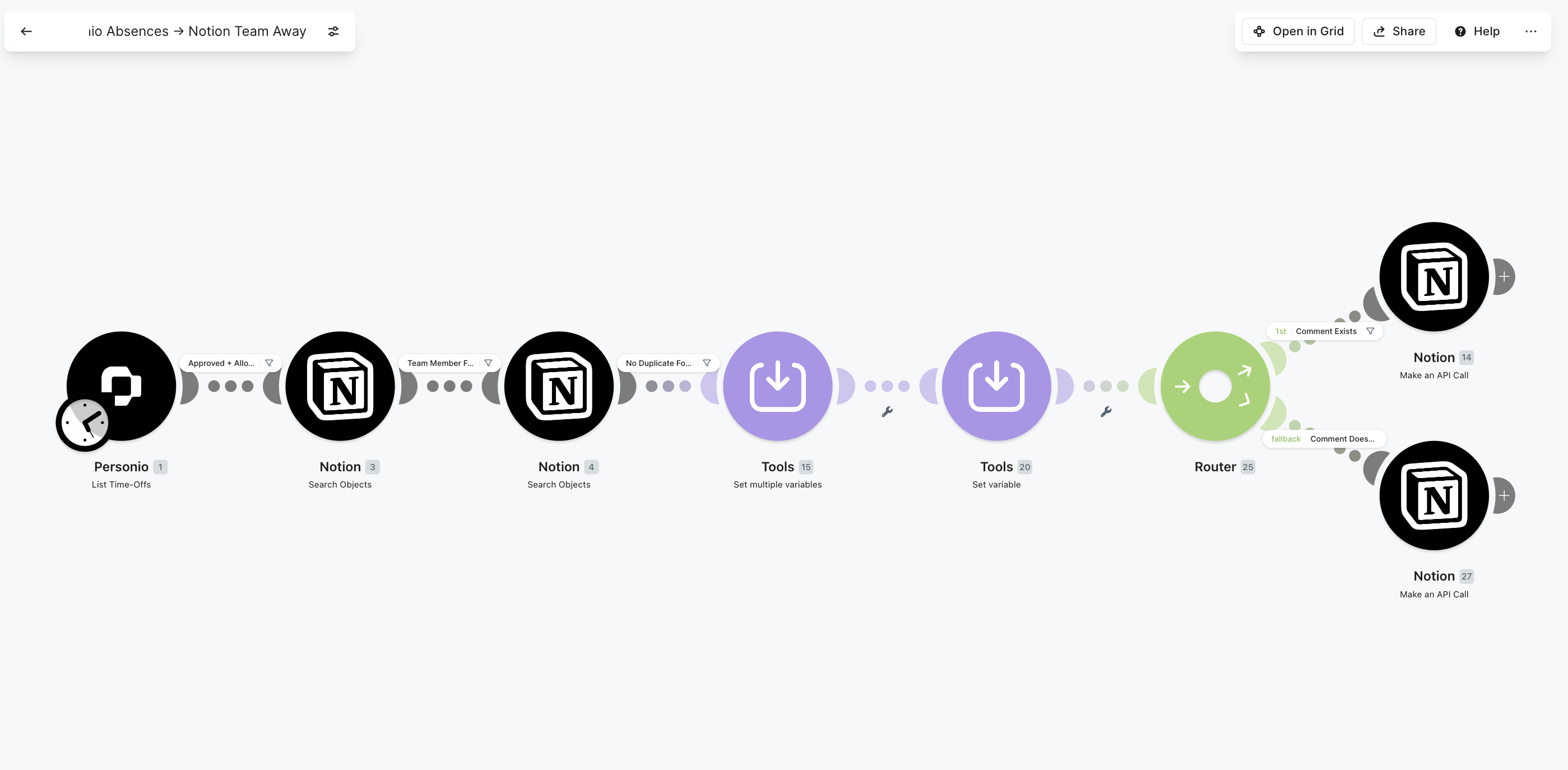
Personio Absences → Notion Team Away
Brings approved absences from Personio, the HR system, into the same Notion "Team Away" view, deduplicated and matched to the right team member, with or without comments.
The design
How the system fits together
Each tool keeps doing what it's best at. Make moves data between them and writes IDs back, so the sync is one-directional per field and never creates a duplicate.
Notion is the planning hub
Projects, phases, owners and the team-away calendar all live and are edited in Notion. Everything downstream follows from it.
Float stays the live schedule
Resourcing and capacity stay in Float, populated automatically from Notion, so planners keep the tool they already use to see who's booked.
Personio is the HR source
Approved absences come straight from Personio into the away view, so HR stays the single source of truth for leave, with no parallel list to maintain.
Make is the engine
Webhook and scheduled scenarios orchestrate it all, writing Float Project and Phase IDs back into Notion so every sync is idempotent and duplicate-safe.
The consulting value
Hard problems, solved honestly
The hard part of a multi-tool sync is not the happy path, it's making it safe to re-run and honest about the edge cases.
Safe to run again, every time
We write the Float Project and Phase IDs back into Notion. On the next run the scenario updates the existing record instead of creating a new one, so nothing is ever duplicated.
Handled, not ignored
Branches for "client doesn't exist, create it", "owner not found in Float, flag it in Notion", "needs review" and duplicate checks, so the team can trust the data without policing it.
Native where it fits, raw where it doesn't
Float's native modules where they exist, raw HTTP for endpoints Make doesn't cover (Float phases), Notion data-source queries via the API, and the Personio module, all in one flow.
Live where it matters, polled where it's fine
Instant webhooks fire Notion changes into Float; Float and Personio absences are pulled on a schedule, so updates feel live without hammering the APIs.
The biggest relief is that nobody re-keys anything anymore. A project goes into Notion and it just appears in Float, time off and all. It has saved us hours every week, and for the first time everything is finally in sync.
Tools & stack
What it runs on



Give your business one system to run on.
Tell us where it hurts. In 30 minutes we'll map the system that fixes it, what to build first and in what order. If we're not the right team for you, we'll say so on the call and point you somewhere better.
Free 30-minute call. Honest take, even if that means “you don't need us yet.”