Can Notion AI Templates Actually Save SMBs Time in 30 Days? A Practical Playbook
Published on:
Dec 12, 2025

Ishan Vats
Introduction
In today's fast-paced business environment, small to medium-sized businesses (SMBs) often grapple with challenges such as limited headcount, competing priorities, and the chaos of finding and using the right templates. Notion AI offers a solution to these problems with its innovative workspace templates. This blog post serves as a compact playbook, demonstrating how SMBs can leverage Notion AI templates strategically across various roles, ensuring measurable improvements in productivity and efficiency.
Why Notion AI Templates Matter for SMBs
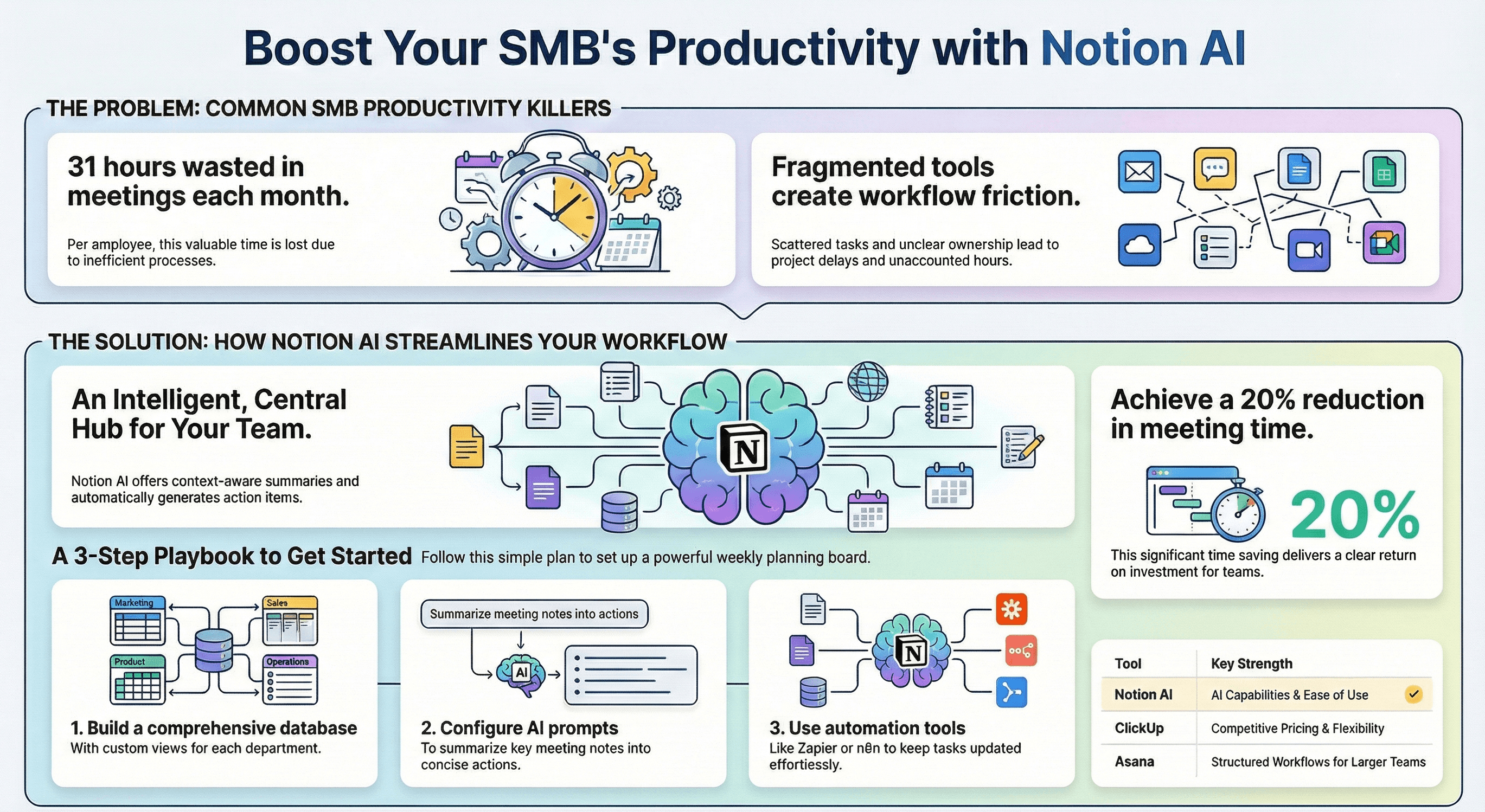
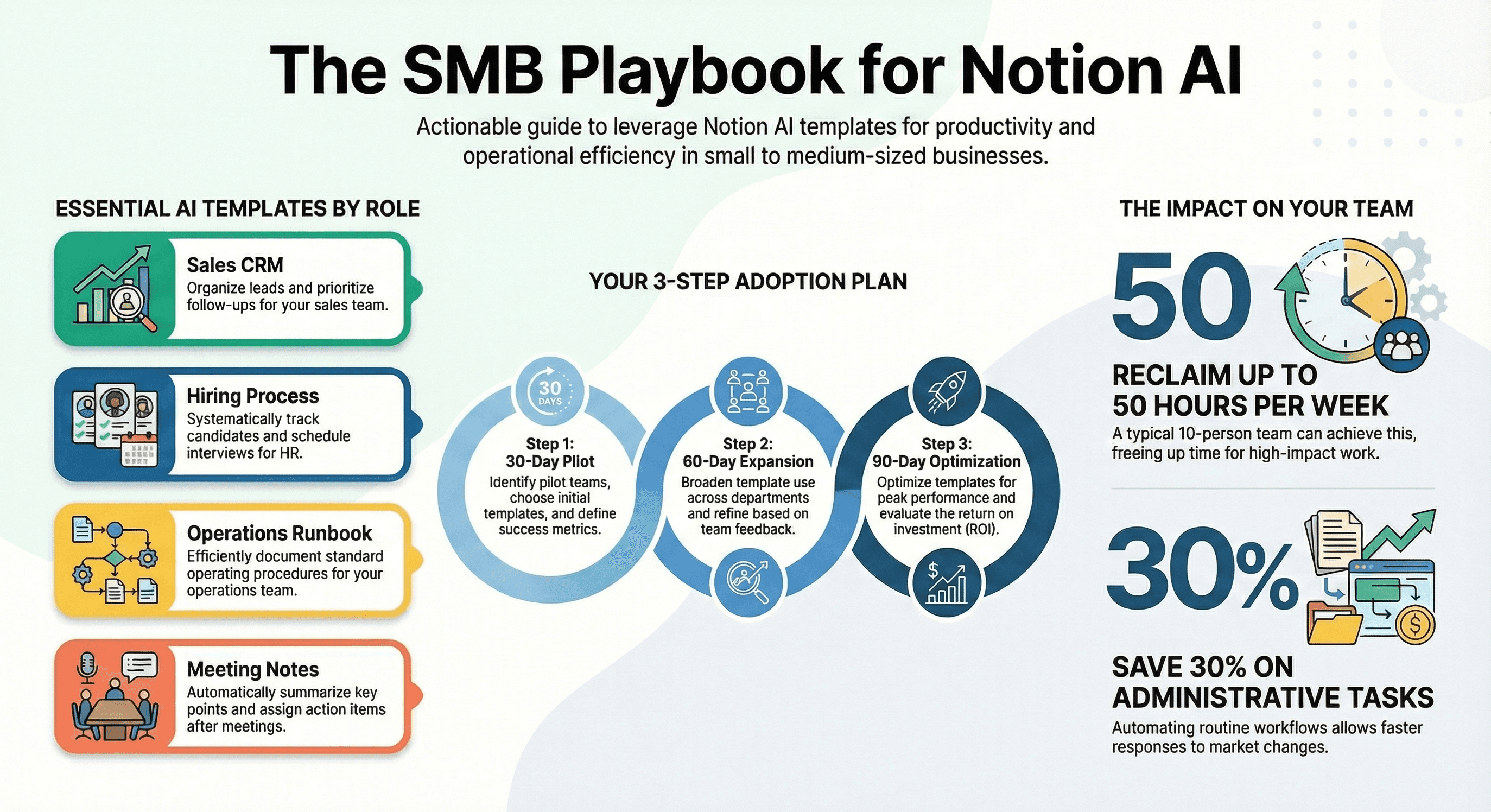
Notion AI templates are transforming the way SMBs operate by significantly reducing repetitive tasks, centralizing essential knowledge, and expediting decision-making processes. By automating routine workflows, these templates free up valuable time for employees to focus on more strategic initiatives. For instance, a study suggests businesses can save up to 30% in time spent on administrative tasks, directly enhancing productivity and enabling faster responses to market changes.
Top 6 SMB Templates, Copy-Paste Prompts Included
Here are six essential templates designed for key SMB functions:
Sales CRM - AI Prompt: 'Organize leads and prioritize follow-ups.' Role: Sales Manager.
Hiring Process - AI Prompt: 'Track candidates and schedule interviews systematically.' Role: HR Manager.
Operations Runbook - AI Prompt: 'Document SOPs for repetitive tasks efficiently.' Role: Operations Head.
Meeting Notes - AI Prompt: 'Summarize key points and assign actions post-meeting.' Role: Project Manager.
Product PRD - AI Prompt: 'Detail product features and deadlines for roadmap clarity.' Role: Product Manager.
Customer Support Triage - AI Prompt: 'Categorize and prioritize support tickets for faster resolution.' Role: Customer Service Lead.
3 Automation Recipes That Tie Templates to Tools
Enhancing the value of Notion AI templates, these recipes integrate with everyday SMB tools:
Slack Alerts: Connect Notion updates to Slack for real-time team notifications. Use triggers like 'New Database Entry' in Notion to post updates in relevant channels.
Google Calendar Sync: Automatically link project deadlines from Notion to Google Calendar. Use a 'Date Changed' trigger in Notion to update the calendar.
CRM Lead Capture: Streamline lead data from Notion to your CRM. Trigger new entries in your CRM when a 'Prospect Added' in Notion occurs.
These automations can be implemented using platforms like Zapier, simplifying integration and operational efficiency.
30/60/90 Day Adoption Plan
To ensure a smooth transition to using Notion AI templates, follow this phased rollout:
30-Day Pilot: Identify pilot teams, assign roles, and choose initial templates to test. Checklist: Define success metrics, set up training sessions.
60-Day Expansion: Broaden use across departments, refine templates based on feedback. Checklist: Regular feedback loops, adjust UI for better user experience.
90-Day Optimization: Optimize templates for peak performance, evaluate ROI. Checklist: Comprehensive performance review, celebrate milestones.
This structured plan facilitates quick wins and long-term success.
Estimating ROI and Key Metrics
Evaluating the return on investment (ROI) is critical for SMBs using Notion AI templates. Consider key performance indicators (KPIs) such as time saved per role or estimated weekly hours reclaimed. For a typical 10-person team, using these templates can reclaim up to 50 hours weekly, translating into substantial savings and efficiency gains. For example, if administrative duties occupy 15% of time, the reduction improves focus on high-impact activities, showcasing a strong cost-benefit ratio.
Troubleshooting and Migration Notes
Here are solutions to common issues when integrating Notion AI templates:
Prompt Tuning: Adjust AI prompts based on feedback for improved accuracy.
Template Versioning: Regularly update templates and maintain a changelog for transparency.
Migration: When moving tasks from Asana or ClickUp, carefully map data fields to ensure seamless integration.
Enforce governance practices to protect data privacy, ensuring compliance with corporate standards.
Conclusion
Embracing Notion AI templates can revolutionize your SMB's operational efficiency, cutting down on wasted time and resources. This playbook provides a roadmap for harnessing AI power across various functions, enhancing productivity and facilitating growth. If you want to cut inefficiencies and scale with AI and automation, IV Consulting helps SMBs implement these solutions step by step. Book a consultation today.
Join
Get notified
Your Weekly Newsletter for Smarter Work and Simpler Systems
Get practical insights on AI, automation, and business optimization - without the jargon.
Join 1,000+ business owners, founders, and managers who use our tips to save time, scale faster, and simplify their workflows every week.